web
You’re offline. This is a read only version of the page.
close
Skip to main content

Notifications

Announcements

No record found.

Community site session details

Community site session details

Session Id :
Small and medium business | Business Central, N...
Suggested Answer

Send to email address in Posted Sales Invoice

(0) ShareShare
ReportReport
Posted on by

Hi experts,

I have a problem in sending email in business central, the 'To' email address always take from the 'Customer Card', but I want the email address to follow what found in the every Posted Sales Invoice (under 'Shipping and Billing' Email [yellow highlighted part)]. Because they tend to have different email address even for the same company. Please kindly advise me on this.
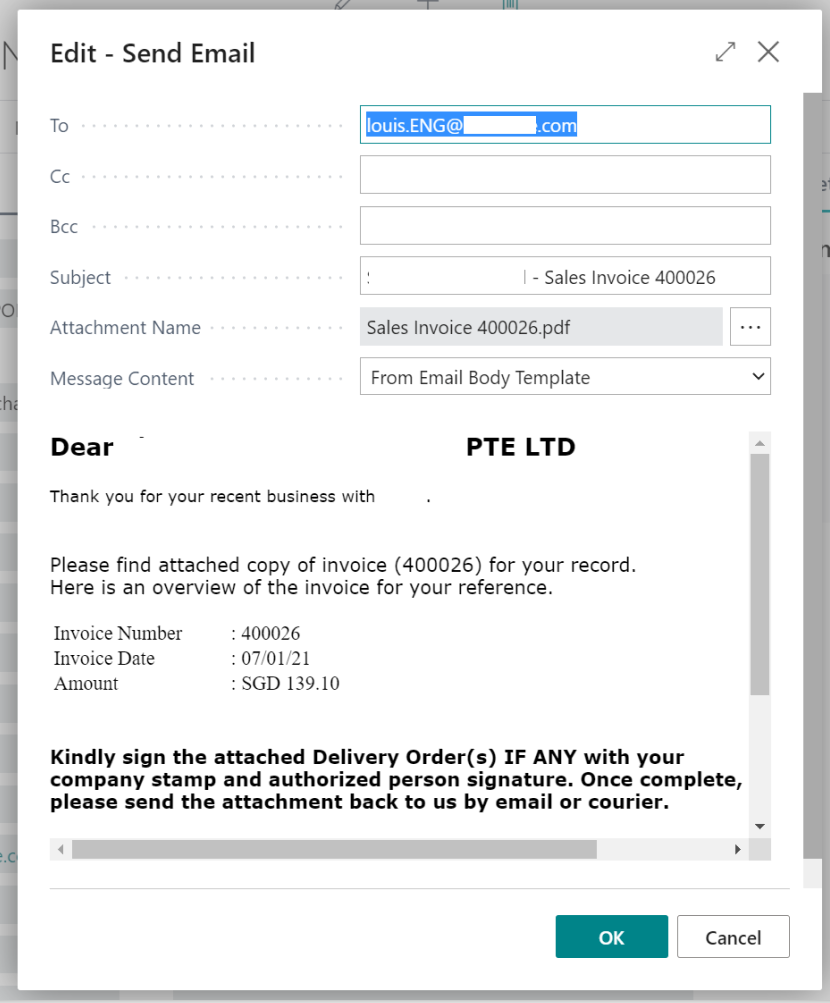
pastedimage1611728094142v2.pngpastedimage1611728368713v3.png

I have the same question (0)
  • Suggested answer
    JAngle Profile Picture
    133 on at

    The feature described in this resource is worth reviewing: docs.microsoft.com/.../ui-define-customer-vendor-document-layouts

    Go to the page mentioned via the customer card. From there you can set more than one email per document. Just separate the email addresses with a ;

    This is the easiest way to ensure an override every time of the email used

  • Community Member Profile Picture
    on at

    I'm understand the way you shared above, but I'm not sure when we're getting a new email address again for the customer and impossible for us to check one by one because there are too many. So this way considered a  high maintenance level for us.

    Is there anyway we can do an extension to get the 'To' field pointed to the 'Sell-to E-mail' in Posted Sales Invoice?

  • Suggested answer
    JAngle Profile Picture
    133 on at

    Sure. Check out the report selections table. It has numerous events that you can subscribe to. I believe one of them will fit the bill so you can alter the email address.

Under review

Thank you for your reply! To ensure a great experience for everyone, your content is awaiting approval by our Community Managers. Please check back later.

Helpful resources

Quick Links

Responsible AI policies

As AI tools become more common, we’re introducing a Responsible AI Use…

Neeraj Kumar – Community Spotlight

We are honored to recognize Neeraj Kumar as our Community Spotlight honoree for…

Leaderboard > Small and medium business | Business Central, NAV, RMS

#1
OussamaSabbouh Profile Picture

OussamaSabbouh 2,577

#2
YUN ZHU Profile Picture

YUN ZHU 888 Super User 2025 Season 2

#3
Jainam M. Kothari Profile Picture

Jainam M. Kothari 778 Super User 2025 Season 2

Last 30 days Overall leaderboard

Featured topics

Product updates

Dynamics 365 release plans
