web
You’re offline. This is a read only version of the page.
close
Skip to main content

Announcements

No record found.

News and Announcements icon
Community site session details

Community site session details

Session Id :
Microsoft Dynamics CRM (Archived)

Update plugin not working

(0) ShareShare
ReportReport
Posted on by 65

I am new to plugins and I am trying to create a simple update plugin to get my project started. All I want to do is update the "description" field on contact with a string "test". I got this to work, but then I changed something in the code to try something new. Now I can't get it to work again.

I am using the Plugin Registration Tool and have set up the step like in the picture. When I do some changes in the "crmn_ourdescription" field nothing seems to happen. I have tried both pre- and post-operation.

What is wrong here?

using System;
using Microsoft.Xrm.Sdk;

namespace CalculateScorePlugin
{
    public class CalculateScore : IPlugin
    {
        public void Execute(IServiceProvider serviceProvider)
        {
            IPluginExecutionContext context = (IPluginExecutionContext)serviceProvider.GetService(typeof(IPluginExecutionContext));
            IOrganizationServiceFactory servicefactory = (IOrganizationServiceFactory)serviceProvider.GetService(typeof(IOrganizationServiceFactory));
            IOrganizationService client = servicefactory.CreateOrganizationService(context.UserId);
            {
                if (context.InputParameters.Contains("Target"))
                {
                    if (context.InputParameters["Target"] is Entity)
                    {
                        Entity entity = (Entity)context.InputParameters["Target"];
                        if (entity.LogicalName == "contact")
                        {
                            if (entity.Attributes.Contains("description"))
                            {
                                try
                                {
                                    //entity["crmn_ourdescription"] = "Test";
                                    entity.Attributes["description"] = "Test";
                                   
                                    //entity.Attributes["crmn_ourdescription"] = "Tester";


                                    client.Update(entity);
                                }
                                catch (Exception ex)
                                {
                                    throw new InvalidPluginExecutionException("An error occured in the plugin:", ex);
                                }
                            }

                        }
                        else return;
                    }
                }
            }

        }
    }
}
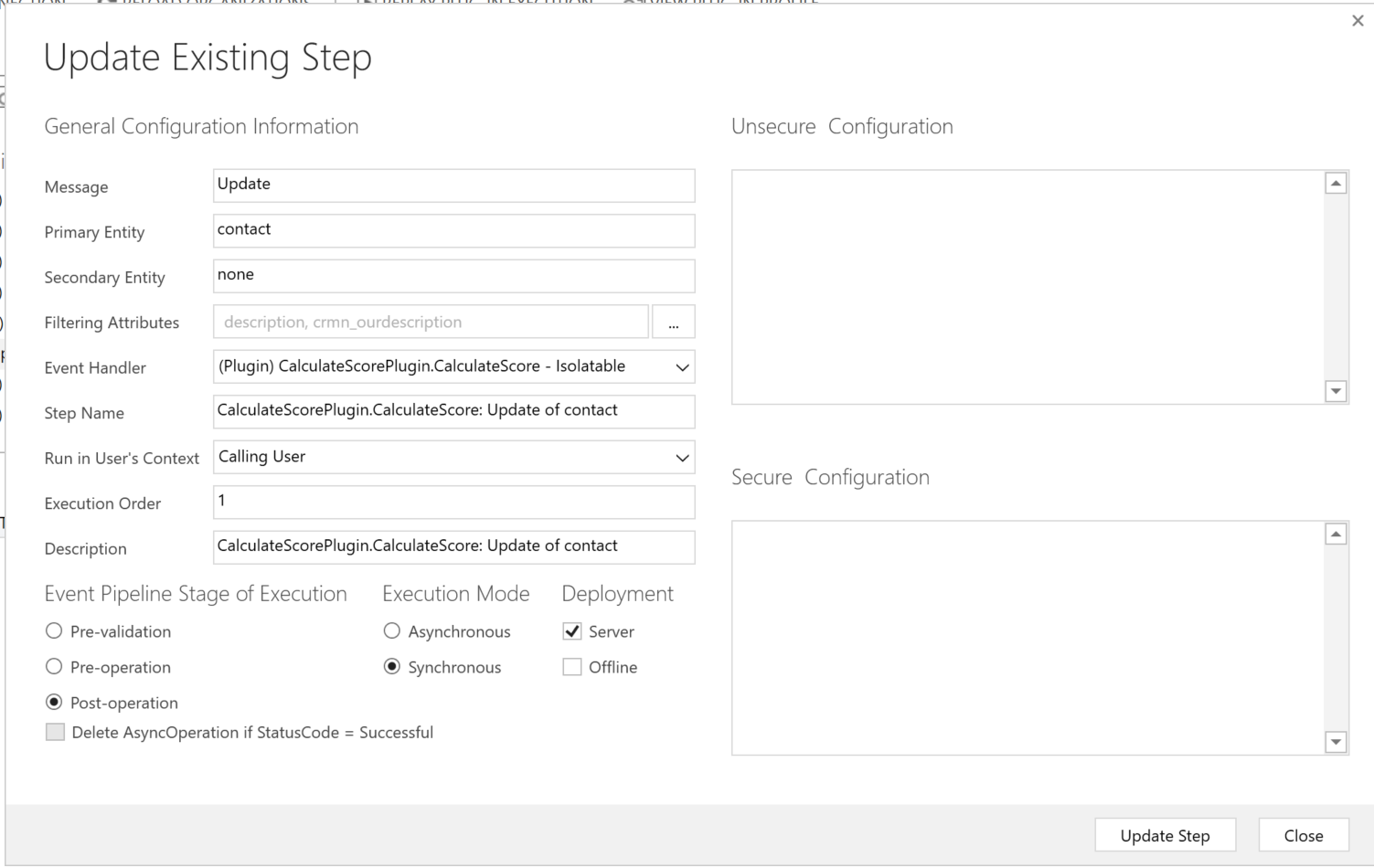
5417.Plugin-step.PNG

*This post is locked for comments

I have the same question (0)
  • Verified answer
    ashlega Profile Picture
    34,477 on at

    There are a couple of problems with your plugin right now:

    1. You are calling update, so you are getting into a recursive "update" (if you do it in the pre-operation without calling client.Update, you will avoid the recursion)

    2. Your plugin will only kick in if you update ethe "description field because you have this condition:

    if (entity.Attributes.Contains("description"))

    So, change the step to "pre"-operation and completely remove client.Update(entity) call to take care of #1

    And, then, probably remove that condition for the description.. or replace it with

    if (entity.Attributes.Contains("crmn_ourdescription"))

  • k3000 Profile Picture
    65 on at

    Thank you! I got it to work now.

Under review

Thank you for your reply! To ensure a great experience for everyone, your content is awaiting approval by our Community Managers. Please check back later.

Helpful resources

Quick Links

Introducing the 2026 Season 1 community Super Users

Congratulations to our 2026 Super Stars!

Meet the Microsoft Dynamics 365 Contact Center Champions

We are thrilled to have these Champions in our Community!

Congratulations to the April Top 10 Community Leaders

These are the community rock stars!

Leaderboard > 🔒一 Microsoft Dynamics CRM (Archived)

#1
ScottDurow Profile Picture

ScottDurow 2

#2
GJones Profile Picture

GJones 1

Last 30 days Overall leaderboard

Featured topics

Product updates

Dynamics 365 release plans
