web
You’re offline. This is a read only version of the page.
close
Skip to main content

Announcements

No record found.

News and Announcements icon
Community site session details

Community site session details

Session Id :
Small and medium business | Business Central, N...
Answered

FA posting type Depreciation must be posted in the general journal in FA journal line journal template = Name Asset in Navision 2018

(0) ShareShare
ReportReport
Posted on by 5,039

Hi Community,

May I ask what does this error means?

"FA posting type Depreciation must be posted in the general journal in FA journal line journal template Name = 'Asset', Journal Batch Name "Default", Line = 1000  in Navision 2018
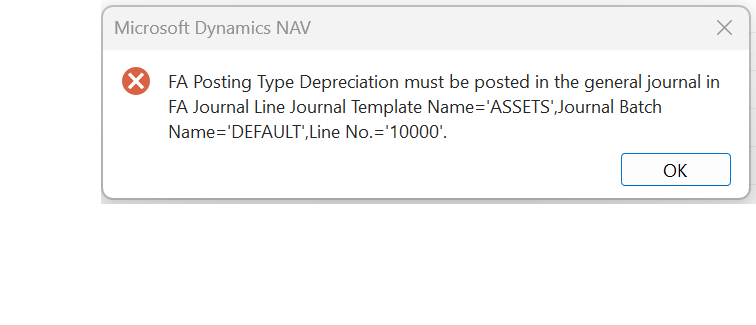
pastedimage1678875739450v1.png

I am trying to do depreciation in FA Journal,

Thank you!

I have the same question (0)
  • Suggested answer
    Bilal Haider Profile Picture
    459 on at

    Hi @josh

    Looks like the depreciation book you are using is linked to G/L account, so you need to post the depreciation using Fixed Asset G/L Journal.

  • Verified answer
    YUN ZHU Profile Picture
    100,132 Super User 2026 Season 1 on at

    Hi, Bilal is right. You should do it in Fixed Asset G/L Journal.

    But when you run Calculate Depreciation batch, it will automatically go to Fixed Asset G/L Journal. Are you doing depreciation manually?

    pastedimage1678927257656v1.png 

    Hope this helps.

    Thanks.

    ZHU

  • joshtechsolutions Profile Picture
    5,039 on at

    Hi hu,

    After I change to FA GL journal, I have this error but I see that the document no FAJ202300110 is not in use. Pls advise where lese should i check?

    pastedimage1678940535035v1.png

  • joshtechsolutions Profile Picture
    5,039 on at

    Hi Bildal,

    After I change to FA GL journal, I have this error but I see that the document no FAJ202300110 is not in use. Pls advise where lese should i check?

    pastedimage1678940612011v1.png

  • Suggested answer
    Bilal Haider Profile Picture
    459 on at

    Hi Josh,

    Please review all of your FA Journal and FA G/L Journal and all Batches

  • Suggested answer
    YUN ZHU Profile Picture
    100,132 Super User 2026 Season 1 on at

    Hi, Just to add some information, the table in this background is Gen. Journal Line (81). So there are still many places to check.

    pastedimage1679010290003v1.png

    So, if you have access to a development environment, an easier way is to open the table directly. All data can be seen.

    pastedimage1679010358008v2.png

    pastedimage1679010437563v4.png

    Hope this helps as well.

    Thanks.

    ZHU

Under review

Thank you for your reply! To ensure a great experience for everyone, your content is awaiting approval by our Community Managers. Please check back later.

Helpful resources

Quick Links

Introducing the 2026 Season 1 community Super Users

Congratulations to our 2026 Super Stars!

Meet the Microsoft Dynamics 365 Contact Center Champions

We are thrilled to have these Champions in our Community!

Congratulations to the April Top 10 Community Leaders

These are the community rock stars!

Leaderboard > Small and medium business | Business Central, NAV, RMS

#1
OussamaSabbouh Profile Picture

OussamaSabbouh 1,957 Super User 2026 Season 1

#2
YUN ZHU Profile Picture

YUN ZHU 956 Super User 2026 Season 1

#3
Teagen Boll Profile Picture

Teagen Boll 645 Super User 2026 Season 1

Last 30 days Overall leaderboard

Featured topics

Product updates

Dynamics 365 release plans
