web
You’re offline. This is a read only version of the page.
close
Skip to main content

Announcements

No record found.

News and Announcements icon
Community site session details

Community site session details

Session Id :
Microsoft Dynamics CRM (Archived)

Removing an OnChange Event on the Opportunity

(0) ShareShare
ReportReport
Posted on by

Hello,

Is there a safe and easy way to remove a "Set Sales Stage Dependencies" Event on the Opportunity form?

It's only allowing one Security Role to change Opportunities to the final Sales Stage. I've added that security role to users that need to be able to make the change, however the restriction to the security role is no longer necessary.

Also, when users try to do this, they get an error, but it allows them to make the change anyways. Any ideas as to why this error is occurring?
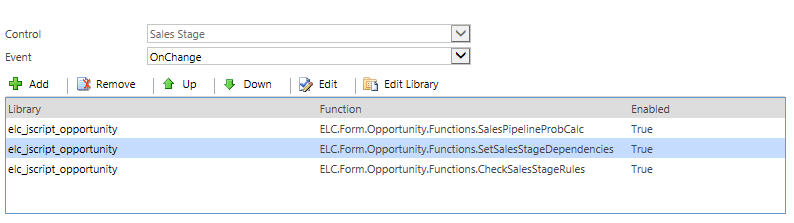
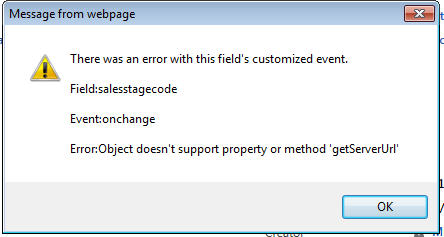
Sales-Stage-on-change.jpgSales-Stage-7-error.jpg

Thank you,

Brianna

*This post is locked for comments

I have the same question (0)
  • Suggested answer
    razdynamics Profile Picture
    17,308 User Group Leader on at

    HI Briana

    Have you tried disable the Client Side Event for the web resource by setting it to disabled on the On Change Rules?

    Best Wishes, Raz

  • Community Member Profile Picture
    on at

    Hi Raz,

    No, I haven't. How would I go about doing that?

  • Community Member Profile Picture
    on at

    Hi Raz,

    In looking at the form, it looks to all be in the same javascript code as other functions that we wouldn't want to disable. Is there a way to seperate out just the one part?

  • Community Member Profile Picture
    on at

    Hi Raz,

    I was able to disabled it (set to false). Now the users no longer need the extra security role to make the change but are still getting the error in my original message.

  • Verified answer
    Community Member Profile Picture
    on at

    you need to check all the javascript.

    Please mark the answer as verified if it was helpful.

  • Suggested answer
    necsa Profile Picture
    3,455 on at

    Hi brianna222,

    please check your javascript and change where you use "getServerUrl" as "getClientUrl"

    "getServerUrl" is since CRM 2013 deprecated.

  • Community Member Profile Picture
    on at

    Hi Necdect,

    I don't see a getServerUrl in the Opportunity form javascript.

    Where should I be checking?

    Thanks,

    Brianna

  • Community Member Profile Picture
    on at

    Is there only one javascript library attached to the opportunity form?

    Worst case scenario, look through all custom .js webresources in your solution and search for "getServerUrl".

  • Verified answer
    necsa Profile Picture
    3,455 on at

    Hi brianna222,

    On the your screenshot there are 3 javascript for Control: Sales Stage OnChange event checkup them.

  • necsa Profile Picture
    3,455 on at

    Do you have business process flow on the Opportunity? Check it or delete and create again.

Under review

Thank you for your reply! To ensure a great experience for everyone, your content is awaiting approval by our Community Managers. Please check back later.

Helpful resources

Quick Links

Introducing the 2026 Season 1 community Super Users

Congratulations to our 2026 Super Stars!

Meet the Microsoft Dynamics 365 Contact Center Champions

We are thrilled to have these Champions in our Community!

Congratulations to the April Top 10 Community Leaders

These are the community rock stars!

Leaderboard > 🔒一 Microsoft Dynamics CRM (Archived)

Last 30 days Overall leaderboard

Featured topics

Product updates

Dynamics 365 release plans
