web
You’re offline. This is a read only version of the page.
close
Skip to main content

Notifications

Announcements

No record found.

Community site session details

Community site session details

Session Id :
Small and medium business | Business Central, N...
Suggested Answer

Job queue entry won't save the settings

(0) ShareShare
ReportReport
Posted on by 29

Hi,

I have this problem when creating a job queue entry for Report 296 – Batch Post Sales Orders. I'd like to schedule this to be invoiced accordingly to some filtered criteria. Unfortunately, it seems like it won't save the option Invoice so I have to set it again and again.

Have I missed anything?
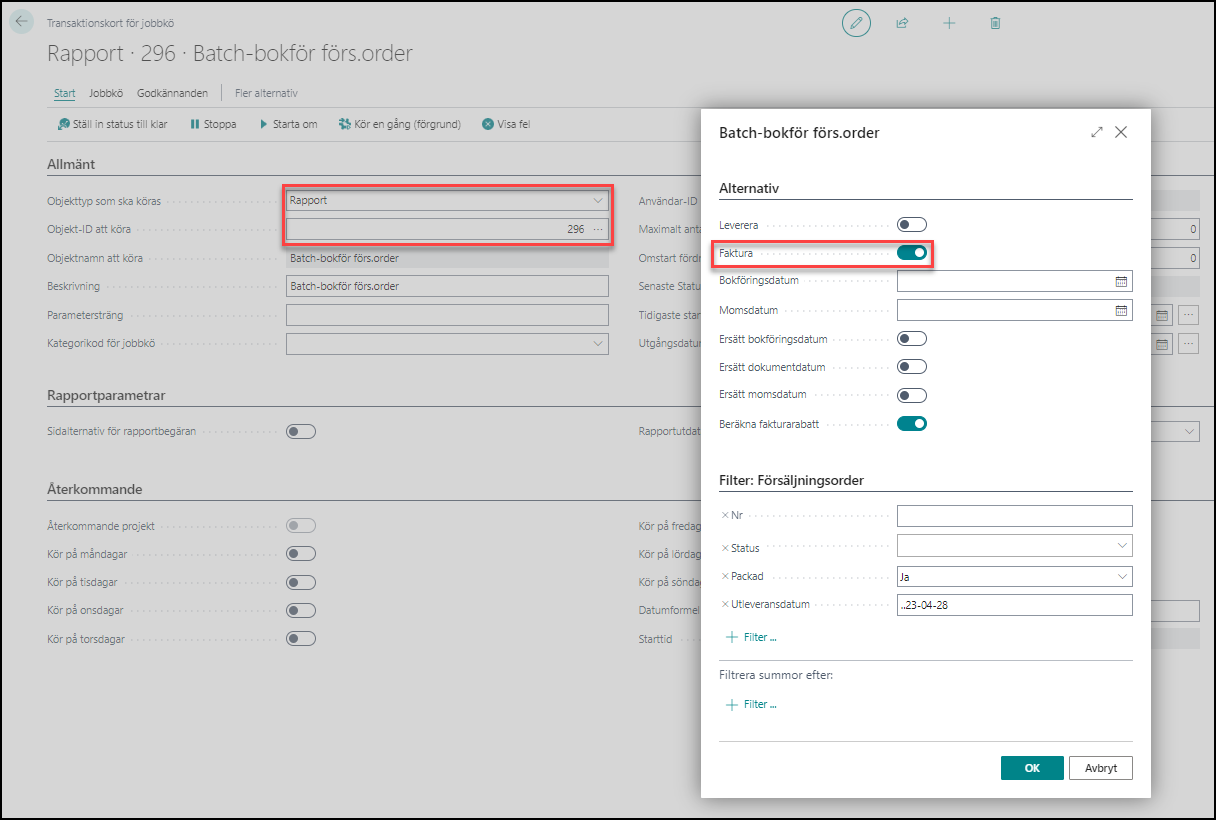

pastedimage1683264966238v1.png

I have the same question (0)
  • zoe Profile Picture
    15 on at

    I have a same question.

    Do you solve it?

  • Suggested answer
    Nitin Verma Profile Picture
    21,698 Moderator on at

    Hi,

    You can not do this way, instead create a codeunit and write run your 296 report on that codeunit's OnRun Trigger with set those values what you want set on request page. and Call that codeunit in the Job queue not this report.

  • Suggested answer
    Nitin Verma Profile Picture
    21,698 Moderator on at

    You can try this way and pass your parameters values in InitializeRequest function

    odeunit 66002 TestingLoadFields
    {
        trigger OnRun()
        var
            BatchPostSalesOrders: Report "Batch Post Sales Orders";
            SalesHeader: Record "Sales Header";
        begin
            SalesHeader.Reset();
            SalesHeader.SetRange("Document Type", SalesHeader."Document Type"::Order);
            BatchPostSalesOrders.InitializeRequest();
            BatchPostSalesOrders.SetTableView(SalesHeader);
            BatchPostSalesOrders.UseRequestPage := false;
            BatchPostSalesOrders.Run();
        end;

  • zoe Profile Picture
    15 on at

    Hi!

    InitializeRequest function has some problem,but I have no idea.

    pastedimage1684310097035v1.png

    Thank a lot!

  • Suggested answer
    Nitin Verma Profile Picture
    21,698 Moderator on at

    Do as system is suggesting

  • Typhooneforrest Profile Picture
    29 on at

    Hi Nitin,

    Thanks for your answer. Do you believe this is a bug in the latest version? It seems to work in previous versions of BC. Did Microsoft make any changes/updates at your knowledge?

  • Suggested answer
    Nitin Verma Profile Picture
    21,698 Moderator on at

    Please verify first with your partner to assist in development side otherwise you can raise a support ticket to Microsoft

  • Jim Oskarsson Profile Picture
    120 on at

    Hi Nitin,

    I work in the same company as Tony. We are a Microsoft Partner company and this question concerns the customers that we help with Business Central. We have developers so we can make a solution with code as you kindly suggested and showed how to do. But we think that if Microsoft provides a simple and stable solution in the system then we should use that instead of building custom coded solutions.

    In this article we get the impression that we can schedule batch posting/invoicing of sales orders through the user interface, not with custom code: learn.microsoft.com/.../ui-batch-posting

    So our question is - should this work as described in the article above? Then our conclusion is that we are experiencing a bug in the latest release.

    Batch invoicing should be a pretty common thing to use so if this is a bug then why are not more people asking the same question?

    Thanks,

    Jim

  • Suggested answer
    Nitin Verma Profile Picture
    21,698 Moderator on at

    Hi,

    Did you try this?

  • Suggested answer
    Nitin Verma Profile Picture
    21,698 Moderator on at

    Also I tried to replication it and its working fine my side, I m using US version.

Under review

Thank you for your reply! To ensure a great experience for everyone, your content is awaiting approval by our Community Managers. Please check back later.

Helpful resources

Quick Links

Responsible AI policies

As AI tools become more common, we’re introducing a Responsible AI Use…

Neeraj Kumar – Community Spotlight

We are honored to recognize Neeraj Kumar as our Community Spotlight honoree for…

Leaderboard > Small and medium business | Business Central, NAV, RMS

#1
OussamaSabbouh Profile Picture

OussamaSabbouh 3,226

#2
Jainam M. Kothari Profile Picture

Jainam M. Kothari 2,047 Super User 2025 Season 2

#3
YUN ZHU Profile Picture

YUN ZHU 1,257 Super User 2025 Season 2

Last 30 days Overall leaderboard

Featured topics

Product updates

Dynamics 365 release plans
