ISSUE: Unable to install Sales due to error:
msdyn_SalesApp
NotProvided
Solution manifest import: FAILURE: The following solution cannot be imported: msdyn_SalesApp. Some dependencies are missing. The missing dependencies are : <MissingDependencies><MissingDependency><Required key="0" type="1" schemaName="quotedetail" displayName="Quote Line" solution="msdynce_Sales (9.0.4.0076)" /><Dependent key="1" type="80" schemaName="msdynce_saleshub" displayName="Sales Hub" /></MissingDependency><MissingDependency><Required key="3" type="1" schemaName="salesorder" displayName="Order" solution="msdynce_Sales (9.0.4.0076)" /><Dependent key="1" type="80" schemaName="msdynce_saleshub" displayName="Sales Hub" /></MissingDependency><MissingDependency><Required key="5" type="1" schemaName="invoice" displayName="Invoice" solution="msdynce_Sales (9.0.4.0076)" /><Dependent key="1" type="80" schemaName="msdynce_saleshub" displayName="Sales Hub" /></MissingDependency><MissingDependency><Required key="6" type="1" schemaName="competitor" displayName="Competitor" solution="msdynce_Sales (9.0.4.0076)" /><Dependent key="1" type="80" schemaName="msdynce_saleshub" displayName="Sales Hub" /></MissingDependency><MissingDependency><Required key="7" type="1" schemaName="productsubstitute" displayName="Product Relationship" solution="msdynce_ProductManagement (9.0.4.0066)" /><Dependent key="1" type="80" schemaName="msdynce_saleshub" displayName="Sales Hub" /></MissingDependency><MissingDependency><Required key="8" type="1" schemaName="invoicedetail" displayName="Invoice Product" solution="msdynce_Sales (9.0.4.0076)" /><Dependent key="1" type="80" schemaName="msdynce_saleshub" displayName="Sales Hub" /></MissingDependency><MissingDependency><Required key="9" type="1" schemaName="productpricelevel" displayName="Price List Item" solution="msdynce_ProductManagement (9.0.4.0066)" /><Dependent key="1" type="80" schemaName="msdynce_saleshub" displayName="Sales Hub" /></MissingDependency><MissingDependency><Required key="10" type="1" schemaName="leadtoopportunitysalesprocess"...
Error code
-2147188685
CAUSE:
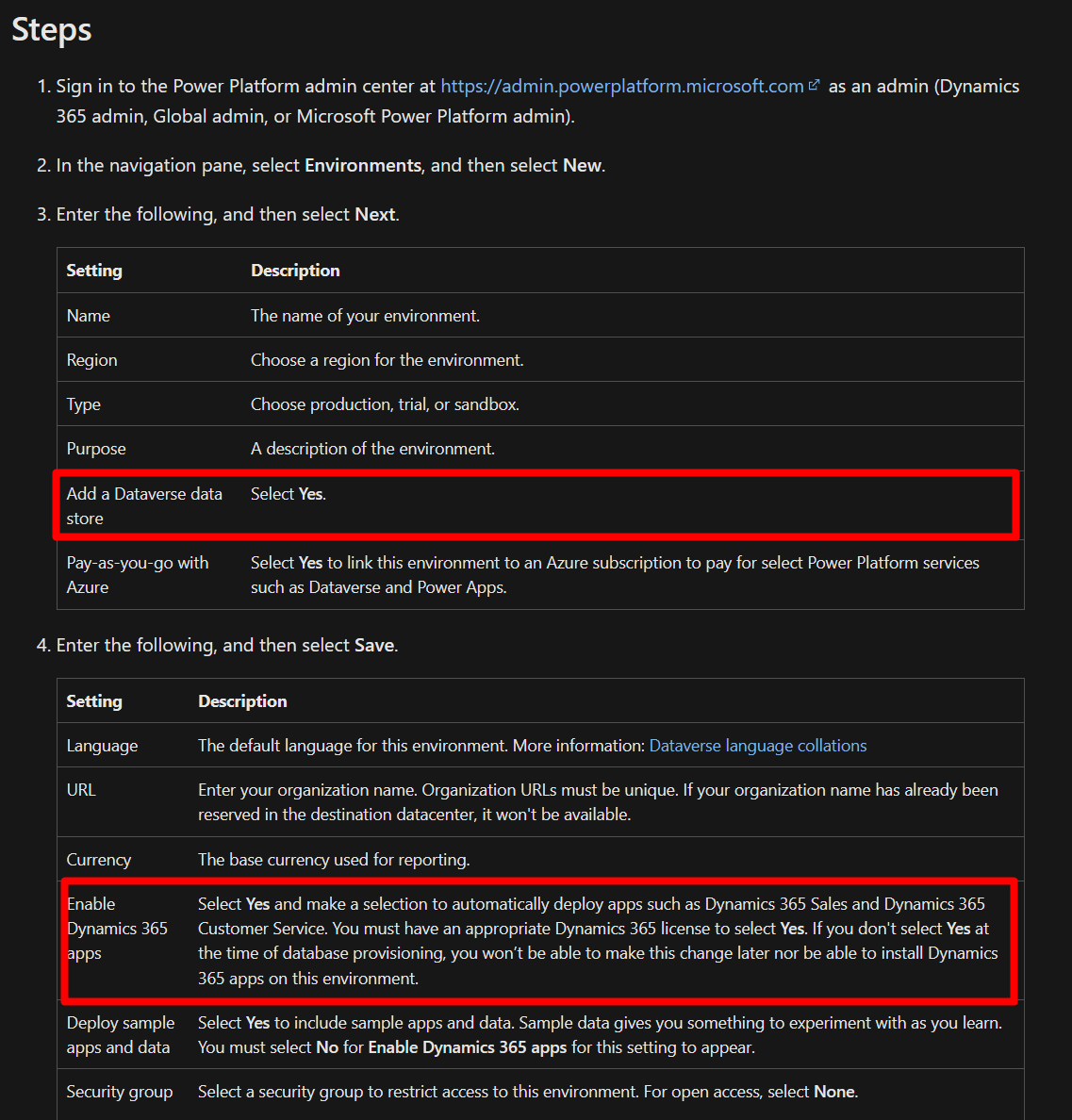
This error normally occurs when trying to install Sales on instances without a database and enable the Dynamics 365 apps option. Please refer to - https://learn.microsoft.com/en-us/power-platform/admin/manage-apps

- Once environment is created it is not possible to revert these configurations.
RESOLUTION:
To resolve this issue , you will need to create a new environment with database and enable Dynamics 365 apps to be able to install Dynamics 365 Sales Enterprise app on it - you can refer to this article for more details on these configurations https://learn.microsoft.com/en-us/power-platform/admin/create-environment#create-an-environment-with-a-database