web
You’re offline. This is a read only version of the page.
close
Skip to main content

Notifications

Announcements

No record found.

Community site session details

Community site session details

Session Id :
Microsoft Dynamics 365 | Integration, Dataverse...
Answered

Cannot set a target when trying to create a work flow for setwordtemplate

(0) ShareShare
ReportReport
Posted on by 10

Good morning all, 

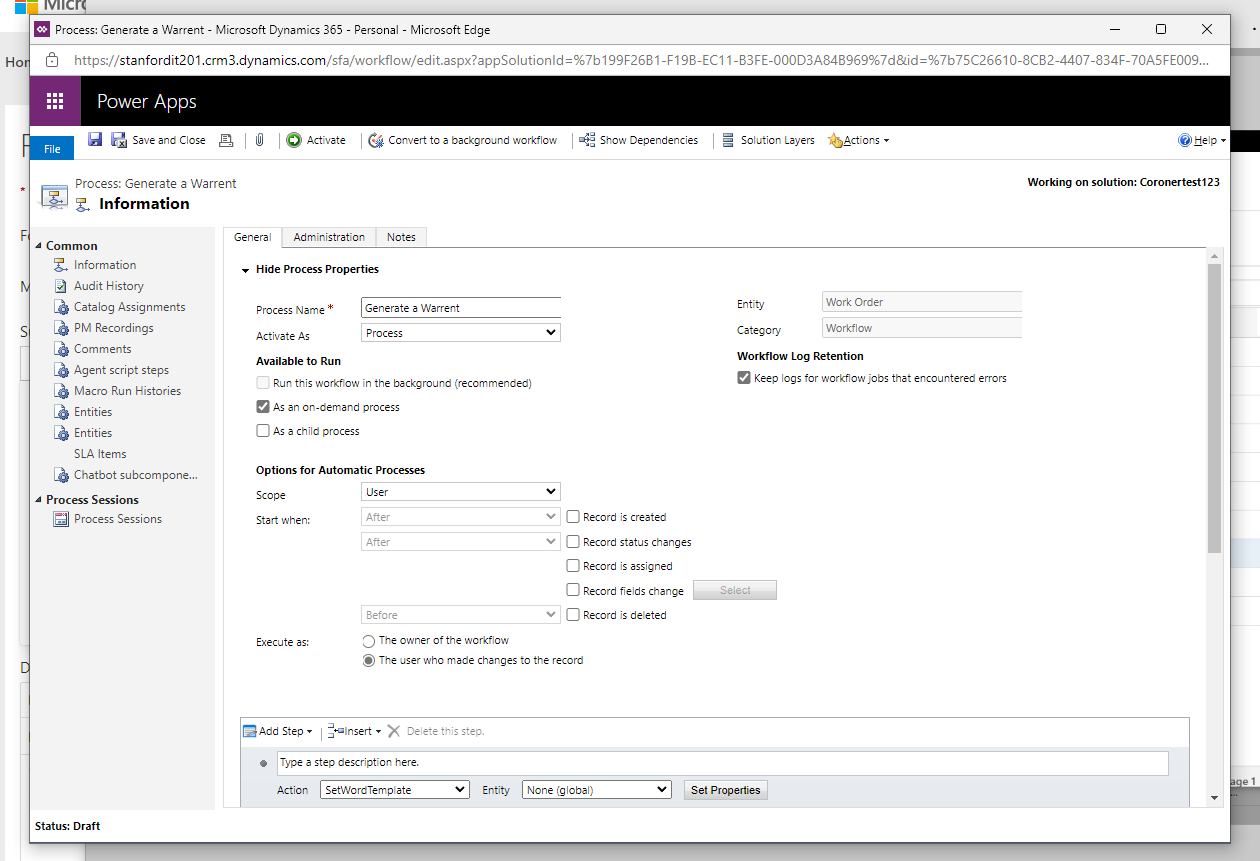
I am trying to auto generate a word template for my work order entity using workflow. The action i used is setwordtemplate. Please see attached for the workflow i created. For some reason, for the target I cannot find (work order(work order)) I can only find (parent work order(work order)). I believe it leads to the malfunction of my work flow, can anyone please advise where I could have made a mistake. For the work order entity, business process flow is set to yes and for other entities such as invoice, there was no problem with setting the target (invoice(invoice)).

Thank you guys I appreciate your help,
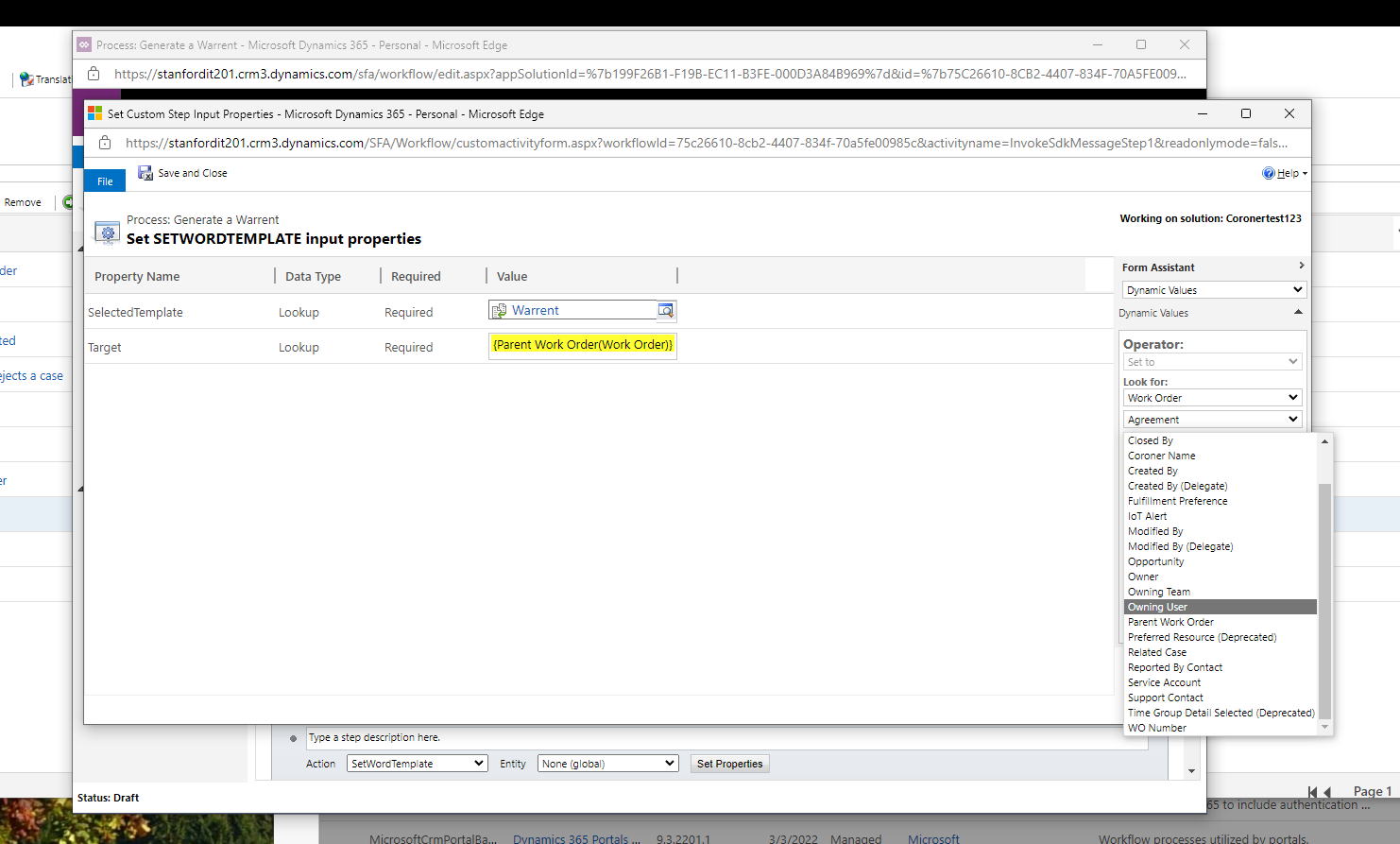
Screenshot-2022_2D00_03_2D00_08-111814.pngScreenshot-2022_2D00_03_2D00_08-111910.png

I have the same question (1)
  • Work it out Profile Picture
    10 on at

    Thanks

  • Suggested answer
    Bipin D365 Profile Picture
    28,983 Moderator on at

    HI,

    make sure you have notes enabled for the entity.

    nishantrana.me/.../

    Select WO Number from left hand dropdown.

    Please mark my answer verified if this is helpful!

    Regards,

    Bipin Kumar

    Follow my Blog: xrmdynamicscrm.wordpress.com/

  • Verified answer
    Nya Profile Picture
    29,060 on at

    Hi,

    You can try to adjust the property with the WO Number in Work Order.

    pastedimage1646896735264v1.png

    It is actually the GUID of the Work Order. (Ref: msdyn_workorder EntityType (Microsoft.Dynamics.CRM) | Microsoft Docs)

    pastedimage1646896827297v2.png

    In Invoice entity you have exemplified, the corresponding field is named Invoice. (Ref: invoice EntityType (Microsoft.Dynamics.CRM) | Microsoft Docs)

    pastedimage1646896905065v3.png

  • Grandcheese Profile Picture
    15 on at

    Thank so much it worked

  • Grandcheese Profile Picture
    15 on at

    thanks so much it worked!

Under review

Thank you for your reply! To ensure a great experience for everyone, your content is awaiting approval by our Community Managers. Please check back later.

Helpful resources

Quick Links

Responsible AI policies

As AI tools become more common, we’re introducing a Responsible AI Use…

Neeraj Kumar – Community Spotlight

We are honored to recognize Neeraj Kumar as our Community Spotlight honoree for…

Leaderboard > Microsoft Dynamics 365 | Integration, Dataverse, and general topics

#1
Siv Sagar Profile Picture

Siv Sagar 93 Super User 2025 Season 2

#2
#ManoVerse Profile Picture

#ManoVerse 74

#3
Martin Dráb Profile Picture

Martin Dráb 64 Most Valuable Professional

Last 30 days Overall leaderboard

Product updates

Dynamics 365 release plans