web
You’re offline. This is a read only version of the page.
close
Skip to main content

Announcements

No record found.

News and Announcements icon
Community site session details

Community site session details

Session Id :
Microsoft Dynamics CRM (Archived)

Subgrid lookup calling a javascript to display lookup data from a different entity

(0) ShareShare
ReportReport
Posted on by 1,532

Hi,

Using Microsoft Dynamics® CRM 2016(8.1.0.359) (DB 8.1.0.359)

I have seen many examples of using a filter on a subgrid lookup.  However, I have not been able to find an example where the subgrid is displaying a lookup based on a different entity (Entity A).

I would like to display a subgrid lookup from a different entity.  When when the users select a record or records populate the data from the lookup Entity A to Entity BEntity B is the subgrid entity.

Example :

Entity A contain "Case Model" and "Model".      Entity B is the actual entity that will need the data from Entity A.

Looking for examples or help on how to do this.   Thanks
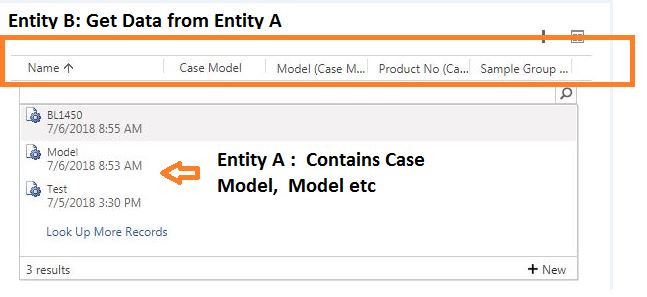
0358.Subgrid.JPG


*This post is locked for comments

I have the same question (0)
  • Suggested answer
    Alex Fun Wei Jie Profile Picture
    33,628 on at

    Hi,

    do you means below?

    3750.65.png

    if yes, follow below steps

    open up the lookup view

    3750.65.png

    Result

    6574.66.png

    you only can display up to 3 fields.

  • rthompson Profile Picture
    1,532 on at

    Hi Alex,

    Thanks for responding.  This is not what I am looking for.  This is working from a field.  I am using a subgrid.  The subgrid shows a lookup.  I want to change the lookup in the subgrid.

  • Alex Fun Wei Jie Profile Picture
    33,628 on at

    Hi,

    can i conclude that, you want above functionality working in subgrid?

  • rthompson Profile Picture
    1,532 on at

    Hi Alex,

    That is correct.

  • Suggested answer
    Alex Fun Wei Jie Profile Picture
    33,628 on at

    Hi,

    this would be the same configuration as above. Just give it a try.

    Before

    68.png

    Configuration ( look for lookup view and remember to save and publish)

    68.png

    After


    6886.69.png

  • Suggested answer
    Nithya Gopinath Profile Picture
    17,078 on at

    Hi Thompson,

    Go to Settings --> Customisation --> Customize the System. Consider EntityA as account and EntityB as Contact.

    Expand Entities and under Entity B (contact entity), choose Views. Select the Contact Lookup View (Entity B Lookup view) as shown below.

    52818.2.png

    In the window that appears, click on Add Columns.

    52818.2.png

    In the Add Columns window, change the Record Type to Company Name (Account) which will be Related Lookup Field to EntityA in Entity B (Entity A) in your case.

    4774.3.png

    Now you can select which all fields from EntityA should appear in the lookup details of EntityB.

    Also, change the order of the fields so that your fields are first in the view. Only first 3 fields added in the lookup view will be seen while lookup records.

    Hope this helps.

  • rthompson Profile Picture
    1,532 on at

    Hi Alex,

    I am not doing a good job at explaining myself.

    Here's what I have.

    I have a table that contains data that I want to do a lookup on.  When I click the plus sign on the Subgrid I get a lookup.  This is what you are showing me. I do understand that.  But the problem that I am running into is that the look can only work from the data that exist in the entity Subgrid.  I do not want to do a lookup on the data based on the Subgrid.  I know that I change the view to display  different entity data.  But what I want to do is show all the data from a different entity select the data from the lookup and update the Subgrid entity with the needed fields.  Below is an example.

    Entity A                   Entity B 

    Car                            Car

    Model                       Model

    Make                         Blank

    Dealer                       Dealer

    PlusSign.JPG

    The lookup with in the Subgrid will only display data that exist in the Subgrid.

    I am trying to do get data from a different entity show all the data with a filter select the data and use a javascript function that will update the Subgrid entity.

    PlusSign.JPG

  • Suggested answer
    Alex Fun Wei Jie Profile Picture
    33,628 on at

    Hi,

    filtering inline lookup is not supported. you can follow the suggestion from below post.

    community.dynamics.com/.../209482

Under review

Thank you for your reply! To ensure a great experience for everyone, your content is awaiting approval by our Community Managers. Please check back later.

Helpful resources

Quick Links

Introducing the 2026 Season 1 community Super Users

Congratulations to our 2026 Super Stars!

Meet the Microsoft Dynamics 365 Contact Center Champions

We are thrilled to have these Champions in our Community!

Congratulations to the April Top 10 Community Leaders

These are the community rock stars!

Leaderboard > 🔒一 Microsoft Dynamics CRM (Archived)

#1
ScottDurow Profile Picture

ScottDurow 2

#2
GJones Profile Picture

GJones 1

Last 30 days Overall leaderboard

Featured topics

Product updates

Dynamics 365 release plans
