web
You’re offline. This is a read only version of the page.
close
Skip to main content

Announcements

No record found.

News and Announcements icon
Community site session details

Community site session details

Session Id :
Small and medium business | Business Central, N...
Suggested Answer

Bank reconcilliation error message

(0) ShareShare
ReportReport
Posted on by 47

Hi all,

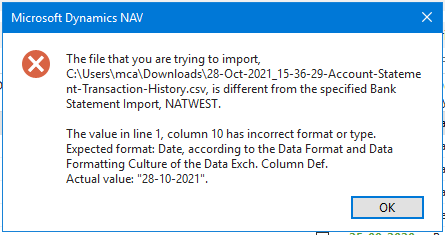
I have been trying to import our bank statement to NAV for a recon. But I keep getting this error message:
2818.Error-message.png

I have checked the CSV file and the column with the date (column 10) is formatted as date and it still won't accept it. Any help please? 

I have the same question (0)
  • Suggested answer
    Kolitha_Dissanayake Profile Picture
    230 on at

    Hi Michelle,

    It seems that your importing bank statement CSV file date format and Data Exchange Definitions date format are different. Please refer below link for your reference;

    https://docs.microsoft.com/en-us/dynamics365/business-central/across-how-to-set-up-data-exchange-definitions

    Thank You,

    Kolitha

  • Suggested answer
    YUN ZHU Profile Picture
    100,212 Super User 2026 Season 1 on at

    Hi, this still seems to be a problem with the date format from the error message, 
    Please try to change the date format in the csv file like 2021/10/28, 10/28/2021, 28-10-2021.

    You can check the date format displayed in the system, and theoretically change it to the same.

    For example: 10/28/2021

    pastedimage1635471811729v1.png

    Hope this will help.

    Thanks.

    ZHU

  • MichelleCA Profile Picture
    47 on at

    I tried looking for Data Exchange Definitions but I don't have access to this? Perhaps because of some user permissions? (I am not the primary administrator of our NAV, "just" a user)

    I also tried changing the format in the csv file several times - I can save it with the new format, but then when I close the document, it seems to revert to the old format because when I open the file again, it's gone back to original format (dd-mm-yyyy) but this is the fortmat used throughout our NAV so it should be the correct format
    *EDIT* I finally got it to save the csv file properly when changing the format. I have tried every single format now and I am still getting the error message with every single format type

  • Suggested answer
    Community Member Profile Picture
    on at

    Michelle,

    You need to connect with the User who has Data Exchange permission and correct the layout.

    Thanks,

    Steve

Under review

Thank you for your reply! To ensure a great experience for everyone, your content is awaiting approval by our Community Managers. Please check back later.

Helpful resources

Quick Links

Introducing the 2026 Season 1 community Super Users

Congratulations to our 2026 Super Stars!

Meet the Microsoft Dynamics 365 Contact Center Champions

We are thrilled to have these Champions in our Community!

Congratulations to the April Top 10 Community Leaders

These are the community rock stars!

Leaderboard > Small and medium business | Business Central, NAV, RMS

#1
OussamaSabbouh Profile Picture

OussamaSabbouh 2,059 Super User 2026 Season 1

#2
YUN ZHU Profile Picture

YUN ZHU 994 Super User 2026 Season 1

#3
Teagen Boll Profile Picture

Teagen Boll 664 Super User 2026 Season 1

Last 30 days Overall leaderboard

Featured topics

Product updates

Dynamics 365 release plans
