web
You’re offline. This is a read only version of the page.
close
Skip to main content

Notifications

Announcements

No record found.

Community site session details

Community site session details

Session Id :
Microsoft Dynamics CRM (Archived)

CRM to NAV via the Dynamics connector error on Primary key element Code in service Integration_Ship_to_Address_Service is empty or null.

(0) ShareShare
ReportReport
Posted on by 112

Hi All,

We have a online CRM 2016 which is connected to on NAV via the dynamics connector, When syncing takes place we are receiving the below error message on a few accounts' in the MAP Account to NAV customer card.

"Primary key element Code in service Integration_Ship_to_Address_Service is empty or null.  Empty and null elements are not allowed in primary keys."

Can anyone help me identify what missing or the cause of this? Is it that CRM does not contact a ship to address but the connector is expecting one?
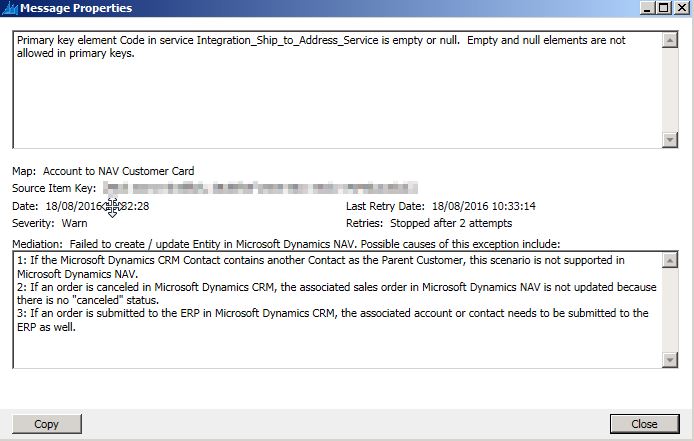
Error-.jpg

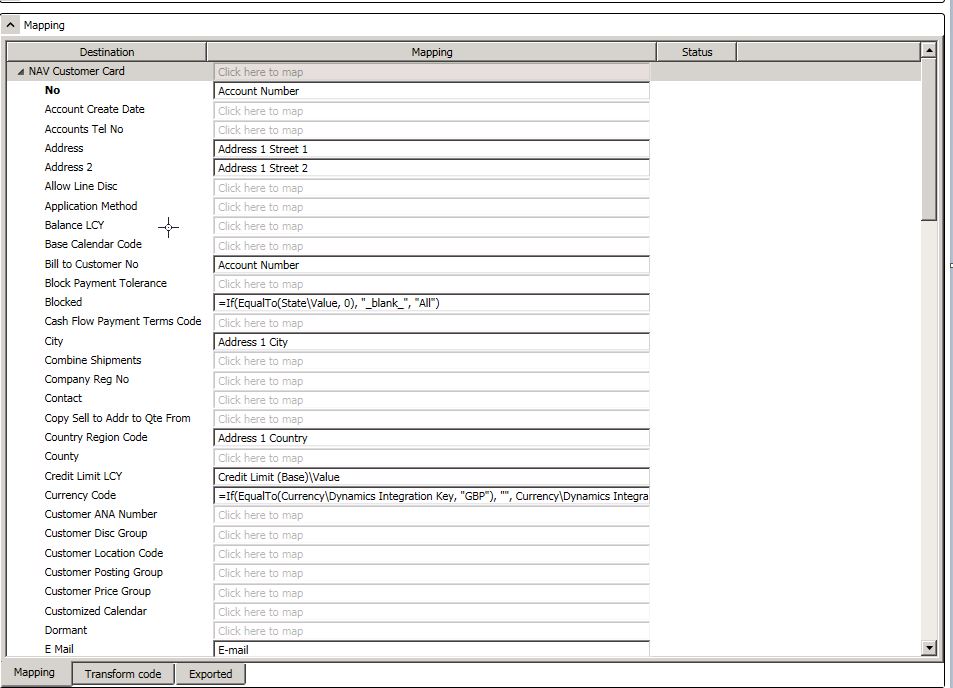
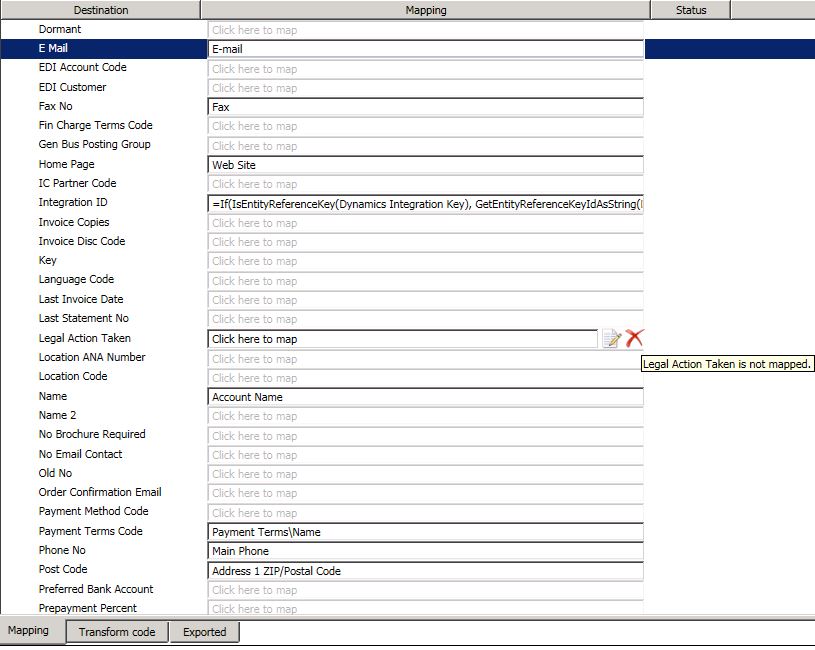
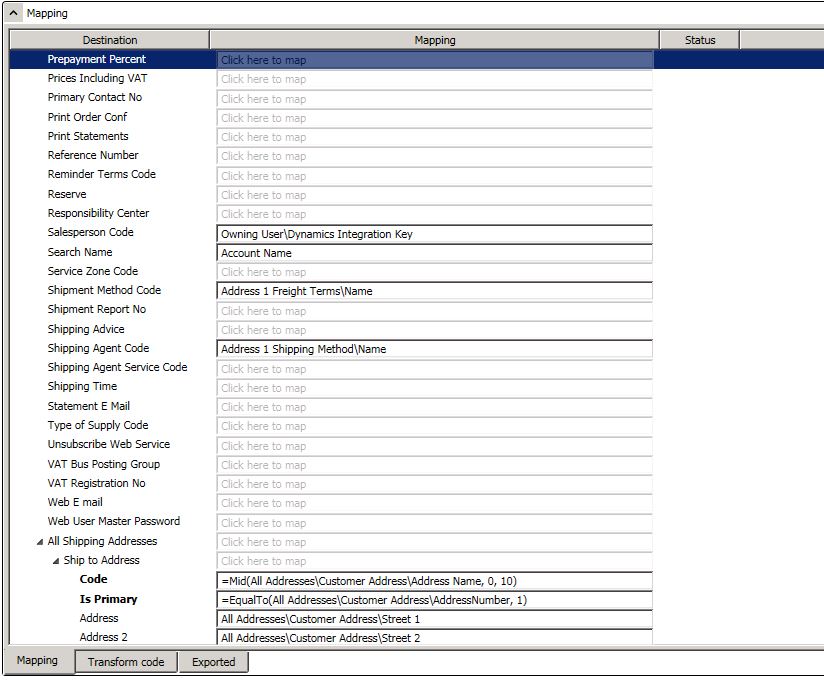
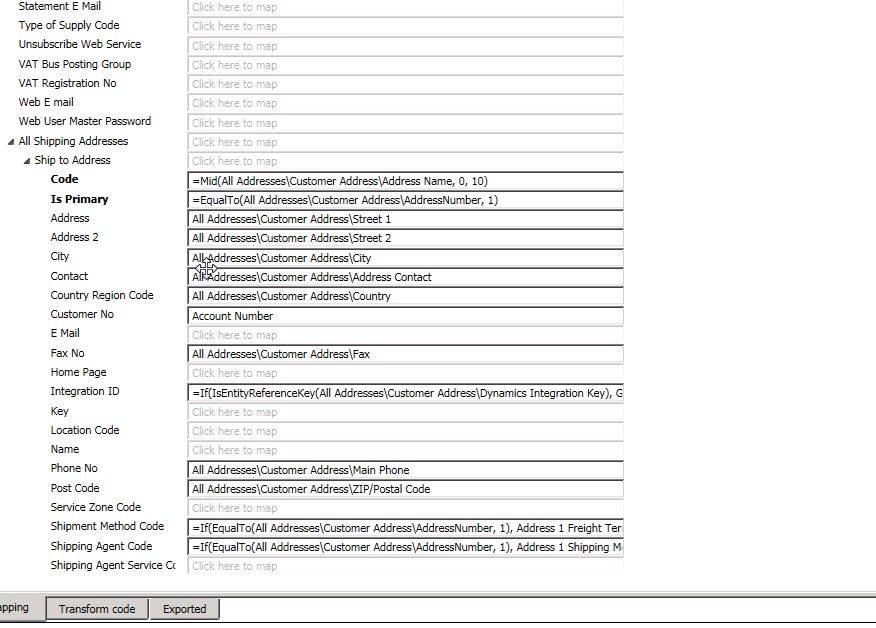
The mapping is as below

map-1.jpg

Map2.jpg

Map3.jpg

Map4.jpg

*This post is locked for comments

I have the same question (0)
  • Verified answer
    TheMarkChristie Profile Picture
    10,328 Moderator on at

    Hi Iain

    In NAV Ship to address name is a separate table where the ship to name is the primary key

    So if you try and send something to NAV that does not have a "Name" then it will not send to NAV as there is no primary key

    I would recommend that in CRM you make this a mandatory field

  • Iain_C_54 Profile Picture
    112 on at

    Hi Mark,

    I agree that it is a separate table in NAV, this issue does not happen for all accounts only some of them.

    For example 10 accounts were added to CRM today and this error/warning occurred on 2 of them.

    In this scenario I believe the primary key is the address number not name, and in CRM once the record is ready for integration the address 1: name is set to Primary

  • Verified answer
    TheMarkChristie Profile Picture
    10,328 Moderator on at

    The Address number in NAV is a counter of number of addresses. Do you have access to NAV

  • Verified answer
    TheMarkChristie Profile Picture
    10,328 Moderator on at

    Did you get this resolved?

  • Iain_C_54 Profile Picture
    112 on at

    No Its still occurring, I understand that the in NAV there is a counter for number of addresses however as this is coming from CRM to NAV

    I was incorrect in saying that it was my primary key above. I got confused by the mapping where IS primary checks the CRM field Number.

    Which is the CRM address number field which has the description Shows the number of the address, to indicate whether the address is the primary, secondary, or other address for the customer.

    I guess I need to identify what fields this is pointing to "Integration_Ship_to_Address_Service"

  • Verified answer
    TheMarkChristie Profile Picture
    10,328 Moderator on at

    On the Dynamics Connector I would say just use the default selections then map anything that is different

Under review

Thank you for your reply! To ensure a great experience for everyone, your content is awaiting approval by our Community Managers. Please check back later.

Helpful resources

Quick Links

Responsible AI policies

As AI tools become more common, we’re introducing a Responsible AI Use…

Neeraj Kumar – Community Spotlight

We are honored to recognize Neeraj Kumar as our Community Spotlight honoree for…

Leaderboard > 🔒一 Microsoft Dynamics CRM (Archived)

#1
SA-08121319-0 Profile Picture

SA-08121319-0 4

#1
Calum MacFarlane Profile Picture

Calum MacFarlane 4

#3
Alex Fun Wei Jie Profile Picture

Alex Fun Wei Jie 2

Last 30 days Overall leaderboard

Featured topics

Product updates

Dynamics 365 release plans