web
You’re offline. This is a read only version of the page.
close
Skip to main content

Announcements

No record found.

News and Announcements icon
Community site session details

Community site session details

Session Id :
Small and medium business | Business Central, N...
Answered

How do we use Reorder-Points Perimeters in Vendor card of Navision 2018?

(0) ShareShare
ReportReport
Posted on by 5,067

Hi,

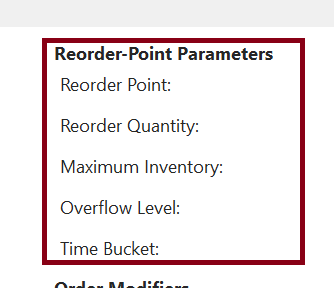
In Vendor Card, under Planning tab, there is the Reorder-Point Parameters. I would understand how to set it up and use it:

1. May I know what is Reorder Point and how will it be triggered?

2. How do I set up Reorder Quantity so that it can be triggered?

3. What does Maximum Inventory do? Is it suppose to set a cap so that the Inventory will not get more than a certain number of items?

4.If we have set a Maximum Inventory, what happens if we ordered more than the maximum?

5.What happens if a certain item was being sold, which then trigger the Reorder Point, but after that, the item was return back to the system.

How will the system response to this?
pastedimage1630642179102v1.png

I have the same question (0)
  • Suggested answer
    Community Member Profile Picture
    on at

    Josh,

    The fields you noted above appear on the Item Card not Vendor card. If you see these on a Vendor Card it sounds like you have a customization.

    Thanks,

    Steve

  • Verified answer
    YUN ZHU Profile Picture
    100,974 Super User 2026 Season 1 on at

    Hi, as Steven Chinsky said, the Reordering Policy fields are on the item card.

    Hope the link below can give you some hints.

    https://docs.microsoft.com/en-us/dynamics365/business-central/setup-best-practices-reordering-policies

    pastedimage1630885844990v1.png

  • joshtechsolutions Profile Picture
    5,067 on at

    Sorry Steven, Yes its on the Item Card.

    Please kindly explain the questions if you are aware of the answers?

    Thank you.

  • joshtechsolutions Profile Picture
    5,067 on at

    Thank you Yun Zhu. Yes its on the Item Card.

  • Verified answer
    Community Member Profile Picture
    on at

    Josh,

    I am attaching my Supply Planning handout that talks about these fields and its impact on planning and Items.

    Thanks,

    Steve

    6327.Supply-Chain-Planning-wPROD.pdf

Under review

Thank you for your reply! To ensure a great experience for everyone, your content is awaiting approval by our Community Managers. Please check back later.

Helpful resources

Quick Links

Introducing the 2026 Season 1 community Super Users

Congratulations to our 2026 Super Stars!

Meet the Microsoft Dynamics 365 Contact Center Champions

We are thrilled to have these Champions in our Community!

Congratulations to the April Top 10 Community Leaders

These are the community rock stars!

Leaderboard > Small and medium business | Business Central, NAV, RMS

#1
OussamaSabbouh Profile Picture

OussamaSabbouh 2,086 Super User 2026 Season 1

#2
YUN ZHU Profile Picture

YUN ZHU 1,290 Super User 2026 Season 1

#3
AndrewThomas81 Profile Picture

AndrewThomas81 1,218

Last 30 days Overall leaderboard

Featured topics

Product updates

Dynamics 365 release plans
