web
You’re offline. This is a read only version of the page.
close
Skip to main content

Announcements

No record found.

News and Announcements icon
Community site session details

Community site session details

Session Id :
Small and medium business | Business Central, N...
Suggested Answer

Customer No. on sales order / search function issue

(0) ShareShare
ReportReport
Posted on by 454
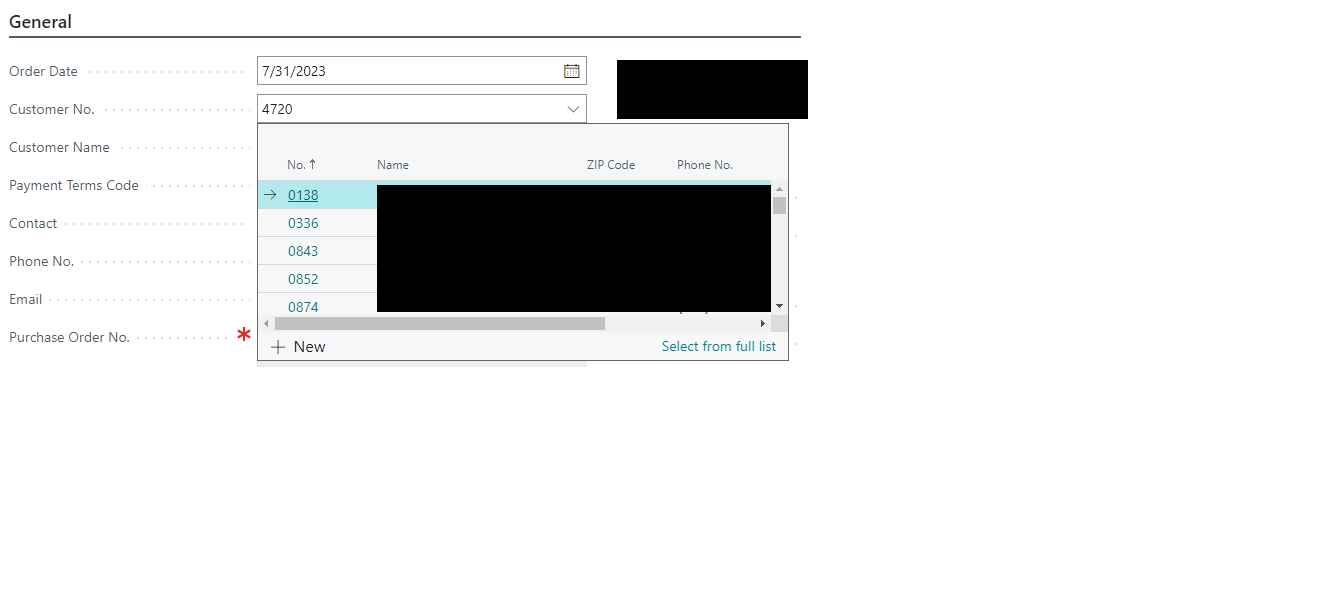
When the Customer No. is entered on the Sales Order, it searches against No., Name, Zip Code, Phone No.  This is kind of nice, however if the salesperson knows the Customer No., it does not always show up as the first /selected/ option meaning that once they hit tab/enter the number they've entered is changed.  Is there a way around this?
For example: salesperson wants to enter 4720 but if they do not tab/enter immediately after entering, the search comes up and now if they hit enter, it will change to 0138.
I have the same question (0)
  • Suggested answer
    YUN ZHU Profile Picture
    100,696 Super User 2026 Season 1 on at
    Hi, I tried it and there is no such problem. Below is my version.
    Version: W1 22.3 (Platform 22.0.59032.0 + Application 22.3.58346.58475)
     
    Hope this helps.
    Thanks.
    ZHU
  • Suggested answer
    HVGEEL Profile Picture
    310 on at
    I recognize this one.
     
    I remember having the same issue a few years ago.
    The behaviour you are seeing is a result of the 'fuzzy search' BC does in the list, while populating the dropdown.
     
    There is no simple answer to the question because the end-user will only in some cases know the CustomerNo by heart.
     
    You now have a tough decision to make, and it has to be made together with the end-users, in my opinion you cannot force it on them.
    - create a customization to force the No. when it is used: this requires that end-users know the No. UNDER ALL CIRCUMSTANCES, it breaks the fuzzy search completely
    - leave the fuzzy search as it is... all it requires is the effort from the end-users to pay attention to the data proposed in the dropdown.
     
    This in fact is more a business decision than a technical issue.


  • Brett F Profile Picture
    454 on at
    HVGEEL - Yes, exactly.  For our business, it would be ideal for the search to search against the No. or the Name only.  They do not even need to see the ZIP Code or Phone No.  Do you know if it is possible to customize to that?
     
    YUN ZHU - It only happens if the number is in a different field.  In this case the zip code or phone no.  We are transitioning from Nav, and so we are used to clicking on the Column Name to search to that field specifically, so this is something users will need to adapt to. Example:

Under review

Thank you for your reply! To ensure a great experience for everyone, your content is awaiting approval by our Community Managers. Please check back later.

Helpful resources

Quick Links

Introducing the 2026 Season 1 community Super Users

Congratulations to our 2026 Super Stars!

Meet the Microsoft Dynamics 365 Contact Center Champions

We are thrilled to have these Champions in our Community!

Congratulations to the April Top 10 Community Leaders

These are the community rock stars!

Leaderboard > Small and medium business | Business Central, NAV, RMS

#1
OussamaSabbouh Profile Picture

OussamaSabbouh 1,865 Super User 2026 Season 1

#2
YUN ZHU Profile Picture

YUN ZHU 1,098 Super User 2026 Season 1

#3
AndrewThomas81 Profile Picture

AndrewThomas81 898

Last 30 days Overall leaderboard

Featured topics

Product updates

Dynamics 365 release plans
