Hi, All.
I hava a issue which i'd like to solve.
See the pictures below as examples for more info.

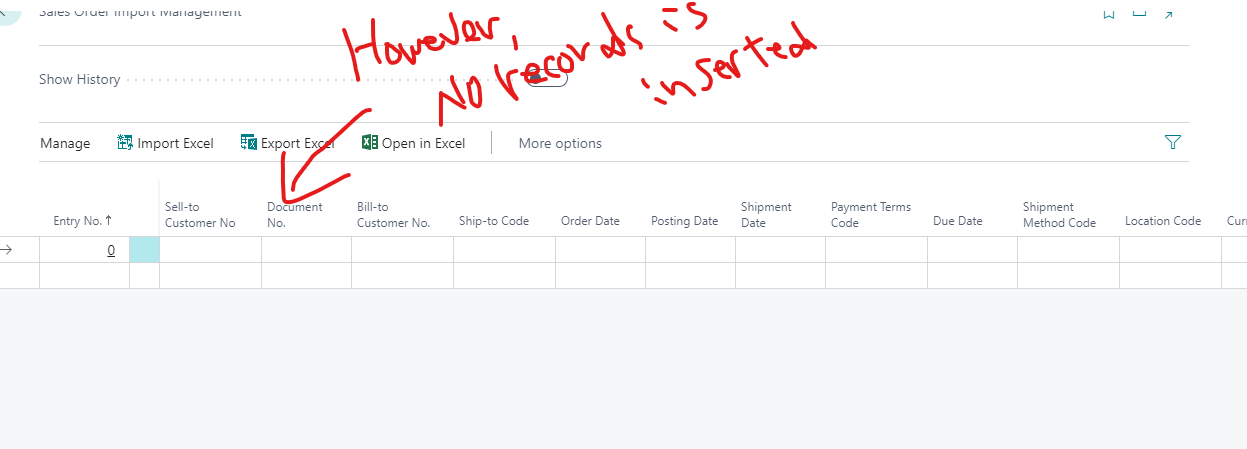
I created a function for Excel file import with AL.
I wrote a process to import data from Excel file, and then insert it into the table, but No records are inserted into the table.
How do I insert the records in the table?
Here is the source code of Excel Import:
procedure ImportSalesOrderExcel()
    var
    begin
        Rec_ExcelBuffer.DeleteAll();
        Rows := 0;
        Columns := 0;
        FileUploaded := UploadIntoStream('インポートするファイルを選択してください', '', '', Filename, Instr);

        if Filename <> '' then
            Sheetname := Rec_ExcelBuffer.SelectSheetsNameStream(Instr)
        else
            exit;

        Rec_ExcelBuffer.Reset;
        Rec_ExcelBuffer.OpenBookStream(Instr, Sheetname);
        Rec_ExcelBuffer.ReadSheet();

        Commit();
        Rec_ExcelBuffer.Reset();
        Rec_ExcelBuffer.SetRange("Column No.", 1);
        if Rec_ExcelBuffer.FindFirst() then
            repeat
                Rows := Rows   1;
            until Rec_ExcelBuffer.Next() = 0;

        Rec_ExcelBuffer.Reset();
        Rec_ExcelBuffer.SetRange("Row No.", 1);
        if Rec_ExcelBuffer.FindFirst() then
            repeat
                Columns := Columns   1;
            until Rec_ExcelBuffer.Next() = 0;

        for RowNo := 2 to Rows do begin
            SalesOrderImportBuffer_R.Reset();
            if SalesOrderImportBuffer_R.Get(GetValueAtIndex(RowNo, 1), GetValueAtIndex(RowNo, 2)) then begin
                Evaluate(SalesOrderImportBuffer_R."Document No.", GetValueAtIndex(RowNo, 3));
                SalesOrderImportBuffer_R.Validate("Document No.");
                //


                SalesOrderImportBuffer_R.Modify(true);
                Commit();
            end

            else begin
                SalesOrderImportBuffer_R.Init();
                Evaluate(SalesOrderImportBuffer_R."Entry No.", GetValueAtIndex(RowNo, 1));
                Evaluate(SalesOrderImportBuffer_R."Sell-to Customer No.", GetValueAtIndex(RowNo, 2));
                Evaluate(SalesOrderImportBuffer_R."Document No.", GetValueAtIndex(RowNo, 3));

                //trueを追加
                SalesOrderImportBuffer_R.Insert(true);
                Commit();
            end;
        end;

        Message('Successfully imported %1 Records', Rows - 1);

    end;
and Here is the source code of GetValueAtIndex:
  local procedure GetValueAtIndex(RowNo: Integer; ColNo: Integer): Text
    var
    begin
        Rec_ExcelBuffer.Reset();
        if Rec_ExcelBuffer.Get(RowNo, ColNo) then
            exit(Rec_ExcelBuffer."Cell Value as Text");
    end;
Thanks in advance.


