web
You’re offline. This is a read only version of the page.
close
Skip to main content

Notifications

Announcements

No record found.

Community site session details

Community site session details

Session Id :
Microsoft Dynamics CRM (Archived)

Pricing field in order product remains locked - CRM Online 2016

(1) ShareShare
ReportReport
Posted on by 358

Hello,

I am currently facing an issue in CRM 2016 Online regarding order product override pricing. I have created a sales order and added order products to it. For some products it was required to override price per unit in order products, but I am unable to override it as the Pricing field shows locked. Also the prices locked is set to No. I have System Administrator and System Customizer roles assigned. Here is the screenshot. How can I override price? 
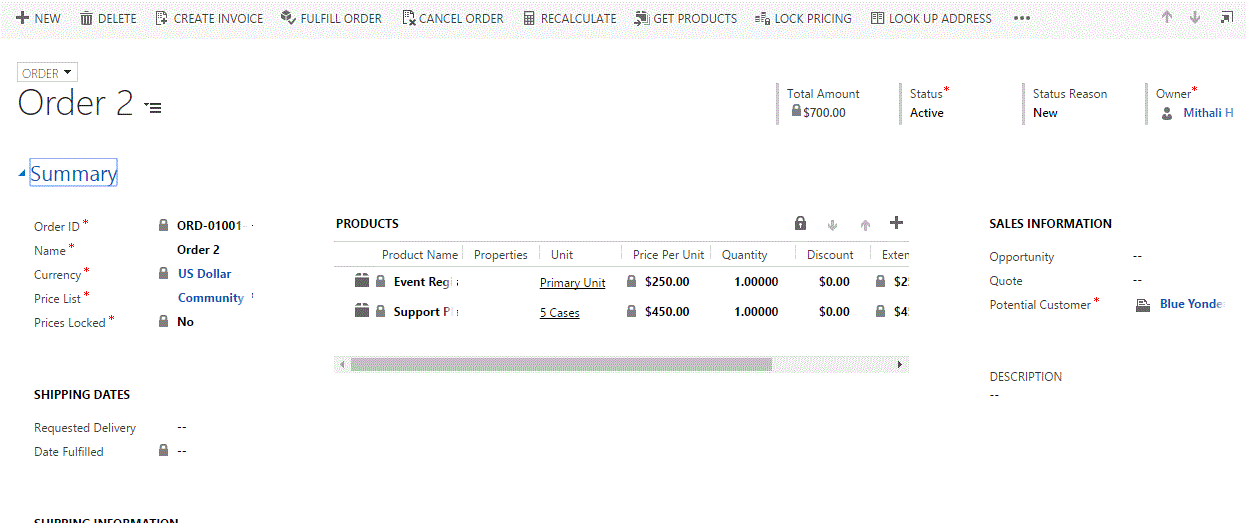
Products.GIF

*This post is locked for comments

I have the same question (0)
  • Suggested answer
    lloydz1 Profile Picture
    265 on at

    We had this the other day also seems to be a bug, we got around it by removing and adding the product back in again, it was then editable!

  • meetdynamics Profile Picture
    358 on at

    HI Lloyd,

    Thanks for the response. I have tried removing the order product and adding it again but still its not working :(

  • Community Member Profile Picture
    on at

    We had no problem with it until we received the 2016 update.  We can no longer edited the price either :(

  • Community Member Profile Picture
    on at

    From what I can tell, the problem seems to be with the ispriceoverridden field on the Order Product form.  If I change the default to Override Price, I can enter a price for the item.  The problem, at this point is that it does not show the default value for the price.  In other words, I need to remember what the price was.  This was not a problem until the 2016 update was installed so something must of changed.  For the time being, I will use the Override Price default so that we can edit the item price but I'm hoping that this will be fixed soon.

  • Community Member Profile Picture
    on at

    Hi Lloyd, do you mean removing and adding back to the product catalogue?

  • Community Member Profile Picture
    on at

    Open the Order Product line (double click in any white space on that row). Change the value for Pricing to "Overriden" rather than "Use Default", then you should be able to write in a price

  • Community Member Profile Picture
    on at

    We are having the same issue.  The problem being, the field is locked - even for admin!

  • Suggested answer
    Community Member Profile Picture
    on at

    The inability to override Quote and Order pricing has afflicted us since 2016 update 1. This is irrespective of security role setting.

    This answer is provided in this thread community.dynamics.com/.../189054 with credit going to Ilkka Priha.

    The following code in the OnLoad handler in the Product Line form unlocks pricing:

    var control = Xrm.Page.ui.controls.get('ispriceoverridden');

    control.setDisabled(false);

    This can be refined to ensure default price comes through first to avoid issue mentioned by Diane

    //Function to unlock "Pricing"

    function unlockPricing() {

        Xrm.Page.ui.controls.get("ispriceoverridden").setDisabled(false);

    }

    function onLoad() {

       setTimeout(unlockPricing, 3000);

    }

  • Community Member Profile Picture
    on at

    i have same probleme after put update 1 on crm 2016

    its like error script when i do refresh

    i try to put in compatibity list its help a bit but so frstrating

  • Community Member Profile Picture
    on at

    this didn't work for us , we just had update 1 yesterday and  price override option is locked , even though it not ticked on form properties.

    any other solutions  please ?

Under review

Thank you for your reply! To ensure a great experience for everyone, your content is awaiting approval by our Community Managers. Please check back later.

Helpful resources

Quick Links

Responsible AI policies

As AI tools become more common, we’re introducing a Responsible AI Use…

Neeraj Kumar – Community Spotlight

We are honored to recognize Neeraj Kumar as our Community Spotlight honoree for…

Leaderboard > 🔒一 Microsoft Dynamics CRM (Archived)

#1
SA-08121319-0 Profile Picture

SA-08121319-0 4

#1
Calum MacFarlane Profile Picture

Calum MacFarlane 4

#3
Alex Fun Wei Jie Profile Picture

Alex Fun Wei Jie 2

Last 30 days Overall leaderboard

Featured topics

Product updates

Dynamics 365 release plans
