web
You’re offline. This is a read only version of the page.
close
Skip to main content

Announcements

News and Announcements icon
Community site session details

Community site session details

Session Id :
Small and medium business | Business Central, N...
Suggested Answer

Data Import Exchange Definition Differences

(5) ShareShare
ReportReport
Posted on by 192
Hi,
 
I have a data import exchange set up like so:
 
 
The field definition mapping is as follows:

 
In this case related to this problem - the Transformation rule is irrelevant.
 
The data exchange definition is working for one file, but not the other and is erroring on the date field.
 
I have confirmed that both files date field is (as an example) - dd/MM/yyyy = 20/08/2025. 
 
File 1 will import successfully, yet file 2 will error with this:
 
The value in line 1, column 7 has incorrect format or type.
Expected format: Date, according to the Data Format and Data Formatting Culture of the Data Exch. Column Def.
Actual value: "2025-07-08".
 
The value in the file is 100% 08/07/2025 as displayed here:
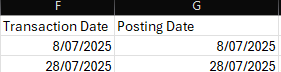
and more importantly:
 
 
I have confirmed:
 
- Both files encoding is the same - .csv
- I have tried both encoding csv as UTF-8 and .csv with no luck.
- Removed the definition from both bank accounts and readded.
- Added and removed the data transformation rule in the field mapping
 
What causes the definition to work on one, fail on the other?
 
I have the same question (0)
  • Suggested answer
    Mansi Soni Profile Picture
    9,839 Super User 2026 Season 1 on at
    Hello,

    The error happens because in the second file, even though Excel shows the date as 08/07/2025, the actual raw value inside the CSV is stored as 2025-07-08 (ISO format). Business Central checks the raw text against the Data Format (dd/MM/yyyy) you defined in the Data Exchange Definition, so when it sees 2025-07-08, it doesn’t match the expected format and fails. The first file works because its raw values really are in dd/MM/yyyy. Always ensure the exporting system always outputs the date in the required format.

    https://community.dynamics.com/blogs/post/?postid=5bc2164b-25dc-ee11-a73d-0022484c32cd
    https://learn.pocketsmith.com/article/103-transaction-dates-are-incorrect-after-importing-a-bank-file#prevent
    https://learn.microsoft.com/en-us/dynamics365/business-central/across-how-to-set-up-data-exchange-definitions

    Hope this answer will help you!

    Regards,
    Mansi Soni
  • Jacob Profile Picture
    192 on at
    Hey @Mansi Soni,

    Unfortunately, that isn't the case. The Raw text output for the date is in dd/MM/yyyy format. 
     
    This is the raw text date:
    From what I can tell it there is nothing in the output that is doing yyyy-mm-dd
  • Suggested answer
    Dhiren Nagar Profile Picture
    2,890 Super User 2026 Season 1 on at
    Hi,
     
    You need to change the format to d/MM/yyyy.
     
    This is because your date if is in the single digit does not have 0 before it for e.g. 28 is showing as 28 but 07 is showing as 7 which is incorrect date format for your file. So use d/MM/yyyy and try again.
     
    I hope this helps.
     
    Regards,
    Dhiren.
     
    If this works mark the answer as verified.
  • Jacob Profile Picture
    192 on at
     
    Unfortunately, didn't work either. I did check the other file and the date format did only have dd/MM/yyyy so that part makes sense. 
     
    Despite this - I have changed the date format to 'yyyy-MM-dd' and this appears to be working for both.
     
    This honestly seems like D365 is doing something under the hood. The format in the file is 100% either dd/mm/yyyy or d/mm/yyyy. Doesn't really make sense why one would work and the other not other than magic but have to accept that there is some.
     
    Thanks again for the help
     
    Jake
     
     
  • Suggested answer
    Sohail Ahmed Profile Picture
    11,177 Super User 2026 Season 1 on at
    adding more details
     
     
    ✅ Mark the checkbox below if this answer helped you.

Under review

Thank you for your reply! To ensure a great experience for everyone, your content is awaiting approval by our Community Managers. Please check back later.

Helpful resources

Quick Links

Introducing the 2026 Season 1 community Super Users

Congratulations to our 2026 Super Stars!

Meet the Microsoft Dynamics 365 Contact Center Champions

We are thrilled to have these Champions in our Community!

Congratulations to the April Top 10 Community Leaders

These are the community rock stars!

Leaderboard > Small and medium business | Business Central, NAV, RMS

#1
OussamaSabbouh Profile Picture

OussamaSabbouh 2,273 Super User 2026 Season 1

#2
YUN ZHU Profile Picture

YUN ZHU 1,669 Super User 2026 Season 1

#3
AndrewThomas81 Profile Picture

AndrewThomas81 1,402

Last 30 days Overall leaderboard

Featured topics

Microsoft Training Manuals

Product updates

Dynamics 365 release plans



