web
You’re offline. This is a read only version of the page.
close
Skip to main content

Notifications

Announcements

No record found.

Community site session details

Community site session details

Session Id :
Small and medium business | Business Central, N...
Suggested Answer

Consuming Job Queue Entry in Power Automate

(0) ShareShare
ReportReport
Posted on by 85

Hi, 
I have exposed an API for the Job Queue Entry table and want to consume that in Power Automate, Unfortunately, when I try to consume the API through the Business central connector's default triggers ( When a record is changed, When a record is modified) if am not able to find table/entity name as shown in picture. I have tried with the API page and V2 API (Published from Web Services page). 
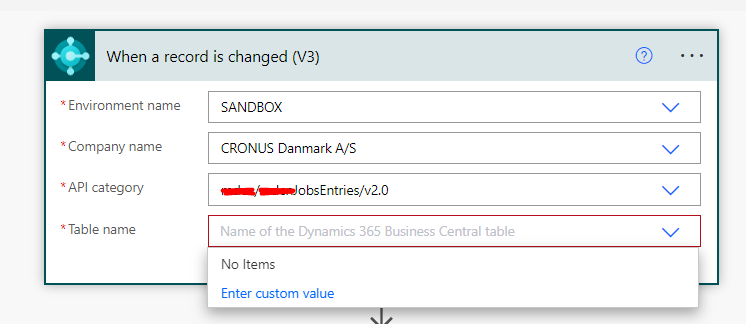
pastedimage1674066398797v2.png

However, If I try to consume some other tables, like the Item table then it worked fine, Can someone guide me about this? Is there any sort of restriction on the Job queue Entry table?
Is there any permission that I am missing?
Best Regards.

I have the same question (0)
  • Suggested answer
    Steven Renders Profile Picture
    5,672 Moderator on at

    Is it for BC Saas or BC On Prem? Power Automate and Power Apps are currently not able to connect to any custom APIs in BC On Prem. Power BI has no problem with that.
    So that might be the reason?

  • Abdullah Zafar Profile Picture
    85 on at
    [quote user="Steven Renders"]

    Is it for BC Saas or BC On Prem? Power Automate and Power Apps are currently not able to connect to any custom APIs in BC On Prem. Power BI has no problem with that.
    So that might be the reason?

    [/quote]

    Hi
    Thanks for the reply,
    I am trying on SaaS version. I have used the same API in Canvas app as data source and it’s working. Moreover, I am able to use functions like (Get records) but not able to use triggers for Job query entry

  • Finn1980 Profile Picture
    21 on at
    I'm facing this same issue when trying to set up automated notifications on job queue errors. I'm trying to set up a trigger on a custom API page but it's not showing up (first screenshot). It does show up when setting up an action (second screenshot). I'm using a 3rd party app to expose APIs called Simple Object Designer. Funny thing is the other APIs I've created show up, but not the job_Queue_Entrys API. It shouldn't be this difficult to get notified of when a job queue errors. This should be native functionality @Microsoft!


Under review

Thank you for your reply! To ensure a great experience for everyone, your content is awaiting approval by our Community Managers. Please check back later.

Helpful resources

Quick Links

Responsible AI policies

As AI tools become more common, we’re introducing a Responsible AI Use…

Neeraj Kumar – Community Spotlight

We are honored to recognize Neeraj Kumar as our Community Spotlight honoree for…

Leaderboard > Small and medium business | Business Central, NAV, RMS

#1
OussamaSabbouh Profile Picture

OussamaSabbouh 3,143

#2
Jainam M. Kothari Profile Picture

Jainam M. Kothari 1,694 Super User 2025 Season 2

#3
YUN ZHU Profile Picture

YUN ZHU 1,067 Super User 2025 Season 2

Last 30 days Overall leaderboard

Featured topics

Product updates

Dynamics 365 release plans



