web
You’re offline. This is a read only version of the page.
close
Skip to main content

Notifications

Announcements

No record found.

Community site session details

Community site session details

Session Id :
Microsoft Dynamics CRM (Archived)

Trouble setting up IFD - Internal and External federation metadata URL both point to Internal endpoint

(0) ShareShare
ReportReport
Posted on by 15

Hi All,

We are setting up our ADFS for Dynamics 365 On-Premise. Claims based authentication and internal access are setup correctly but facing issues while setting up IFD and external access. 

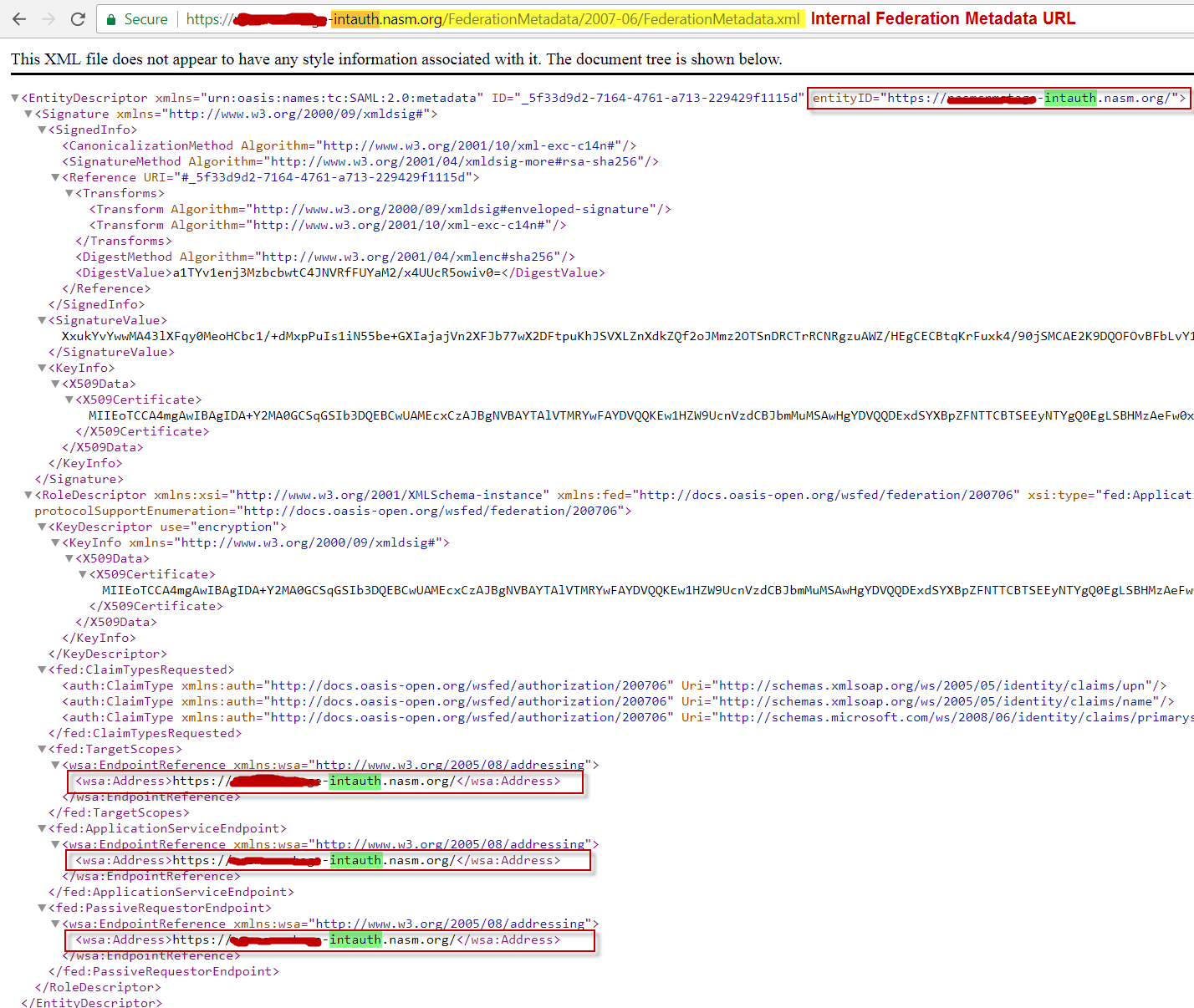
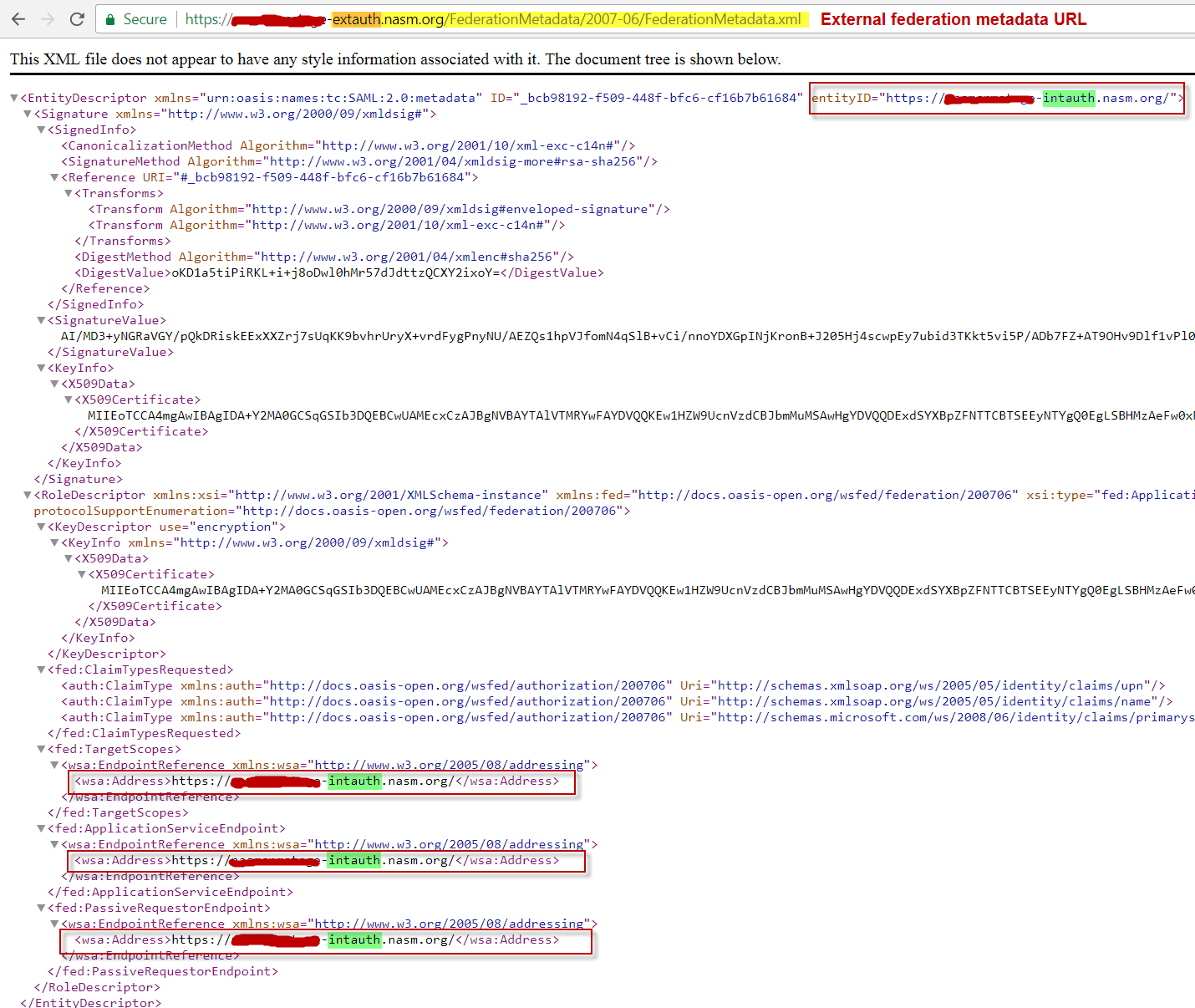
After setting up IFD through CRM Deployment manager, when we try browse the Federation metadata URL for external access, it points to the internal metadata URL itself. Please follow the screenshots.

Image 1: Internal Federation Metadata URL rendered in browser 
Internal_5F00_Fed_5F00_Url.png

Image 2: External Federation Metadata URL rendered in browser
External_5F00_Fed_5F00_Url.png

If you notice the images above carefully, both URLs point to the same endpoints i.e. internal. This causes issues in the next step where we have to setup Relying party trust in ADFS since the external Fed URL conflicts with Internal Fed URL.

Please help!

*This post is locked for comments

I have the same question (0)
  • Abarao Bhople Profile Picture
    445 on at

    Hi Prathmesh,

    can you please cross check DNS Entry's for Extauth 

    on your DNS and Public DNS as well.

    Thank you !

  • Verified answer
    David Jennaway Profile Picture
    14,065 on at

    Do you have any network components (e.g. load balancers) between the client and the CRM server which might modify the http headers in any packets. CRM uses the http headers to determine the original url (internal or external) used, and hence whether to return the internal or external metadata

  • Prathmesh Profile Picture
    15 on at

    Yes, we do have Load Balancer in front of our 2 CRM servers. I would try to take a look at it's configurations.

  • Prathmesh Profile Picture
    15 on at

    Hi Abarao, DNS entries look good for Extauth.

  • Abarao Bhople Profile Picture
    445 on at

    Thank you Prathmesh , for your response

    you have performed the IFD Configuration as below.

    Enter the external domain where your Internet-facing servers are located 

    and you entered Value : extauth.nasm.org


    right 

    please check , if it is not like this then try it and check  again.

    probably you would be get the federation metadata as below

    https://extauth.nasm.org/FederationMetadata/2007-06/FederationMetadata.xml

    Thank you !

    Abarao Bhople

  • Prathmesh Profile Picture
    15 on at

    Hi Abarao,

    Thanks for your response. Tried your suggestion as well as even tried reconfiguring everything all over again from CRM side, but unfortunately our issue still exists. It seems like the issue is from the hardware side probably the Load Balancer. Currently trying to work with our engineers to verify the details on the hardware side. I'll post the actual findings if the issue is resolved.

    Any idea on the load balancer configurations for CRM IFD would be really great.

    Thanks,

    Prathmesh

  • Suggested answer
    Prathmesh Profile Picture
    15 on at

    Hi All,

    We were finally able to resolve the issue with help of Microsoft support. The issue was at the Load balancer. The new load balancer we implemented doesn't support SSL offloading and there was one more setting configured incorrectly.

    Thanks all for the help.

Under review

Thank you for your reply! To ensure a great experience for everyone, your content is awaiting approval by our Community Managers. Please check back later.

Helpful resources

Quick Links

Responsible AI policies

As AI tools become more common, we’re introducing a Responsible AI Use…

Neeraj Kumar – Community Spotlight

We are honored to recognize Neeraj Kumar as our Community Spotlight honoree for…

Leaderboard > 🔒一 Microsoft Dynamics CRM (Archived)

#1
SA-08121319-0 Profile Picture

SA-08121319-0 4

#1
Calum MacFarlane Profile Picture

Calum MacFarlane 4

#3
Alex Fun Wei Jie Profile Picture

Alex Fun Wei Jie 2

Last 30 days Overall leaderboard

Featured topics

Product updates

Dynamics 365 release plans
