web
You’re offline. This is a read only version of the page.
close
Skip to main content

Notifications

Announcements

No record found.

Community site session details

Community site session details

Session Id :
Microsoft Dynamics 365 | Integration, Dataverse...
Suggested Answer

How to make the calendar view default to Month instead of Week

(0) ShareShare
ReportReport
Posted on by 26

Is it possible to change the default to Month instead of Week for the calendar view?  If yes, how?

pastedimage1668623318924v1.png

I have the same question (0)
  • Suggested answer
    Leah Ju Profile Picture
    Microsoft Employee on at

    Hi USA80, 

    The result is that Default Calendar View depends on personal settings.

    Have each user refer to the screenshot below to edit their personal settings.

    pastedimage1668654295826v1.png

    Personalization Settings > Activities tab > Default view:

    pastedimage1668654313646v3.png

    ==================================

    If you need, we can manage users personal settings in bulk through third-party tool--User Settings Utilit, which is one built-in plugin of XrmToolBox

    How to use it?

    https://d365demystified.com/tag/user-settings-utility/ 

  • USA80 Profile Picture
    26 on at

    That didn't work.  I had mine on Day, and the view was defaulting to Week. I changed the setting to Month and it still defaulted to week.

  • Suggested answer
    Leah Ju Profile Picture
    Microsoft Employee on at

    Hi USA80,

    Based on your screenshot, it seems to be the reason for choosing a different calendar control.

    The default view setting only works with the new "Calendar Control V2".

    My calendar Control shown(It should be Calendar Control V2):

    pastedimage1668741534308v2.png

    Apply the control to the Activity table:

    https://reenhanced.com/2021/applying-the-calendar-control-v2-to-dynamics-365/ 

    pastedimage1668741847859v3.png

  • Suggested answer
    USA80 Profile Picture
    26 on at

    I actually had to use the other "calendar control" as the V2 wouldn't read my settings that I had in my personnal settings area.  Then it worked.

  • Leah Ju Profile Picture
    Microsoft Employee on at

    Hi USA80,

    The other "calendar control" you are using shows the same format as the screenshot I provided?

    So what was the first calendar control you used?

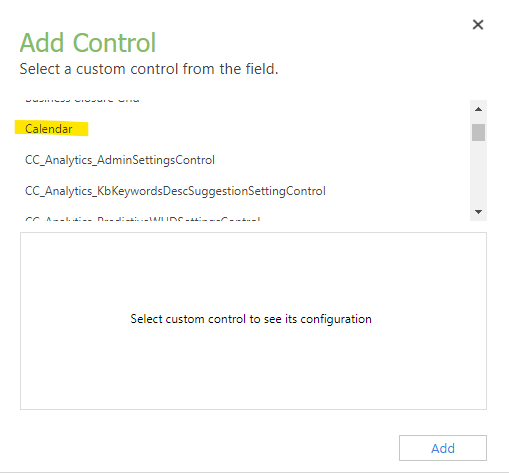
    How many calendar controls do you have in your environment?

    In my version of the environment, there is only one control left named Calendar:
    pastedimage1669020907939v2.png

    pastedimage1669020878272v1.png

Under review

Thank you for your reply! To ensure a great experience for everyone, your content is awaiting approval by our Community Managers. Please check back later.

Helpful resources

Quick Links

Responsible AI policies

As AI tools become more common, we’re introducing a Responsible AI Use…

Neeraj Kumar – Community Spotlight

We are honored to recognize Neeraj Kumar as our Community Spotlight honoree for…

Leaderboard > Microsoft Dynamics 365 | Integration, Dataverse, and general topics

#1
Martin Dráb Profile Picture

Martin Dráb 62 Most Valuable Professional

#2
#ManoVerse Profile Picture

#ManoVerse 57

#3
Pallavi Phade Profile Picture

Pallavi Phade 49

Last 30 days Overall leaderboard

Product updates

Dynamics 365 release plans