web
You’re offline. This is a read only version of the page.
close
Skip to main content

Announcements

No record found.

News and Announcements icon
Community site session details

Community site session details

Session Id :
Microsoft Dynamics CRM (Archived)

How to generate a pdf document with info from a record of a case with report?

(0) ShareShare
ReportReport
Posted on by 92

Hello everyone, I'm working on a scenario like this: a technician is working on a case and he needs to generate a pdf file with some info from some fields of the case form by "run report“.  I try to build a report with report wizard, but it comes out as a spreadsheet. Is there anyone who jumps into a similar scenario? Thanks.
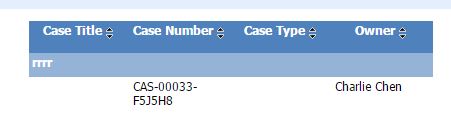
report1.JPG

But what I need  is just like generating an pdf invoice for an order.
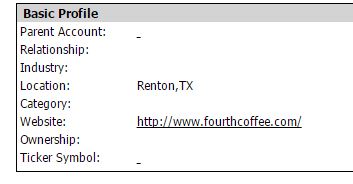
report2.JPG

*This post is locked for comments

I have the same question (0)
  • Suggested answer
    Community Member Profile Picture
    on at

    Hi there,

    when you run a report there is a icon that is called "Export" click there and then, "PDF  File"

    5518.Capturar.PNG

    My language is portuguese, but you can see there.

    if this Icon does not appear for you, you don't have the permission to export reports, search for it in the right access.

  • Charlie Chen Profile Picture
    92 on at

    Hello,

    I mean I need a report capturing several case details like a invoice layout rather than a spread sheet by run report.

    Thanks.

  • Suggested answer
    Mahadeo Matre Profile Picture
    17,021 on at

    Hi,

    To format report layout, you can download report .rdl file from report, and make changes in report format using visual studio.

    Here are some useful links for report development.

    www.codeproject.com/.../Creating-a-SSRS-Report-With-Microsoft-Dynamics-CRM

    www.magnetismsolutions.com/.../crm-report-wizard-the-foundation-for-custom-reports

  • Charlie Chen Profile Picture
    92 on at

    Hello,

    These are perfect approach to create a report. But I need the report for a case looks like a invoice layout rather than a table display all the fields horizontally.

    This what I got:

    Name    Age     Sex

    Nike        7         M

    This what I want:

    Name: Nike

    Age:7

    Sex:M

    Thanks.

  • Inogic Profile Picture
    760 on at

    Once you created report using report wizard, export rdl file for the report. Change the report layout and design as per requirement using visual studio (Visual Studio -> Report Properties -> Page Setup) and reimport the file in CRM.

    Thanks

Under review

Thank you for your reply! To ensure a great experience for everyone, your content is awaiting approval by our Community Managers. Please check back later.

Helpful resources

Quick Links

Introducing the 2026 Season 1 community Super Users

Congratulations to our 2026 Super Stars!

Meet the Microsoft Dynamics 365 Contact Center Champions

We are thrilled to have these Champions in our Community!

Congratulations to the March Top 10 Community Leaders

These are the community rock stars!

Leaderboard > 🔒一 Microsoft Dynamics CRM (Archived)

Last 30 days Overall leaderboard

Featured topics

Product updates

Dynamics 365 release plans
