web
You’re offline. This is a read only version of the page.
close
Skip to main content

Announcements

No record found.

News and Announcements icon
Community site session details

Community site session details

Session Id :
Supply chain | Supply Chain Management, Commerce
Suggested Answer

Security Roles for Excel Add-in

(0) ShareShare
ReportReport
Posted on by

Hello All

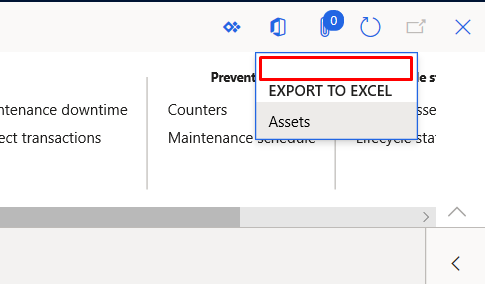
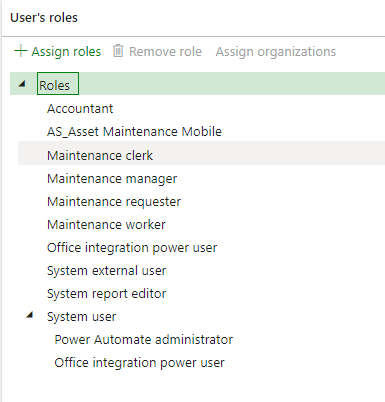
What security roles must be assigned in order to make a user able to use Excel add in?
At first I though that the Office Integration Power User would do the deed but that wasn't the case
pastedimage1590150736427v1.png

pastedimage1590150822005v2.png

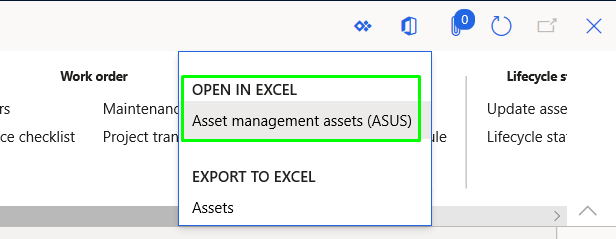
It looks like the only way to achieve this is by assign them the System Administrator role, but obviously i don't want anyone having full access
pastedimage1590150958755v3.png

Kind Regards

I have the same question (0)
  • Suggested answer
    SouravDam Profile Picture
    11,730 on at

    Hello Esteban Torres,

    Not sure but you can try with this privilege if this helps you restricting users to use excel add-ins in system - SystemExportToExcelLimited.

    pastedimage1590151422288v1.png

    You can add this privilege to the role in "Security configuration" form.

    After doing that, refresh the system URL in that user's machine and see if this works!

    Best regards.
    Sourav Dam

    Kindly mark this thread 'Yes' if this is answered your query which may help other community members in this forum.

  • Community Member Profile Picture
    on at

    Hi Sourav

    Reviewing the privilege that you mention I find that is part of the System External User role which is already assigned to the user I'm doing the test with and it doesn't work

    pastedimage1590152562493v1.png

    pastedimage1590152669980v2.png

    Best Regards

  • Suggested answer
    SouravDam Profile Picture
    11,730 on at

    Hello Esteban Torres,

    In your screen shot, I don't see what are the privileges set for "System external user" role.

    I just checked in my system and by default no such privilege is available for this role.

    2742.JPG

    Let's wait for other members to share their input on this.

    Best regards,
    Sourav Dam

    Kindly mark this thread 'Yes' if this is answered your query which may help other community members in this forum.

  • André Arnaud de Calavon Profile Picture
    303,730 Super User 2026 Season 1 on at

    Hi Esteban,

    The Open in Excel option itself is part of the system user role. To be able to use the entities itself, you need to provide access to the data entities involved using privileges. So, the users also needs to have permissions on the entity.

  • Suggested answer
    Rahul Mohta Profile Picture
    21,042 on at

    as others suggested, data entity security os key and could always give user access to the form by  using security diagnostics or security configuration tool or in Visual studio

  • Suggested answer
    Adrian Peter Profile Picture
    219 on at

    Hi 

    The Excel-Add-In is linked to this Privilege ...

    pastedimage1590420079997v1.png

    … which is OOTB included in Role 'System User' --> as this is a Basic role for each User, they should have this Privilege unless you customized this role.

    Further:

    Excel-AddIn respects data-access-permission as assigned to a user via roles --> if the user doesn't have Access to entities (which are the datasource for Excel-AddIn), then he won't see the Menuitem for this Entity.

    best regards,

    Adrian

  • Community Member Profile Picture
    on at

    Hi Adrian

    I've already looked into that privilege and it only allows users to export to excel, not to access the Excel Add In application and make changes to the information from there

    pastedimage1590423110030v1.png

    Best Regards

    pastedimage1590423127441v2.png

  • Suggested answer
    Rahul Mohta Profile Picture
    21,042 on at

    with system user, the user should be able to open in Excel and also when they have edit/modify privilege

    could you suggest and confirm the user privilege for the screen?

  • Suggested answer
    Azeemuddin Chisty Profile Picture
    83 on at

    I faced similar issue. if Privilege "Open in Microsoft Office" or "SystemExportToExcelLimited" is modified to restrict then both Open in excel and Export to excel will disapear.

    There is another way to hide the data entity for non administrative users is to select the "Hide entity" field on data entity list. but again it is not working as expected until 10.0.20 update.

    As a workaround i created a new privilege and added the form data entities manually as deny, with this user do not have access to open in excel but have access to export to excel.

Under review

Thank you for your reply! To ensure a great experience for everyone, your content is awaiting approval by our Community Managers. Please check back later.

Helpful resources

Quick Links

Introducing the 2026 Season 1 community Super Users

Congratulations to our 2026 Super Stars!

Meet the Microsoft Dynamics 365 Contact Center Champions

We are thrilled to have these Champions in our Community!

Congratulations to the March Top 10 Community Leaders

These are the community rock stars!

Leaderboard > Supply chain | Supply Chain Management, Commerce

#1
Mallesh Deshapaga Profile Picture

Mallesh Deshapaga 287

#2
Laurens vd Tang Profile Picture

Laurens vd Tang 212 Super User 2026 Season 1

#3
Syed Haris Shah Profile Picture

Syed Haris Shah 145 Super User 2026 Season 1

Last 30 days Overall leaderboard

Product updates

Dynamics 365 release plans
