




 Like
Like Share
Share
 Report
Want to count all records in all Dataverse tables like a boss? Say no mo.
- Make sure TDS endpoint is enabled using Manage feature settings.
- Connect to your Dataverse as described in Use SQL to query data (Microsoft Dataverse)
- We cannot use some of the features including loops (see How Dataverse SQL Differs from Transact-SQL) so let’s build that SQL:
SELECT
 CONCAT(
 'SELECT ''', name, ''' AS TableName,
 COUNT_BIG(1) AS CountOfRows FROM ',
 name,
 ' UNION')
FROM
	sys.tables
WHERE
	TYPE = 'U'
AND SCHEMA_ID = 1
- Copy all results (Ctrl-A), open New Query window (Ctrl-N), paste (Ctrl-V)
- Scroll to the end, remove the last word
UNIONand addORDER BY 2 DESCline - Execute
- You are welcome
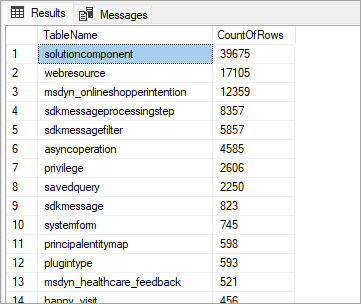
Note: the execution may timeout if your Dataverse is of any decent size. Use trial/error approach to figure out executable chunks – you probably know your largest tables anyway.
*This post is locked for comments