







Show child accounts on Bing Maps under Parent
 Mahendar Pal
 45,095
 Like
Like Share
Share
 Report
In this post we are going to demonstrate how we can add multiple pushpins in Bing Maps based on the latitude and longitude. First we need to make sure address1_latitude and address1_longitude should be added under account form and should be filled for all account records based on their address.
Requirement: Let’s say we have requirement to show all the child accounts (sub accounts) as pushpins on map under parent account and show their name, city when user will hover on pushpin.
Solution: We can simply develop an html web resource where we can use Bing Maps AJAX control to show pushpins for child account based on the latitude or longitude values. We can implement this in three steps:
• Get Bing Maps API
• Need to retrieve all child accounts for current account
• Add pushpins to Bing Maps based on latitude and longitude returned from child accounts
So Let’s follow below steps
• To get Bing Maps key, you can follow instruction here to get it.
• We can create a new solution or can do this customization in base solution, (If you are new to solution, please refer our earlier posts to create solution).
• Let’s first upload REST.SDK.js to your solution, we can use retrievemultiple method under this library to get child records and use below settings (Note: you can get this file under SampleCode\JS\RESTEndpoint\JavaScriptRESTAssociateDisassociate\JavaScriptRESTAssociateDisassociate\Scripts) under your CRM SDK folder, if you don’t have CRM SDK download and extract it first.
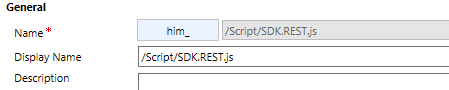 Note: We have used him prefix in our publisher it could be new for you if you are not using specific prefix.
• Create new HTML web resource and use below details.
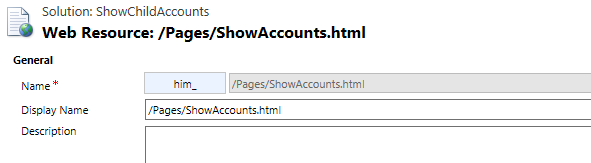
• Use below code for this html web resource
<html>

<head>
    <script src="../../ClientGlobalContext.js.aspx"></script>
    <script src="../Script/SDK.REST.js" type="text/javascript"></script>
    <title>Show Child Accounts</title>
    <meta http-equiv="Content-Type" content="text/html; charset=utf-8">
    <script src="http://ecn.dev.virtualearth.net/mapcontrol/mapcontrol.ashx?v=7.0" type="text/javascript"></script>
    <script type="text/javascript">
        var map = null;
        var messageBox = null;
        var lat = null;
        var lon = null;
        var City = null;
        var AccountName = null;
        var pushpin = null;

        var pushpinCollection = new Microsoft.Maps.EntityCollection();
        var messageBoxCollection = new Microsoft.Maps.EntityCollection();

        document.onreadystatechange = function() {
            if (document.readyState == "complete") {
                //initialise map
                getMap();
                //Get child account records
                getChildAccounts();
            }
        }

        function getChildAccounts() {
            //retrieve current entity id
            var parentaccountId = window.parent.Xrm.Page.data.entity.getId();
            var entitySchemaName = "Account";
            //get all child records based on parent customer id
            var odataQuery = "?$select=Name,Address1_City,Address1_Latitude,Address1_Longitude&" +
                "$filter=ParentAccountId/Id eq guid'" + parentaccountId + "'";

            if (typeof(SDK) != "undefined") {
                //The retrieveAccountsCallBack function is passed through as the successCallBack.
                SDK.REST.retrieveMultipleRecords(entitySchemaName, odataQuery, getnotesImagesCallback, function(error) {
                    alert(error.message);
                }, function() {});
            } else {
                alert("Not able to load REST.SDK library");
            }

        }
        //callback method
        function getnotesImagesCallback(resultSet) {

            //initialise message box
            messageBox = new Microsoft.Maps.Infobox(new Microsoft.Maps.Location(0, 0), {
                visible: false
            });
            messageBoxCollection.push(messageBox);

            //Show current account
            lat = window.parent.Xrm.Page.getAttribute("address1_latitude").getValue();
            lon = window.parent.Xrm.Page.getAttribute("address1_longitude").getValue();
            City = window.parent.Xrm.Page.getAttribute("address1_city").getValue();
            AccountName = window.parent.Xrm.Page.getAttribute("name").getValue();

            pushpin = new Microsoft.Maps.Pushpin(new Microsoft.Maps.Location(lat, lon));
            pushpin.Description = AccountName + ", " + City;
            //show message box on mouse move
            Microsoft.Maps.Events.addHandler(pushpin, 'mouseover', displaymessagebox);
            //remove message box on mouse lost
            Microsoft.Maps.Events.addHandler(pushpin, 'mouseout', hidemessagebox);
            pushpinCollection.push(pushpin);

            //add collection to map
            map.entities.push(pushpinCollection);
            map.entities.push(messageBoxCollection);

            if (resultSet.length > 0) {
                TotalImages = resultSet.length;
                for (i = 0; i < resultSet.length; i++) {
                    lat = resultSet[i].Address1_Latitude;
                    lon = resultSet[i].Address1_Longitude;
                    City = resultSet[i].Address1_City;
                    AccountName = resultSet[i].Name;

                    pushpin = new Microsoft.Maps.Pushpin(new Microsoft.Maps.Location(lat, lon));
                    pushpin.Description = AccountName + ", " + City;

                    //show message box on move move
                    Microsoft.Maps.Events.addHandler(pushpin, 'mouseover', displaymessagebox);
                    //remove message box on mouse lost
                    Microsoft.Maps.Events.addHandler(pushpin, 'mouseout', hidemessagebox);
                    pushpinCollection.push(pushpin);

                }
                //add collection to map
                map.entities.push(pushpinCollection);
                map.entities.push(messageBoxCollection);
            }

        }

        function displaymessagebox(e) {
            messageBox.setOptions({
                description: e.target.Description,
                visible: true,
                offset: new Microsoft.Maps.Point(0, 25)
            });
            messageBox.setLocation(e.target.getLocation());
        }

        function hidemessagebox(e) {
            messageBox.setOptions({
                visible: false
            });
        }

        function getMap() {
            map = new Microsoft.Maps.Map(document.getElementById('bingMaps'), {
                credentials: 'Your BingMaps key',
                center: new Microsoft.Maps.Location(41.956690, -103.137798),
                mapTypeId: Microsoft.Maps.MapTypeId.road,
                zoom: 10
            });
        }
    </script>
</head>

<body>
    <div id="bingMaps" style="width: 600px; height: 500px; position: relative;"></div>
</body>

</html>
• Save and publish your web resource and place this web resource to account form by navigating Insert ->Web Resource under form editor.
• Save and publish form and open any account record, if current account will have any child record it will show pushpins for child accounts otherwise it will just show current account record pushpin.
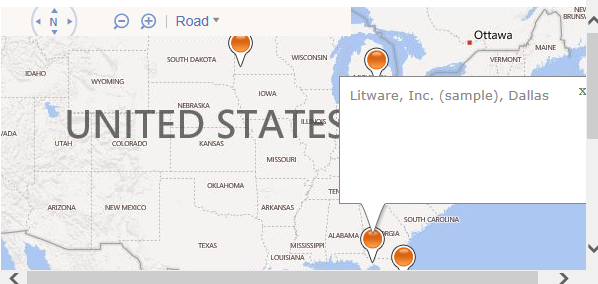
References: BingMaps SDK
HIMBAP | Need any help in Microsoft CRM Contact US !!
*This post is locked for comments