




 22,784
 Like
Like Share
Share
 Report
 This post is part of the New Functionality In Microsoft Dynamics 365 Business Central 2022 Wave 2 series in which I am taking a look at the new functionality introduced in Microsoft Dynamics 365 Business Central 2022 Wave 2.
The first of the new functionality in the Microsoft Power Platform section is personalize and design the Automate actions in the web client.
Giving users freedom and flexibility in designing and adjusting their workspace is essential for productivity in the cloud.
Enabled for: users, automatically
General Availability: October 2022
Actions added in the new Automate action group in the action bar now rely on personalization or designer, so that they can be moved, promoted, or hidden.
This applies to personalizing for a single user, customizing user profiles for user groups, or designing a global customization (page extension) for the whole company.
In addition, Power Automate-bound actions can be added to AL extensions (see the Development category for more).
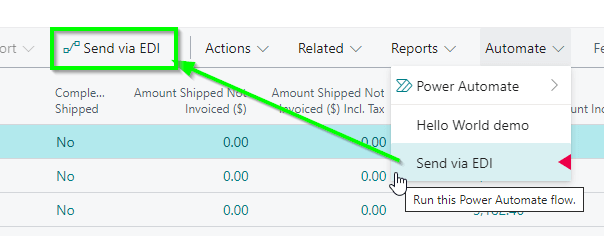
This way, actions created by citizen developers using Power Automate flows are prioritized on the action bar, allowing for easy no-code integration, and the new AL “customAction” is handled by the platform.
New Functionality In Microsoft Dynamics 365 Business Central 2022 Wave 2
Read original post New Functionality In Microsoft Dynamics 365 Business Central 2022 Wave 2: Personalize and Design the Automate Actions in the Web Client at azurecurve|Ramblings of an IT Professional
*This post is locked for comments