







Grouping in SSRS D365 reports

 958
958 Like
Like Share
Share
 Report
Grouping in SSRS D365 reports :
While implementing a FetchXml based SSRS report, there are basically two ways of grouping data:
Server-side: Grouping can be applied by using FetchXml aggregation. To add grouping to your existing FetchXml query, execute these steps:
- Inside your fetch query, set the aggregate attribute to true.
- Set the attribute to groupby to true. Many attributes are allowed for grouping.
- Set the attributes to aggregate to true. Many attributes are allowed for aggregation.
- Remove all other attributes from the query, which have neither grouping nor aggregation applied to create a valid query.
Example:
Next, enter your FetchXml query in your SSRS report's dataset and display the result in a Tablix format.
Client-side: Grouping can be applied during the report render process (actually on the SSRS server). In this case, keep your FetchXml without grouping clause and use Microsoft Visual Basic Expressions to aggregate data:
- Enter you FetchXml query (without grouping) in your SSRS report's dataset and add a Tablix control to your report.
- Find Row Groups and Column Groups.
- In order to add a column group, right-click the Column Group and select Group Properties...
- Select the Group expression (fx) and enter an expression.
Example:
=MonthName(Month(Fields!scheduledend.Value), true)
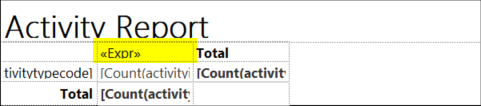
Conclusion: Using server-side grouping, your report will execute slightly faster, because there is less logic to be processed during report generation. On the other hand, with client-side grouping you get more options by using Microsoft Visual Basic Expressions to aggregate data.
Grouping in SSRS D365 reports
This was originally posted here.
*This post is locked for comments