







D365FO – HTTP Error 503. The service is unavailable
Views (579)

 Like
Like Share
Share
 Report
Introduction:
In this blog, we will see how to resolve HTTP Error 503 – The service is unavailable in Microsoft Dynamics 365 Finance and Operations

Details:
For
resolving these kinds of errors, we have 2 solutions as of now. One is to do
from the front end that is LCS and the second is to do from the back-end that
is from Visual Studio
From
LCS:
Reset the
IIS from the LCS. Steps:
1. Go to LCS, login
2. Select the respective project, full details

3.
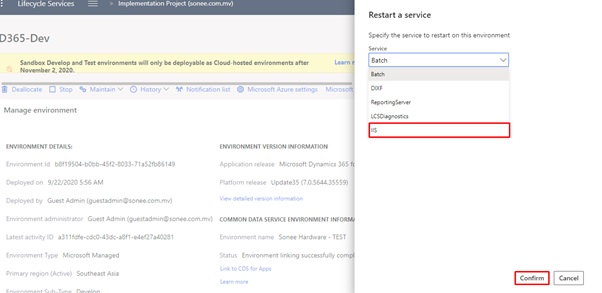
Go to Maintain -> Restart service

4.
Select IIS and confirm it
5.
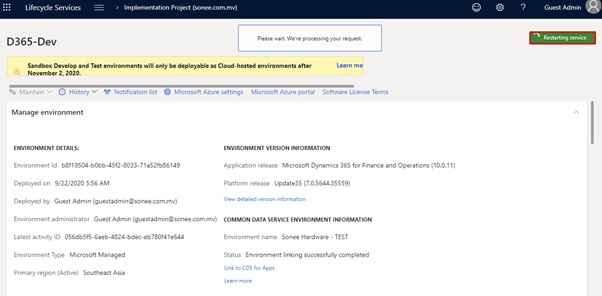
Wait till the service is being restarted
From Visual Studio:
From the
back-end, open the VM and follow the below steps:
1. Login to VM
2. Open the Visual Studio
3. Go to Dynamics 365 tab
4. Click on Restart IIS Express

That’s it. Build the project and go to the frontend and check the output how it looks like.
Thanks for reading and stay connected with us for more updates!!!
Jagdish Solanki | Senior Technical Consultant | CloudFronts
Business Empowering Solutions Team
“Solving Complex Business Challenges with Microsoft Dynamics 365 & Power Platform”
The post D365FO – HTTP Error 503. The service is unavailable appeared first on Cloudfronts - Microsoft Dynamics 365 | Power BI | Azure.
This was originally posted here.
*This post is locked for comments