




 14,151
 Like
Like Share
Share
 Report
 A few times recently I have been asked by users where to find the GP Power Tools Registration window.
I decided to write this post with “my tongue firmly in my cheek” as an overly helpful and fun guide to locate the Registration window in GP Power Tools
Below are some of the many ways to navigate to the GP Power Tools Registration window (pictured below), assuming the product is actually installed!

Note: You will want to be logged in as an Administrator user, such as ‘sa’ or equivalent to be able to make any changes to the Registration window.
1) Area Page
You can use the GP Power Tools Area Page, under routines.

2) Application Menus
Using the Application Menus: Microsoft Dynamics GP >> Tools >> Routines >> GP Power Tools >> GP Power Tools Registration.
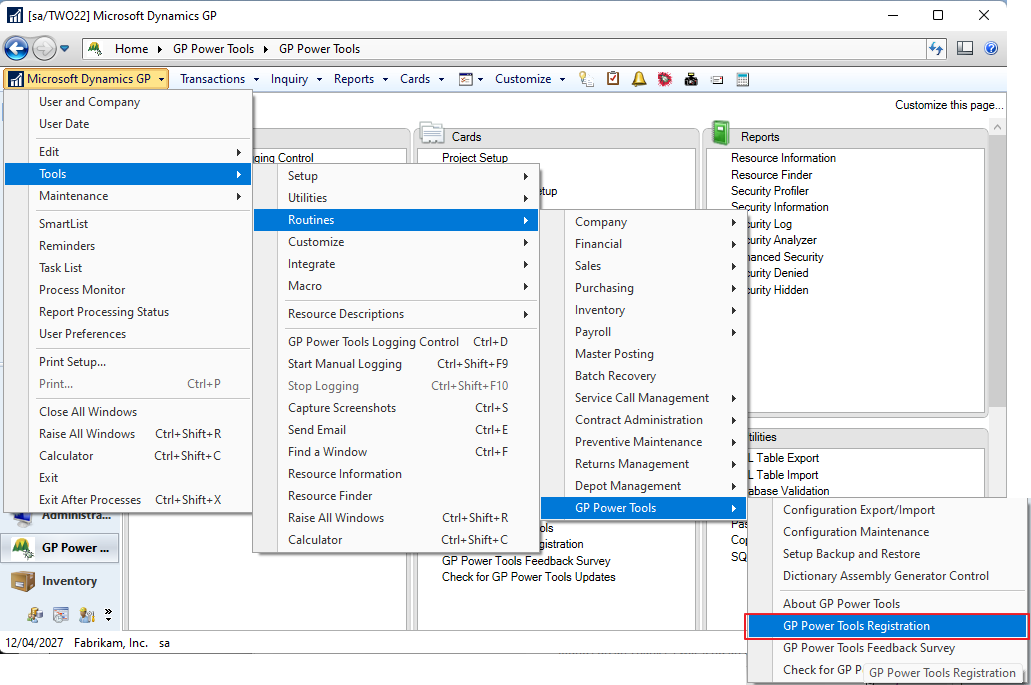
3) GP Power Tools Logging Control
Use the Tools menu on any window or Microsoft Dynamics GP >> Tools >> GP Power Tools Logging Control. Then click the Options button drop list or the form level GP Power Tools menu and select GP Power Tools Registration.

4) Find a Window
Press Ctrl-F or select Find a window from any Tools menu on any window or from the application menus (Microsoft Dynamics GP >> Tools >> Find a Window). Type Registration and press Tab. (This window is a hidden GP window, exposed by GP Power Tools).

5) About Microsoft Dynamics GP Window
Use the menus Help Button >> About Microsoft Dynamics GP, then select from the Additional menu >> About GP Power Tools and click the Registration Button.

6) Microsoft Dynamics GP Registration Window
Open the Microsoft Dynamics GP window using the Area Page (Administration >> Setup >> System >> Registration) or Menus (Microsoft Dynamics GP >> Tools >> Setup >> System >> Registration) and select GP Power Tools from the Additional Menu.

Note: If entering manual keys, make sure you select the line for each module that is registered and click the Expansion button so that you can enter both the Activation Key and the System Key for each module.
Good luck finding the window. 
David
This article was originally posted on http://www.winthropdc.com/blog.
*This post is locked for comments