







Weekly Dynamic: SOP Quick Print
Views (879)

 Like
Like Share
Share
 Report
Have you ever needed to pop out a quick invoice from Sales Order Processing to the printer? Use the Quick Print functionality in Dynamics GP. From the Sales Transaction Entry window select Options->Quick Print or pick CTRL+Q.
There's a setup for Quick Print also under the options menu to control how Quick Print works. So what are you waiting for? Get printing!
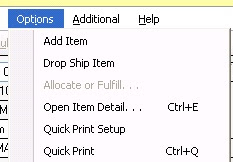

There's a setup for Quick Print also under the options menu to control how Quick Print works. So what are you waiting for? Get printing!


This was originally posted here.
*This post is locked for comments