




 35
35 Like
Like Share
Share
 Report
Hi Folks, Today i will explain how to Create Azure Blob Storage and Upload, Download files from Azure Blob Storage using C#.
Step 1: Create Azure Blob Storage
Open Portal.Azure.com.
Navigate to Storage Account.

Add new Storage Account by Clicking Add Button.

Navigate To Blob Service Section as shown below

Next Create Container for the Blob to Add files into the Container using Upload Button as shown below.


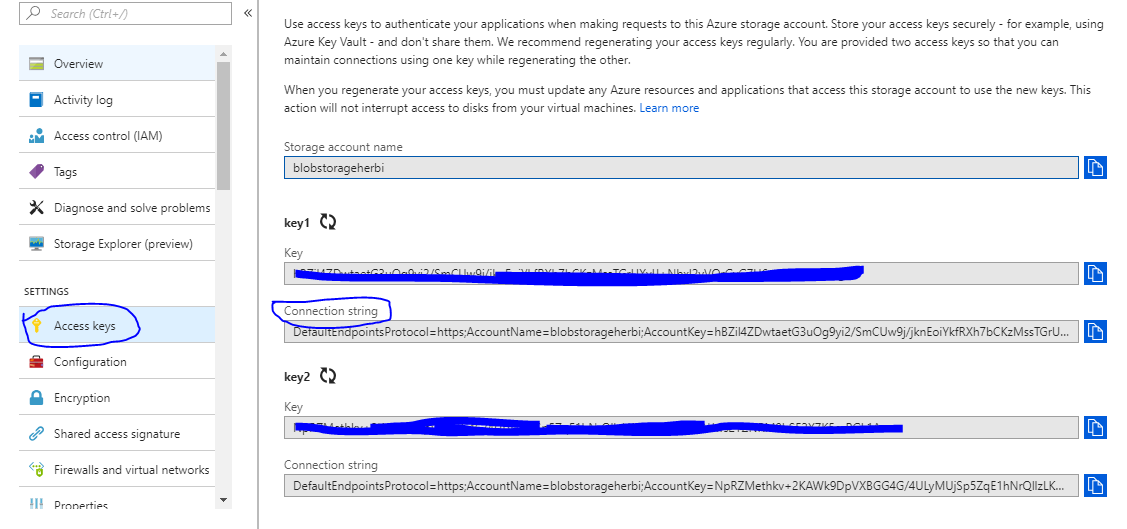
Navigate to Storage Account(Which you created) -> AccessKey , Copy Connectionstring which is used to connect Blob from C# Code.
Step 2: Upload File into Azure Blob using C#
Add the Required reference using Nuget
- using Microsoft.Azure;
- using Microsoft.WindowsAzure.Storage;
- using Microsoft.WindowsAzure.Storage.Blob;
Add the Azure Storage Account Connection String in App.config which i explained in previous Screenshot. Copy the below code and Reference the file which is to be uploaded . The code will work like charm.
string storageConnection = CloudConfigurationManager.GetSetting("BlobStorageConnectionString"); CloudStorageAccount cloudStorageAccount = CloudStorageAccount.Parse(storageConnection);

//create a block blob CloudBlobClient cloudBlobClient = cloudStorageAccount.CreateCloudBlobClient();

//create a container CloudBlobContainer cloudBlobContainer = cloudBlobClient.GetContainerReference("appcontainer");

//create a container if it is not already exists

if (await cloudBlobContainer.CreateIfNotExistsAsync()) {

await cloudBlobContainer.SetPermissionsAsync(new BlobContainerPermissions { PublicAccess = BlobContainerPublicAccessType.Blob });

}

string imageName = "Test-" + Path.GetExtension(imageToUpload.FileName);

//get Blob reference

CloudBlockBlob cloudBlockBlob = cloudBlobContainer.GetBlockBlobReference(imageName); cloudBlockBlob.Properties.ContentType = imageToUpload.ContentType;

await cloudBlockBlob.UploadFromStreamAsync(imageToUpload.InputStream);
Step 3: Download File from Azure Blob using C#
var containerName = "testcontainerherbi";

string storageConnection = CloudConfigurationManager.GetSetting("BlobStorageConnectionString"); CloudStorageAccount cloudStorageAccount = CloudStorageAccount.Parse(storageConnection); CloudBlobClient blobClient = cloudStorageAccount.CreateCloudBlobClient();


CloudBlobContainer cloudBlobContainer = blobClient.GetContainerReference(containerName); CloudBlockBlob blockBlob = cloudBlobContainer.GetBlockBlobReference("uploadedfilename.ext");


MemoryStream memStream = new MemoryStream();

blockBlob.DownloadToStream(memStream);

HttpContext.Current.Response.ContentType = blockBlob.Properties.ContentType.ToString(); HttpContext.Current.Response.AddHeader("Content-Disposition", "Attachment; filename=" + blockBlob.ToString());

HttpContext.Current.Response.AddHeader("Content-Length", blockBlob.Properties.Length.ToString()); HttpContext.Current.Response.BinaryWrite(memStream.ToArray()); HttpContext.Current.Response.Flush(); HttpContext.Current.Response.Close();
Hope It's Helpful. Eat-> Code->Sleep->Repeat.


*This post is locked for comments