




 220
220 Like
Like Share
Share
 Report
When your organization has a huge portion of its employees on the road with a corporate credit card, you most likely find it difficult, and at times impossible, to keep track of all of the expenses being racked up and enforcement of corporate spending policies. For a lot of companies that we speak with, this process is manual and labor-intensive. It usually involves receiving a statement at the end of the month and then trying your best to email employees in an attempt to determine which accounts these expenditures should be assigned to. Depending on your volume, this process can be unmanageable and cost prohibitive. We don’t want your AP department to stay buried in the mountains of credit card statements and validation of those expenses so DynamicPoint’s Office 365 Expense Management Solution, EasyEXP365, is here to help! Our application automates the full expense management and reimbursement funnel including the creation, review, and payment of employee expense reimbursement requests. And most importantly, it seamlessly integrates corporate credit transactions by employees into the expense management application for ease in coding.
Corporate credit card management is a built in feature of the EasyEXP365 product. The solution entails the following:
- Credit card transactions are daily fed into Office 365 using a live feed with your banking institution
- These transactions are assigned to employees based on the card issued to them
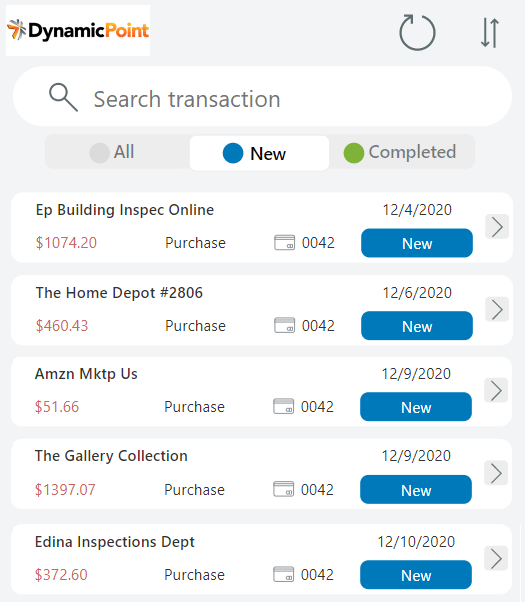
- From a mobile Power App or desktop experience, employees can assign these transactions to the appropriate job or expense type (GL account)
- Coded transactions are routed for workflow (using Power Automate) or directly integrated with your ERP system as a journal entry
- Transactions are easily reconciled with the monthly statement when it is received
The process looks something like this:

Here is a screenshot of the employee’s Power App in which they can easily review their transactions, upload supporting receipts and submit for approval or integration into your accounting system:
Here is a short video that shows exactly what that process looks like:
When the report is routed for approval the reviewing managers will be provided with a holistic view of an employee’s expenses, including credit card as well as out of pocket expenditures. When the report is approved and integrated with the ERP system these transactions can be created as a payable against the credit card provider or as a journal entry to a credit card clearing account.
DynamicPoint’s Office 365 Expense Management Solution helps your organization by providing the visibility you’re AP departments need to keep credit card expenses streamlined and accurate.
Interested in Learning More About EasyEXP365?
EasyEXP365 product page OR Sign up for a Live One-on-One Demo
The post Manage Corporate Credit Cards with Office 365 first appeared on DynamicPoint.
*This post is locked for comments