







Get Optionset Label using stringmap- Web API
Views (2241)
 Mahendar Pal
 45,095
 Like
Like Share
Share
 Report
Requirement: Get Optionset label based on optionset value using client side code.
Solution: We have different option to implement this requirement. Earlier we wrote a post to get option set label using formatted values, today we are going to discuss how we can use stringmap to get optionset label using Web API. Stringmap entity store details about optionsets, it has following attributes:
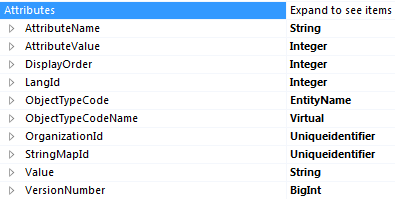
Based on above attributes, to get optionset label based on the value we need to use three following attributes:

We can use following WebAPI request by passing above parameters:
function GetOptionSetLable(entityname, attributename, attributevalue) {
    //prepare query options
    var query = "/api/data/v8.2/stringmaps?$filter=objecttypecode eq '" + entity + "' and  attributename eq '" + attributename + "' and attributevalue eq " + attributevalue;
    //setup webapi request
    var req = new XMLHttpRequest();
    req.open("GET", Xrm.Page.context.getClientUrl() + query, false);
    req.setRequestHeader("OData-MaxVersion", "4.0");
    req.setRequestHeader("OData-Version", "4.0");
    req.setRequestHeader("Accept", "application/json");
    req.setRequestHeader("Content-Type", "application/json; charset=utf-8");
    req.setRequestHeader("Prefer", "odata.include-annotations=\"*\"");
    req.onreadystatechange = function () {
        if (this.readyState === 4) {
            req.onreadystatechange = null;
            if (this.status === 200) {
                var results = JSON.parse(this.response);
                if (results != null && results.value.length > 0)
                    Xrm.Utility.alertDialog(results.value[0].value);

            } else {
                Xrm.Utility.alertDialog(this.statusText);
            }
        }
    };
    req.send();
}
Hope it will help someone !!
*This post is locked for comments