




 4,009
4,009 Like
Like Share
Share
 Report
Introduction:

When dealing with Number Series where the Intercompany Documents are created automatically using the code, using standard number series generation Codeunits cause problems. In this blog, I'll be explaining why this issue is caused and how to resolve such issues.
Pre-requisites:
- Microsoft Dynamics NAV / Business Central
- VS Code
- AL Language Extension
Solution:
- Issue:
Let's say I'm logged in as user of Company B. When I create Sales Order in current company, I need to create Purchase Order in target company say Company A.
When I use the Number Series declared on Company B's Purchase and Payable Setup for Purchase Order, the system either gives an error that Number Series does not exist or number generated is out of sync as Number Series are stored on Per Company basis. This results in overlapping of next PO number to be generated.
- Cause of the Issue:
NoSeriesManagement Codeunit 396 works only with the No. Series for the current company. Because of this if the No. Series with same code is present, the system generates No. Series which is completely different than that of the Company B. Also, there is no synchronization mechanism available out of the box to do the Intercompany No. Series sync.
Create the same Number Series in both the entities:
The Number Series is to be created in the primary company(Company A). The code mentioned below will automatically create the number series in the target company(Company B) from Company A.
Modifying the Number Series back to Company A from Company B:
Using this function, I modified the newly created number series back to the original company.
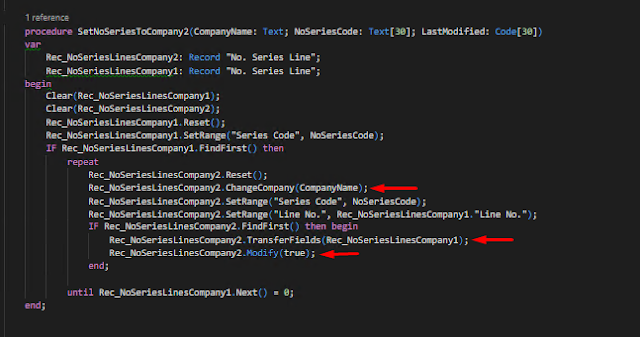
 |
| Code to automatically Insert No. Series |
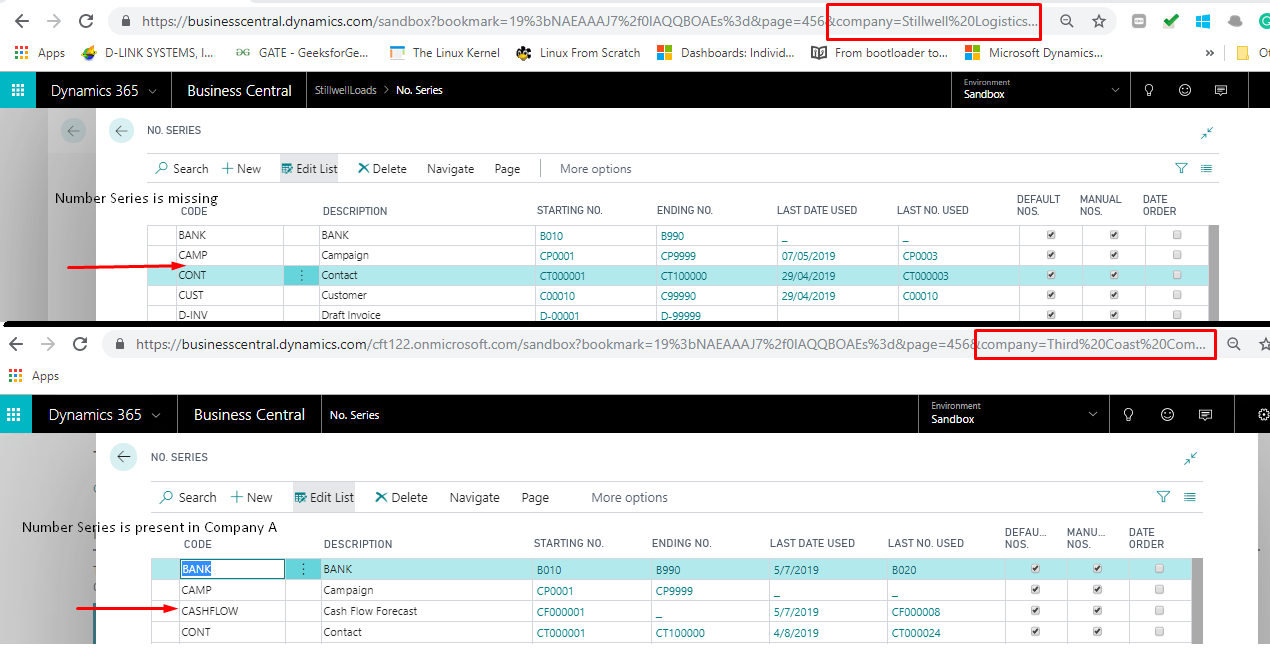 |
| Prior to Creating Number Series |
 |
| After the creation of Number Series |
Modifying the Number Series back to Company A from Company B:
Using this function, I modified the newly created number series back to the original company.
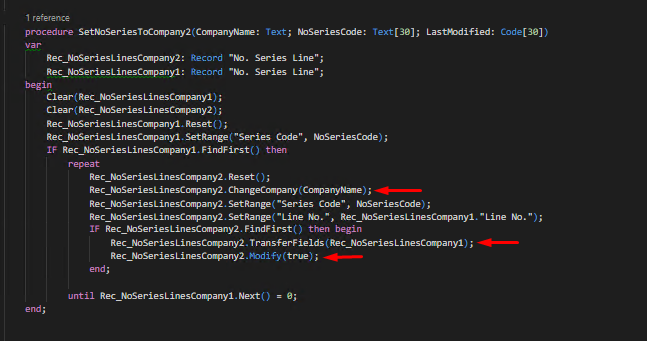
Declare the Number Series and CompanyName to be used in Setup:
In Company A, I've created Number Series in General Ledger Setup. Using this No. Series declared in Company A use this No. Series to create Purchase Order in the same company through Company B.
In Company A, I've created Number Series in General Ledger Setup. Using this No. Series declared in Company A use this No. Series to create Purchase Order in the same company through Company B.

Use ChangeCompany() to the target company(Company B) where you want to create the document. Modify the Number Series Line from Company B in Company A using a function.
Output:

 |
| Code to copy number series from Company A to Company B, generate the new number series and modify the number series back in Company A from Company B |
Output:

Conclusion:
In this way, we can generate a number series for one company from another company.
In this way, we can generate a number series for one company from another company.
*This post is locked for comments