




 26,225
 Like
Like Share
Share
 Report
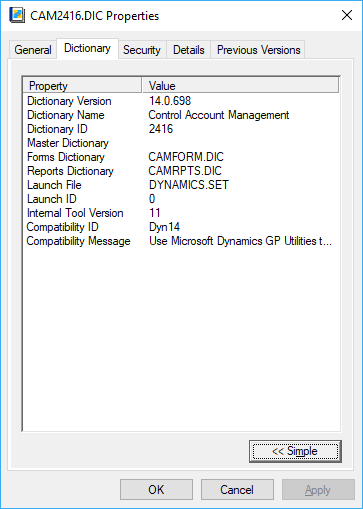 |
| Sample Dictionary properties tab |
Shortly after the publication of this article, I started seeing messages on the forums and discussion boards that the Dictionary tab was not available in certain environments, but I never really paid attention enough to find the reasons why.
Just recently I was checking the Microsoft Dynamics GP Community forum and stumbled upon someone who had ran into this problem in 2010, ensued by some answers asking to check a few registry entries. It wasn't until 2011 that forum user Nathan Hayden provided a complete answer to restore the Dictionary tab in the File Properties window, which I tested and found it to work like a charm.
So here's the solution:
1. Open the Windows Registry (regedit.exe).
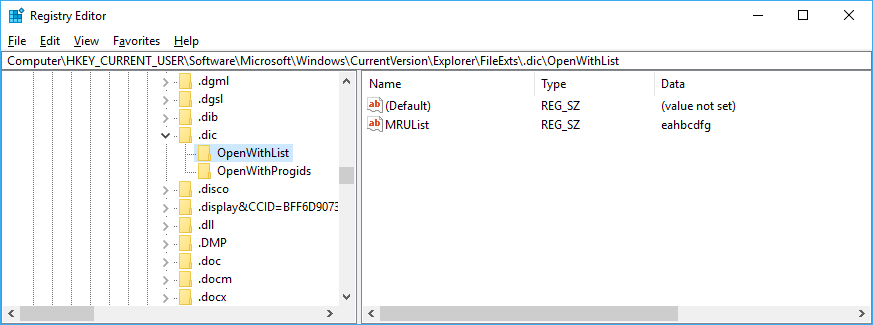
2. Under HKCU\Software\Microsoft\Windows\CurrentVersion\Explorer\FileExts\.DIC\OpenWithList, remove all entries, leaving just (Default) and MRUList.
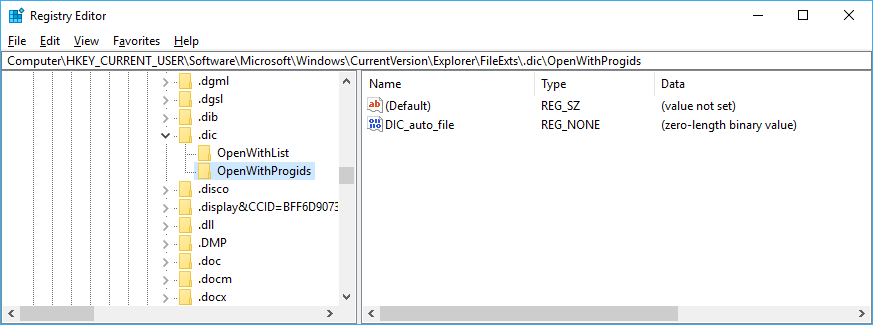
3. Under HKCU\Software\Microsoft\Windows\CurrentVersion\Explorer\FileExts\.DIC\OpenWithProgids, remove all entries, but (Default) and DIC_auto_file.
3. Finally, delete HKEY_CURRENT_USER\Software\Microsoft\Windows\CurrentVersion\Explorer\FileExts\.DIC\User Option, if it exists
NOTE: In Windows 10, the key is UserChoice
Disclaimer: Edit the Registry at your own risk. Inappropriate changes to Windows Registry can disable the operating system! Backup your Windows Registry prior to making any changes.
Until next post!
MG.-
Mariano Gomez, MVP


*This post is locked for comments