




 10,796
 Like
Like Share
Share
 Report
Every organization always keen to track of their resources and keep billable resource utilize. MS Dynamics AX 2012 comes with another marvellous feature for resource management on projects with more visibility and availability of resources.
Microsoft has done a great job in Project Account module by providing some remarkable features, one of them is resouce assignment on projects with more Transparency.
How it does. Let’s have a look on an example.
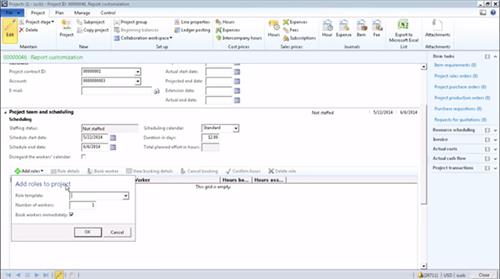
Now create the project team and secure the resources.
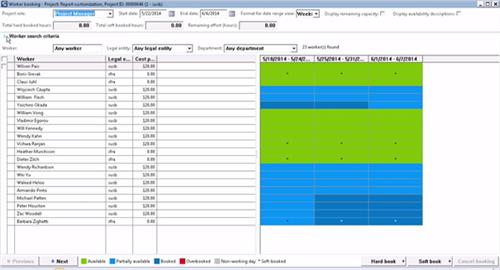
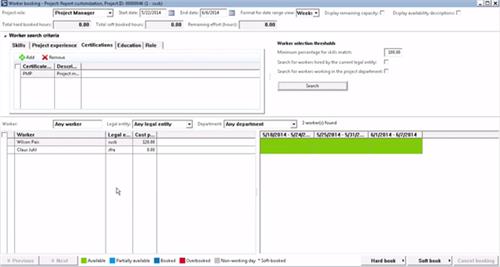
But what if someone wants the project manager to be specifically PMP certified? This can be check from Worker search criteria section by adding skills like PMP. Two resources match the requirement, and both of them are available as shown in green on right side.
I choose Wilson, and I choose to book all of his capacity to the project.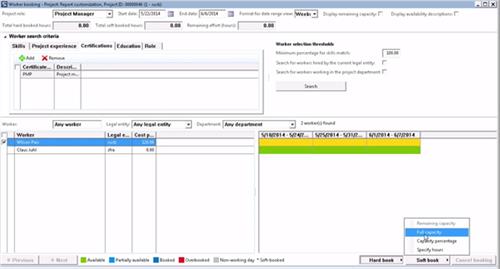
Close this screen and go back to previous screen. Wilson has been assigned as a project manager on this project, and the hours that we have booked for Wilson is about 96 hours because we selected the entire period of time.
I have the project manager secure, and now I will add more resources to the project.
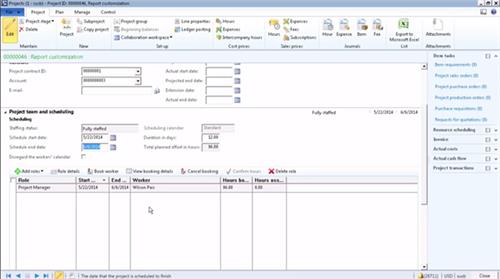
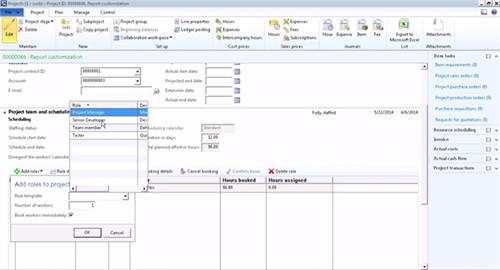
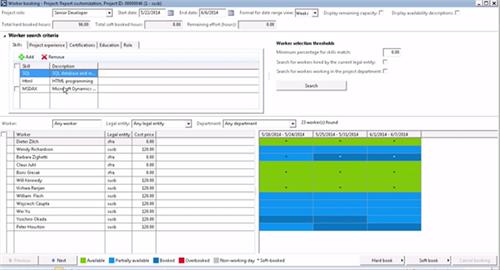
This time when I go back, you will see Dieter is now assigned to my project as well. I will add the final, or the last resource that I need, which is a tester on the project.
Let’s use William, and I book all of his capacity on the project. Okay, I have all three resources that I want secured on the project with 96 hours booked.
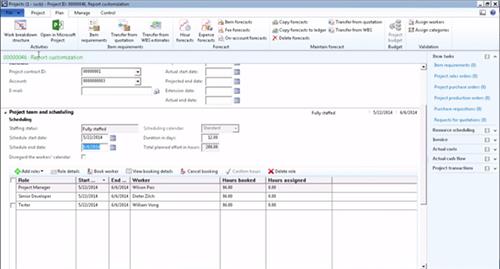
Pay attention on the hours booked. The hours booked are the hours booked against the project.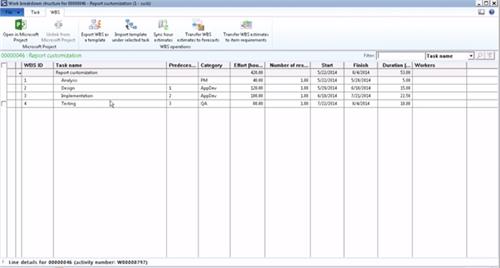
Microsoft has done a great job in Project Account module by providing some remarkable features, one of them is resouce assignment on projects with more Transparency.
How it does. Let’s have a look on an example.
- Open Microsoft Dynamics AX project management and accounting module
- Create a new project
- Select the type of the project
- The customer that I'm going to work with
- The start date, which is you choose based on the project timelines
Now create the project team and secure the resources.
- Click on Add roles button
- Choose a project manager
- Choose the number of project managers that we need
- Mark option based on your requirement “Book workers immediately” or just adds the requirements to the team and then book workers later. For this example I am going to resources right now.
But what if someone wants the project manager to be specifically PMP certified? This can be check from Worker search criteria section by adding skills like PMP. Two resources match the requirement, and both of them are available as shown in green on right side.
I choose Wilson, and I choose to book all of his capacity to the project.
Close this screen and go back to previous screen. Wilson has been assigned as a project manager on this project, and the hours that we have booked for Wilson is about 96 hours because we selected the entire period of time.
I have the project manager secure, and now I will add more resources to the project.
How to add more resources
I definitely need a senior developer to work on this project, which I try to find, and again system will try to match the qualifications expressed in the senior developer project role and come with a list of resources that can satisfy that requirement. I can see some resources are available. Obviously, I can see some resources that are not available.
How to Add more search criteria to be more specific
We can also add a specific qualification to be more precise in resource finding and assigning them on correct project. It seems that I have HTML, and I want Dynamics to be there. Although resource must know SQL because it's a reporting project and there will be a lot of custom reports.
This time when I go back, you will see Dieter is now assigned to my project as well. I will add the final, or the last resource that I need, which is a tester on the project.
Let’s use William, and I book all of his capacity on the project. Okay, I have all three resources that I want secured on the project with 96 hours booked.
Pay attention on the hours booked. The hours booked are the hours booked against the project.
All good with resource assignment. Now we have to execute on the project and for this we have to form a project plan and go to the detailed schedule. That's where I open up the work breakdown structure.
I imported an existing work breakdown structure template, reporting project, where it has a set of standard tasks in a template that you use to execute and deliver a reporting project. And you can also see that each task has efforts. Efforts are going to play a big role in our resources schedule because the capacity of the resources that you assign to these tasks are up to the capacity of the effort identified here.
Part II will cover how can we secure resouces on indiviual project's activity in work breakdown structure.
Part II will cover how can we secure resouces on indiviual project's activity in work breakdown structure.
*This post is locked for comments