




 Like
Like Share
Share
 Report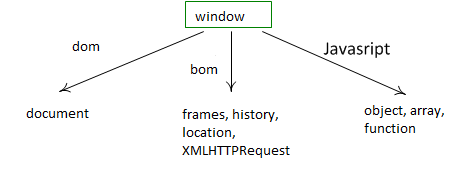
Browser Object Model (BOM) - BOM is a pack of objects that allow to control the browser, e.g change current URL, access frames, do background requests to server with XMLHttpRequest etc. Functions like alert,confirm,prompt also belong BOM, they are provided by the browser.
JavaScript Objects and functions - JavaScript itself is a language which gives us access to DOM, BOM and provides objects and functions of its own.
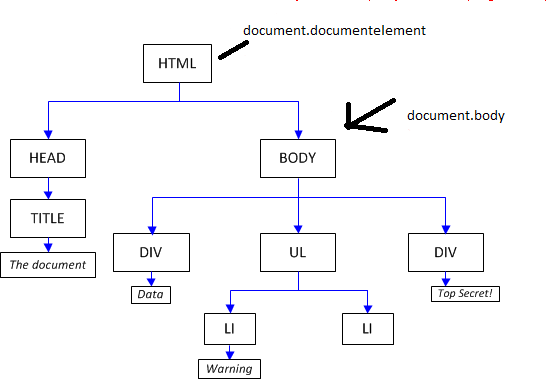
<!DOCTYPE HTML>
<html>
<head>
<title>the title</title>
</head>
<body>
<div>div data</div>
<ul>
<li>menu1</li>
<li></li>
</ul>
<div>div data2</div>
</body>
</html>
<html>
<head>
<title>the title</title>
</head>
<body>
<div>div data</div>
<ul>
<li>menu1</li>
<li></li>
</ul>
<div>div data2</div>
</body>
</html>
DocType is part of the HTML specification and it is an instruction to the web browser about what version of the markup language the page is written in.
Child elements
var childNodes = document.body.childNodes
for(var i=0; i<childNodes.length; i++) {
alert(childNodes[i])
}
document.body.childNodes[1] is DIV => [ojectHTMLDivElement]
for(var i=0; i<childNodes.length; i++) {
alert(childNodes[i])
}
document.body.childNodes[1] is DIV => [ojectHTMLDivElement]
children - contains all element nodes.
var children = document.body.children
for(var i=0; i<children .length; i++) {
alert(children [i])
}
for(var i=0; i<children .length; i++) {
alert(children [i])
}
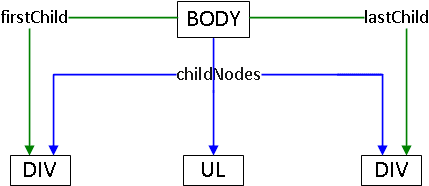 The firstChild and the lastChild
var body = document.body
alert(body.firstChild === body.childNodes[0])
alert(body.lastChild === body.childNodes[body.childNodes.length-1])
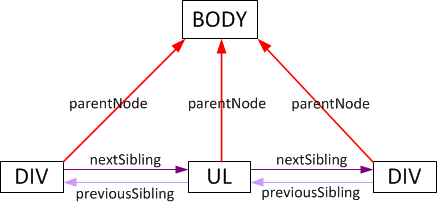
parentNode, previousSibling and nextSibling
A DOM node is an object with properties containing information about node itself and its contents. Some of the properties are read-only, and some can be updated on-the-fly.
nodeType - all nodes are typed
http://www.w3.org/TR/REC-DOM-Level-1/level-one-core.html#ID-1950641247
var childNodes = document.body.childNodes
for(var i=0; i<childNodes.length; i++) {
if (childNodes[i].nodeType != 1) continue
alert(childNodes[i])
}
nodeName, tagName - both are contain the name of an element node
alert( document.body.nodeName ) //BODY
alert(document.nodeName) // #document
innerHTML - content of an element node, writeable
alert( document.body.innerHTML )
nodeValue - content of a text node, writeable
<body>
The text
<!-- A comment -->
<script>
for(var i=0; i<document.body.childNodes.length; i++) {
alert(document.body.childNodes[i].nodeValue)
}
</script>
</body>
// The text, A comment,...
Propertiesfor(var i=0; i<childNodes.length; i++) {
if (childNodes[i].nodeType != 1) continue
alert(childNodes[i])
}
nodeName, tagName - both are contain the name of an element node
alert( document.body.nodeName ) //BODY
alert(document.nodeName) // #document
innerHTML - content of an element node, writeable
alert( document.body.innerHTML )
nodeValue - content of a text node, writeable
<body>
The text
<!-- A comment -->
<script>
for(var i=0; i<document.body.childNodes.length; i++) {
alert(document.body.childNodes[i].nodeValue)
}
</script>
</body>
// The text, A comment,...
document.body.myData = {
name: 'DNS'
}
alert(document.body.myData.name) // DNS
document.body.getName = function() {
alert(this.nodeName)
}
document.body.getName() // BODY
document.body.custom = 5
var list = []
for(var key in document.body) {
list.push(key)
}
alert(list.join('\n'))
name: 'DNS'
}
alert(document.body.myData.name) // DNS
document.body.getName = function() {
alert(this.nodeName)
}
document.body.getName() // BODY
document.body.custom = 5
var list = []
for(var key in document.body) {
list.push(key)
}
alert(list.join('\n'))
Attributes
elem.hasAttribute(name) - checks if the attribute exists
elem.getAttribute(name) - gets an attribute value
elem.setAttribute(name, value) - sets an attribute
elem.removeAttribute(name) - removes an attribute
<body>
<div about="Elephant" class="smiling"></div>
<script>
var div = document.body.children[0]
alert( div.getAttribute('ABOUT') ) // (1)
div.setAttribute('Test', 123) // (2)
alert( document.body.innerHTML ) // (3)
</script>
</body>
<script>
document.body.setAttribute('id','la-la-la')
alert(document.body.id) // la-la-la
</script>
<input type="checkbox" checked>
<script>
var input = document.body.children[0]
alert( input.checked ) // true
alert( input.getAttribute('checked') ) // empty string
</script>
<body>
<input type="text" value="markup">
<script>
var input = document.body.children[0]
input.setAttribute('value', 'new')
alert( input.value ) // 'new', input.value changed
</script>
</body>
<body>
<script>
document.body.setAttribute('class', 'big red bloom')
alert( document.body.className ) // big red bloom
</script>
</body>
<span style="color:blue" id="my">text</span>
<script>
var span = document.body.children[0]
alert( span.attributes['style'].value ) // "color:blue;"
alert( span.attributes['id'].value ) // "my"
</script>
elem.getAttribute(name) - gets an attribute value
elem.setAttribute(name, value) - sets an attribute
elem.removeAttribute(name) - removes an attribute
<body>
<div about="Elephant" class="smiling"></div>
<script>
var div = document.body.children[0]
alert( div.getAttribute('ABOUT') ) // (1)
div.setAttribute('Test', 123) // (2)
alert( document.body.innerHTML ) // (3)
</script>
</body>
<script>
document.body.setAttribute('id','la-la-la')
alert(document.body.id) // la-la-la
</script>
<input type="checkbox" checked>
<script>
var input = document.body.children[0]
alert( input.checked ) // true
alert( input.getAttribute('checked') ) // empty string
</script>
<body>
<input type="text" value="markup">
<script>
var input = document.body.children[0]
input.setAttribute('value', 'new')
alert( input.value ) // 'new', input.value changed
</script>
</body>
<body>
<script>
document.body.setAttribute('class', 'big red bloom')
alert( document.body.className ) // big red bloom
</script>
</body>
<span style="color:blue" id="my">text</span>
<script>
var span = document.body.children[0]
alert( span.attributes['style'].value ) // "color:blue;"
alert( span.attributes['id'].value ) // "my"
</script>
Methods
document.getElementById - A fastest way to obtain an element
<body>
<div id="info">Info</div>
<script>
var div = document.getElementById('info')
alert( div.innerHTML )
</script>
getElementsByTagName - searches all elements with given tagname and returns an array-like list of them<div id="info">Info</div>
<script>
var div = document.getElementById('info')
alert( div.innerHTML )
</script>
<script>
var elements = document.getElementsByTagName('input')
for(var i=0; i<elements.length; i++) {
var input = elements[i]
alert(input.value+': '+input.checked)
}
</script>
<ol id="people">
<li>John</li>
<li>Rodger</li>
<li>Hugo</li>
</ol>
<script>
var elem = document.getElementById('people')
var list = elem.getElementsByTagName('li')
alert(list[0].innerHTML)
</script>
document.getElementsByName - document.getElementsByName('age')
getElementsByClassName
<div class="a b c">Yep</div>
<script>
alert( document.getElementsByClassName('a')[0].innerHTML )
</script>
querySelector, querySelectorAllvar elements = document.getElementsByTagName('input')
for(var i=0; i<elements.length; i++) {
var input = elements[i]
alert(input.value+': '+input.checked)
}
</script>
<ol id="people">
<li>John</li>
<li>Rodger</li>
<li>Hugo</li>
</ol>
<script>
var elem = document.getElementById('people')
var list = elem.getElementsByTagName('li')
alert(list[0].innerHTML)
</script>
document.getElementsByName - document.getElementsByName('age')
getElementsByClassName
<div class="a b c">Yep</div>
<script>
alert( document.getElementsByClassName('a')[0].innerHTML )
</script>
<ul>
<li>The</li>
<li>Test</li>
</ul>
<ul>
<li>Is</li>
<li>Passed</li>
</ul>
<script>
var elements = document.querySelectorAll('UL > LI:last-child')
for(var i=0; i<elements.length; i++) {
alert(elements[i].innerHTML )
}
</script>
Creating elements<li>The</li>
<li>Test</li>
</ul>
<ul>
<li>Is</li>
<li>Passed</li>
</ul>
<script>
var elements = document.querySelectorAll('UL > LI:last-child')
for(var i=0; i<elements.length; i++) {
alert(elements[i].innerHTML )
}
</script>
var div = document.createElement('div')
var textElem = document.createTextNode('Test Doc')
<div>
Added
</div>
<script>
var div = document.body.children[0]
var span = document.createElement('span')
span.innerHTML = 'Test span'
div.appendChild(span) //Added Test span
div.insertBefore(span, div.firstChild) //Test span Added
</script>
Removing nodesvar textElem = document.createTextNode('Test Doc')
<div>
Added
</div>
<script>
var div = document.body.children[0]
var span = document.createElement('span')
span.innerHTML = 'Test span'
div.appendChild(span) //Added Test span
div.insertBefore(span, div.firstChild) //Test span Added
</script>
parentElem.removeChild(elem)
parentElem.replaceChild(elem, currentElem)
document.write methods outputs a string directly into page.parentElem.replaceChild(elem, currentElem)
table
<table>
<tr> <td>one</td> <td>two</td> </tr>
<tr> <td>three</td> <td>four</td> </tr>
</table>
<script>
var table = document.body.children[0]
alert(table.rows[0].cells[0].innerHTML) // "one"
</script>
form<tr> <td>one</td> <td>two</td> </tr>
<tr> <td>three</td> <td>four</td> </tr>
</table>
<script>
var table = document.body.children[0]
alert(table.rows[0].cells[0].innerHTML) // "one"
</script>
<body>
<form name="student">
<input name="name" value="test">
<input name="grade" value="2">
</form>
<script>
var form = document.forms.my // also document.forms[0]
var elem = form.elements.one // also form.elements[0]
alert(elem.value) // "name"
</script>
</body>
Select<form name="student">
<input name="name" value="test">
<input name="grade" value="2">
</form>
<script>
var form = document.forms.my // also document.forms[0]
var elem = form.elements.one // also form.elements[0]
alert(elem.value) // "name"
</script>
</body>
<form name="form">
<select name="color">
<option name="blue" value="blue">blue color</option>
<option name="green" value="green">greencolor</option>
</select>
</form>
<script>
var form = document.body.children[0]
alert(form.elements['color'].options[0].value) // blue
</script>
<script>
var form = document.forms.form
var select = form.elements.genre
var value = select.options[select.selectedIndex].value
</script>
<select name="color">
<option name="blue" value="blue">blue color</option>
<option name="green" value="green">greencolor</option>
</select>
</form>
<script>
var form = document.body.children[0]
alert(form.elements['color'].options[0].value) // blue
</script>
<script>
var form = document.forms.form
var select = form.elements.genre
var value = select.options[select.selectedIndex].value
</script>
*This post is locked for comments