

"Invalid Object Name ..SY01500" error after restoring GP 2013 company database in a different environment
Views (4267)
Just recently I was working with a partner to determine the root cause of an issue that stemmed from restoring a company database from a customer's production environment, to the partner's development environment.
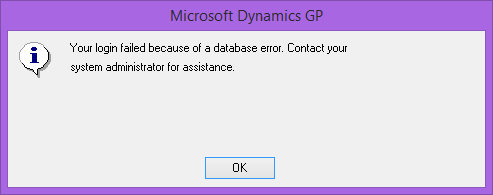
After restoring the database, we could see the following error messages attempting to access the database:
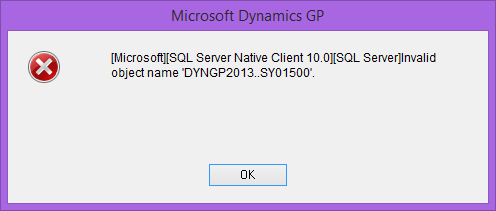
Enabling a DEXSQL.LOG gave us more insight into the issue. We could see the following prepared statement being executed prior to the ODBC error message:
/* Date: 05/18/2014 Time: 19:55:37
stmt(148745784):*/
BEGIN DECLARE @stored_proc_name char(34) DECLARE @retstat int DECLARE @param5 tinyint DECLARE @param6 smallint DECLARE @param7 tinyint DECLARE @param8 tinyint DECLARE @param9 tinyint DECLARE @param10 tinyint DECLARE @param11 tinyint DECLARE @param12 int set nocount on SELECT @param5 = 0 SELECT @stored_proc_name = 'ZBPI.dbo.smCleanupFilesBeforeLogin' EXEC @retstat = @stored_proc_name 5, 'sa', 'Company_Name', 0, @param5 OUT, @param6 OUT, @param7 OUT, @param8 OUT, @param9 OUT, @param10 OUT, @param11 OUT, @param12 OUT SELECT @retstat, @param5, @param6, @param7, @param8, @param9, @param10, @param11, @param12 set nocount on END
/*
/* Date: 05/18/2014 Time: 19:55:37
SQLSTATE:(S0002) Native Err:(208) stmt(148745784):*/
[Microsoft][SQL Server Native Client 10.0][SQL Server]Invalid object name 'DYNGP2013..SY01500'.*/
/*
The prepared statement calls the dbo.smCleanupFilesBeforeLoging stored procedure, which has (68) hardcoded references to the former system database in the old environment. A look at the SY00100 table, confirmed the backup had been taken from an environment with a different system database name.
We had to formulate a plan of attack to address the issue, so we decided for a two step approach which involves:
a) Updating the SY00100 table to reflect the current system database, and
b) Execute the Database Maintenance utility to rebuild all stored procedures and functions, triggers, and views for all products installed in the environment - more about Database Maintenance utility here. After all, they certainly would be other objects referencing the former system database.
This approach resolved the issue completely and the partner could now access the company database in their development environment without having to restore the customer's system database as well.
Until next post!
MG.-
Mariano Gomez, MVP
Intelligent Partnerships, LLC
http://www.intelligentpartnerships.com/

After restoring the database, we could see the following error messages attempting to access the database:
![]() |
| Invalid object name SY01500 error |

![]() |
| smCleanupFilesBeforeLogin stored procedure error |
![]() |
| Login failed error |
Enabling a DEXSQL.LOG gave us more insight into the issue. We could see the following prepared statement being executed prior to the ODBC error message:
/* Date: 05/18/2014 Time: 19:55:37
stmt(148745784):*/
BEGIN DECLARE @stored_proc_name char(34) DECLARE @retstat int DECLARE @param5 tinyint DECLARE @param6 smallint DECLARE @param7 tinyint DECLARE @param8 tinyint DECLARE @param9 tinyint DECLARE @param10 tinyint DECLARE @param11 tinyint DECLARE @param12 int set nocount on SELECT @param5 = 0 SELECT @stored_proc_name = 'ZBPI.dbo.smCleanupFilesBeforeLogin' EXEC @retstat = @stored_proc_name 5, 'sa', 'Company_Name', 0, @param5 OUT, @param6 OUT, @param7 OUT, @param8 OUT, @param9 OUT, @param10 OUT, @param11 OUT, @param12 OUT SELECT @retstat, @param5, @param6, @param7, @param8, @param9, @param10, @param11, @param12 set nocount on END
/*
/* Date: 05/18/2014 Time: 19:55:37
SQLSTATE:(S0002) Native Err:(208) stmt(148745784):*/
[Microsoft][SQL Server Native Client 10.0][SQL Server]Invalid object name 'DYNGP2013..SY01500'.*/
/*
The prepared statement calls the dbo.smCleanupFilesBeforeLoging stored procedure, which has (68) hardcoded references to the former system database in the old environment. A look at the SY00100 table, confirmed the backup had been taken from an environment with a different system database name.
We had to formulate a plan of attack to address the issue, so we decided for a two step approach which involves:
a) Updating the SY00100 table to reflect the current system database, and
b) Execute the Database Maintenance utility to rebuild all stored procedures and functions, triggers, and views for all products installed in the environment - more about Database Maintenance utility here. After all, they certainly would be other objects referencing the former system database.
This approach resolved the issue completely and the partner could now access the company database in their development environment without having to restore the customer's system database as well.
Until next post!
MG.-
Mariano Gomez, MVP
Intelligent Partnerships, LLC
http://www.intelligentpartnerships.com/
This was originally posted here.

Like
Report


*This post is locked for comments
