




 7,396
7,396 Like
Like Share
Share
 Report
Syndicated from - https://d365demystified.com/2019/02/19/get-sharepoint-document-location-link-on-field-on-create-in-d365/
I’ve been working on getting the SharePoint Document’s link to get back into D365 but looks like it can’t come back and get tagged to the record it was created from.
I tried to fire off a plugin on SharePoint Document record create, but in vain. Flow didn’t do justice since SharePoint Document entity doesn’t support Change Tracking.
So, I retrieved the Absolute URL of the “SharePoint Document Location” entity on it’s create itself so that I have the link once the record is created. And click that link to open the folder in SharePoint.
Workflow to wait and then fetch
So if you immediately make a call to retrieve the Absolute URL in the plugin code you’ve written on Create won’t work because Absolute URL gets created moments after the actual Location record is created unlike being passed in the execution context.
My approach is to fire the workflow on the create of the SharePoint Document Location record and Wait for 1 minute.

After 1 minute, set off the flag to call the plugin and fetch the Absolute URL as shown below –

Retrieve Absolute URL in Plugin
You can use RetrieveAbsoluteAndSiteCollectionUrlRequest message to retrieve the SiteCollection URL and the Absolute URL of the document folder of the record

Working
- When you open the Document sub-grid on the record for the first time, a Document Location record is created –

- The workflow designed above will run and fire off the plugin after 1 minute. The plugin will then make the message request go through to get you the Absolute URL as below –
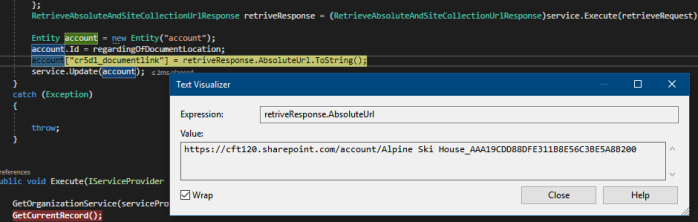
- And probably you can use that link to open up the folder by clicking on the field that has this URL or send it across in email to internal users (whatever suits your requirements)

- It will open up the SP folder for that record and will have all the documents you attach in the Document sub-grid on the record.

Hope this helps!
*This post is locked for comments