







Job to create vendor invoice (PO) through X++ code in D365
Views (2707)
 dasdasd
 841
841
 Like
Like Share
Share
 Report
A vendor invoice for a purchase order is an invoice that is attached to a purchase order. It contains a header and one or more lines for items or services. A vendor invoice finishes the purchase order, product receipt, and vendor invoice cycle.
In this blog I will discuss how to create purchase order invoice through X++ code in Microsoft Dynamics 365 finance & operation.
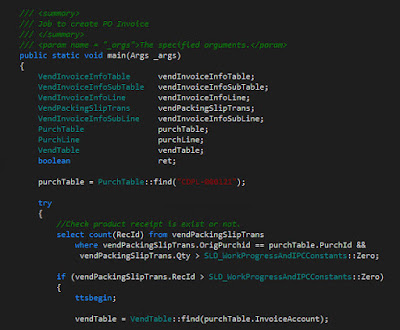
For this example I have created a job, please see source code screenshots below.
Source code explanation (1.1):
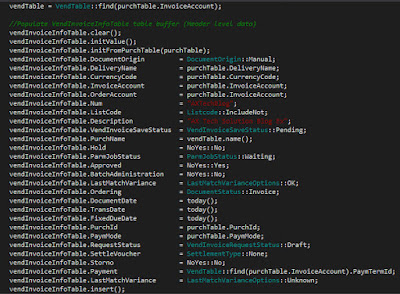
Source code explanation (1.2):
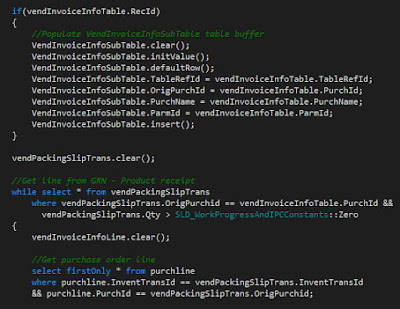
Source code explanation (1.3):
Source code explanation (1.4):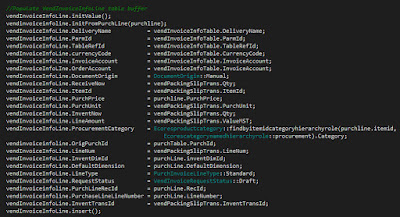
Source code explanation (1.5):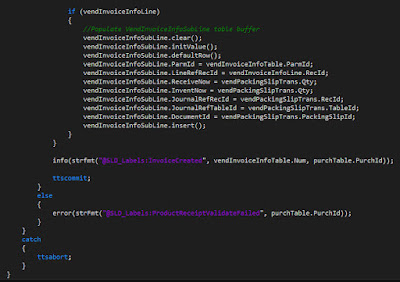
That is all you need to do, now build and run the job.

In this blog I will discuss how to create purchase order invoice through X++ code in Microsoft Dynamics 365 finance & operation.
For this example I have created a job, please see source code screenshots below.
Source code explanation (1.1):
- Initialize classes and tables buffers.
- Get purchase order through find method.
- Check Product receipt for the relevant purchase order exists.

Source code explanation (1.2):
- Populate data for insertions in Vendor invoice info table.
- Call insert method of table.

Source code explanation (1.3):
- Insert data in VendInvoiceInfoSubTable .
- Get product receipt lines for iteration, and populate invoice lines accordingly.

Source code explanation (1.4):
- Insert data in vendor invoice info lines.
- Call insert method of table.

Source code explanation (1.5):
- Insert data in VendInvoiceInfoSubLine table.
- Call insert method of the table.
- Info message for success.

That is all you need to do, now build and run the job.
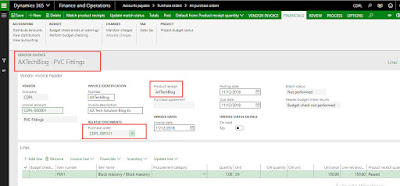
Result


This was originally posted here.
*This post is locked for comments