







Sample HttpModule for CRM 2013 on premise.
Views (404)
 Nishant Rana
 11,325
Microsoft Employee
11,325
Microsoft Employee
 Like
Like Share
Share
 Report
Suppose we have to redirect user belonging to a specific group to some specific page, while they try to access CRM 2013.
For this we can implement an HttpModule
Sample code
public class Class1 : IHttpModule
{
public void Dispose()
{

}
public delegate void MyEventHandler(Object s, EventArgs e);
private MyEventHandler _eventHandler = null;

public event MyEventHandler MyEvent
{
add { _eventHandler += value; }
remove { _eventHandler -= value; }
}
public void Init(HttpApplication context)
{
context.AuthenticateRequest += new EventHandler(ContextOnAuthenticateRequest);
}

private void ContextOnAuthenticateRequest(object sender, EventArgs eventArgs)
{
HttpApplication app = sender as HttpApplication;
HttpContext context = app.Context;

// if the user belongs to adminsitrators role or reporting group
// redirect the user to bing.com
if (context.User.IsInRole(@"BUILTIN\Administrators") &&
context.User.IsInRole(@"LSS\ReportingGroup {0993772e-cfb6-47ba-8b88-2129bfc97f89}"))
{
app.Context.Response.Redirect("http://www.bing.com");
}

if (_eventHandler != null)
_eventHandler(this, null);
}
}
Put the dll in the bin of the CRMWeb
..\Microsoft Dynamics CRM\CRMWeb\bin
And register the http module in the web.config
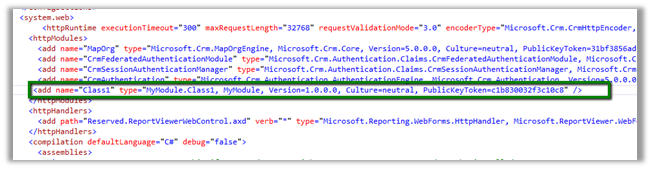
(use sn –T MyModule.dll to get the public key token)
Moreover this can be implemented using URLRewrite as it runs before the authentication so we wont be able to get the username
http://www.iis.net/downloads/microsoft/url-rewrite
Hope it helps
Filed under: CRM, CRM 2011, CRM 2013, Microsoft Dynamics CRM Tagged: CRM, CRM 2011, CRM 2013, Microsoft Dynamics CRM


This was originally posted here.
*This post is locked for comments