




 Like
Like Share
Share
 Report
Project Managers often struggle to manage the project plan, keep the Gantt Chart updated. As there are many activities under the PM’s umbrella to ensure the project delivery goes out smooth and successful.
CloudFronts – PM App helps you to keep your project plan updated. Now, you will ask how does that happen?
Following is what we do:
1. We create the Gantt Chart, in which we:
- List down the Activities
- Assign duration
- Assign Billing Code
- Assign Resources
- Assign Predecessor’s to the Activities: This is an important activity.
What happens when a predecessor is assigned to the task is, that task goes in inactive State.
Unless the previous task is marked complete, the dependent task doesn’t turn active.
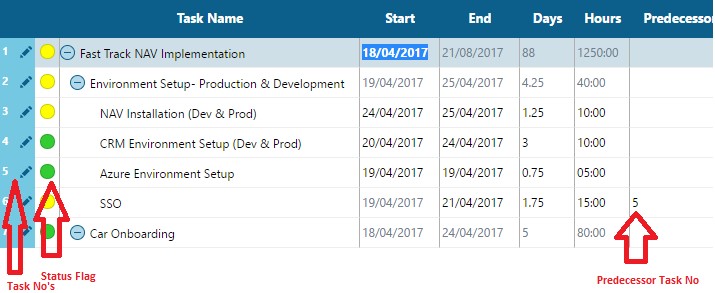
Now, it is Project Manager’s responsibility to ensure that there is 100% time entry done for that task. This will tell you that the task is actually complete. PM-App also provides you this information.
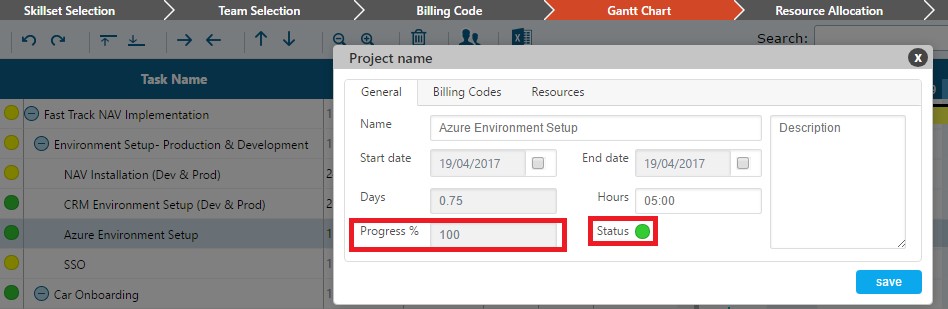
Once you double click the task, you see a Progress Field over that. If that is marked as 100%, means the time entry for the task is done by the developer completely. Now the project manager can safely mark the task as complete which is green in colour, so the dependent task becomes Active.
Tip: A well-managed Gantt chart provides a lot of benefit to all the stakeholders, so always keep it updated.
The post How does “CloudFronts – PM App” help you keep your project plan updated regularly? appeared first on CloudFronts - Microsoft Dynamics 365 | Power BI | Azure.
*This post is locked for comments