







AX 2012 License generator UI
 Shashi s
 1,203
1,203
 Like
Like Share
Share
 Report
So i had created a UI for the license generator.
To create a license in 2012 this was the command:
axutil genlicense /file:c:\licenses\MyLicense.txt /certificatepath:c:\certificates\MyCertificate.pfx /licenseCode:MyModule /customer:MyCustomer /serialnumber:1231232123 /password:MySecretPassword123 /expirationdate:12/30/2018 /usercount:5
However, having the password and certificate path information available wasnt exactly a good idea at that time (and probably is still relevant. Why would you want to distribute those two together no?)
So came the the License generator, with the password hard coded and everything else seemingly invisible to the person punching the licenses without having someone with knowledge of the axutil and more importantly
What is this black box ? and why cant I just click somewhere
Moving forward a few years later and opening up the code out, (yes the password has been taken out of the code). Its now stored as well, although not very secure, but enough to keep prying eyes out for a bit. (this means rooms for improvement)
The code is published at GitHub under AxLicenseGenerator (See the readme in that link)
Or you can Download Ax License Generator 1.1
There is lots more information there, or message me if you need more information.
Happy Licensing
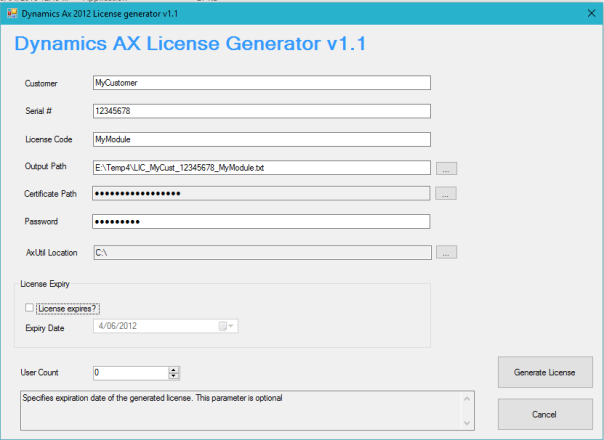 License Generator v 1.1
Filed under: .Net, Ax 2012, Dynamics Ax


This was originally posted here.
*This post is locked for comments