




 34,477
 Like
Like Share
Share
 Report
There is an interesting limitation of the business rules for which there seem to be no other workaround but to use javascript. Imagine the following situation:
- There is a user who has read-only access to the account record through the security roles
- There is a business rule that unlocks a field on the account form
In theory, since the user has read-only access, when such a user opens that record in Dynamics, all the controls on the form should be read-only no matter what.
That’s not the case in Dynamics 365 (V9), though, and, it seems, has not been the case in the earlier versions. You can see it on the screenshot below:
- The form is readonly
- But I can still select a value into the Parent Account field
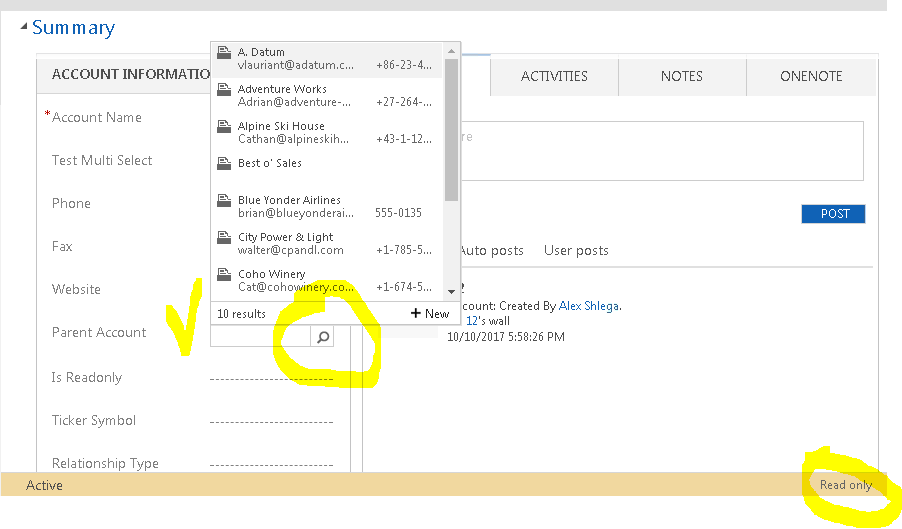
And the only reason it’s happening is because I have the following business rule:
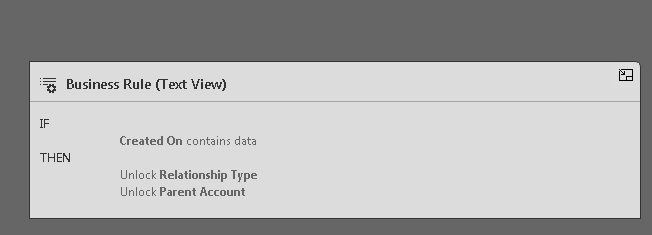
In other words, where we might think that security-based settings will have precedence over the business rules, it’s, actually, not the case.
But what happens if I select a value into that field? Well, not a lot – yes, I can select a value. But no, I cannot save the record. There is no “save” button anywhere. However, if I try to navigate from that screen after that, I will get this warning message:

And, then, if I click “Cancel”, I’ll get “Access Denied”. Which is expected, of course, so, in terms of data consistency, there is nothing to worry about. It seems to be purely a user-interface issue.
As a workaround, we can always fall back to javascripts (where we can use getFormType to add required conditions), though that’s not, always, a good solution if you are trying to avoid code-based customizations.
Anyway, if this is something you’d want to see fixed/added to Dynamics, go ahead and upvote the idea:
https://ideas.dynamics.com/ideas/dynamics-crm/ID0002996
Happy 365-ing!
*This post is locked for comments