







Error Handling in Canvas PowerApps with DataVerse Environment using IfError
 Ram Prakash Duraisamy
 2,287
2,287
 Like
Like Share
Share
 Report
Introduction:
In this Blog we will see how to Handle error in Canvas PowerApps with DataVerse Environment using IfError
Implementation Steps:
Consider a Scenario, we are having 2 tables one is with Account and another with Opportunity
How to Implement Restrict in Dataverse Environment. : https://microsoftcrmtechie.blogspot.com/2022/01/restrict-record-deletion-if-child.html
While Deleting Account if any Opportunity Contains Data then we need to Restrict in PowerApps.
This Restriction will work Perfectly in Dataverse
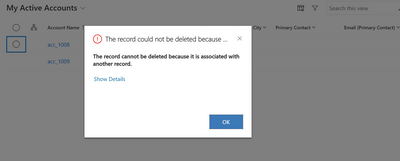
In PowerApps Canvas if you tried to delete the system won't throw Error, lets see how to handle that
Open Canvas App then Click File then settings
Click Upcoming Features and Toggle On --> Formula-level Error Management

Now Write below code in Delete Button
IfError(Remove([@Accounts], BrowseGallery1.Selected),Notify("Record Contains Child Record"),Notify("Deletion Success"))
Thats it  This will throw error if any error occurs
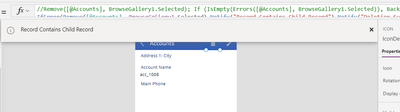
This was originally posted here.
*This post is locked for comments