




 3,569
3,569 Like
Like Share
Share
 Report
In this post, we will see how to display a Confirm Dialog in Dynamics 365 using JavaScript and what are the different properties that can be set.
The confirm dialog will be used to display a confirmation dialog containing a message and two button. This dialog will have the below different options
The below code is a sample on how to use the function openConfirmDialog and display a Confirm Dialog
function displayConfirmDialog(context) {
var formContext = context.getFormContext();
var dialogText = {
confirmButtonLabel: "Confirm button label",
cancelButtonLabel: "Cancel button Label",
title: "This is a Confirm dialog title",
subtitle: "This is a dialog subtitle",
text: "This is a Confirm dialog text message!"
};
var dialogOptions = { height: 200, width: 450 };
Xrm.Navigation.openConfirmDialog(dialogText, dialogOptions).then(
function (success) {
if (success.confirmed)
// Do something here
else
// Do something else here
},
function (error) {
console.log(error.message);
});
}
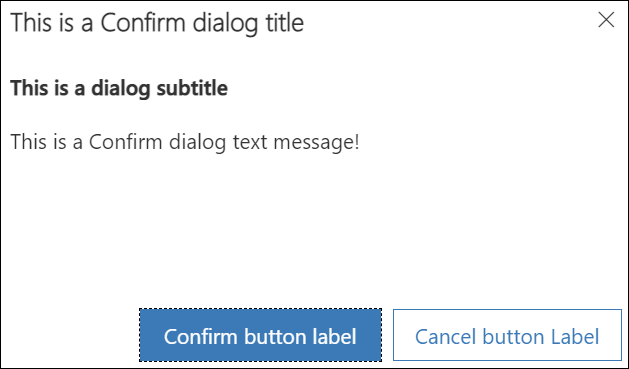
- confirmStrings
Contains the different dialog display properties:- confirmButtonLabel
Contains the value that will be displayed for the confirm button in the confirmation dialog. By default it is set to Ok. - cancelButtonLabel
Contains the value that will be displayed for the cancel button. By default it is set to Cancel. - title
Contains the value of the Title that will be displayed in the confirmation dialog - subtitle
Contains the value of the Subtitle that will be displayed in the confirmation dialog - text
Contains the value of the message that will be displayed in the confirmation dialog
- confirmButtonLabel
- confirmOptions
Contains the pixels values for the width and height options of the confirmation dialog - successCallback
This function will be called when the confirm button, cancel button, or X button of the dialog is clicked. An attribute named confirmed (Boolean) is passed that indicates whether the confirm button was clicked or not. - errorCallback
This function will be called if the operation fails
The below code is a sample on how to use the function openConfirmDialog and display a Confirm Dialog
function displayConfirmDialog(context) {
var formContext = context.getFormContext();
var dialogText = {
confirmButtonLabel: "Confirm button label",
cancelButtonLabel: "Cancel button Label",
title: "This is a Confirm dialog title",
subtitle: "This is a dialog subtitle",
text: "This is a Confirm dialog text message!"
};
var dialogOptions = { height: 200, width: 450 };
Xrm.Navigation.openConfirmDialog(dialogText, dialogOptions).then(
function (success) {
if (success.confirmed)
// Do something here
else
// Do something else here
},
function (error) {
console.log(error.message);
});
}
Hope This Helps!
*This post is locked for comments