




 3,569
3,569 Like
Like Share
Share
 Report
 In UCI, a lot of behaviors have been changed comparing to the Classic Web Interface such as the tabs, BPF, and many others.
Today, I will be talking about one of these behaviors which is the Recent Records in lookup fields.
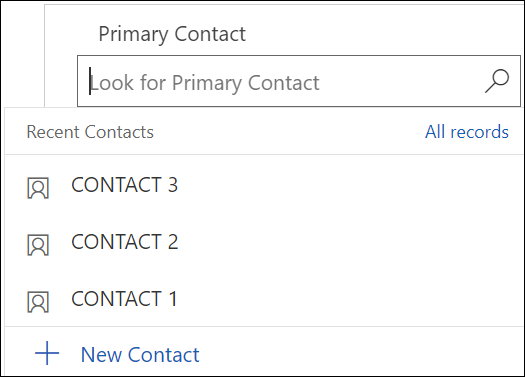
In a brief summary, the Recent Records feature will suggest the latest records that have been searched for, where the user can select one of them, and, the list of available records of the current view will then be displayed.
This is a nice-to-have feature since it might help the users to speed up data entry. However, if the lookup has been filtered to display specific records, the Recent Records will not respect this filter and will keep showing records even is they should not. This scenario can lead to selecting a record by the user that is not allowed to be selected.
Therefore, in this situation, it is better to hide the Recent Records to avoid any problem that might occur due to this conflict. And here, we will learn how to hide the Recent Record in a lookup field.
The below steps, will show you how to change the field behavior settings in order to hide the Recent Records
- Go to your Power Apps maker and open the solution you are working on
- In the solution, go to the entity and open the form where the lookup exists
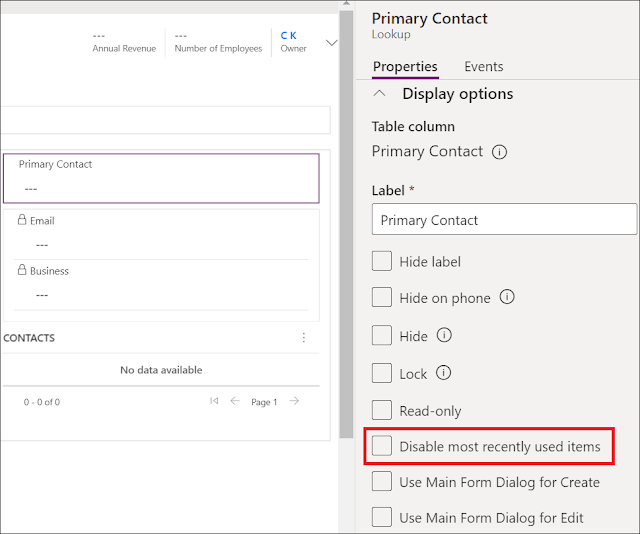
- Click on the lookup field, the Properties pane will appear where you can see the property Disable most recently used items is by default unchecked
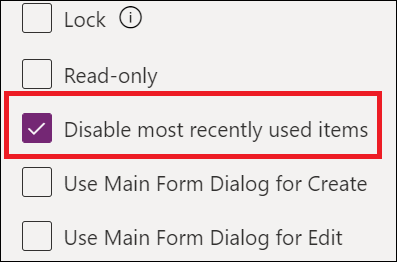
- In order to hide the Recent Records, check this property, save and publish
- Open a record and click in the lookup field, the Recent Records are now hidden
- If using the Classic Interface to hide this feature, you can double click the field and tick the appropriate checkbox


Hope This Helps!
*This post is locked for comments