web
You’re offline. This is a read only version of the page.
close
Skip to main content

Notifications

Announcements

No record found.

Community site session details

Community site session details

Session Id :

In Microsoft Dynamics 365 Business Central (Administration), how do I… Understand Search

Ian Grieve Profile Picture Ian Grieve 22,784
Microsoft Dynamics 365 Business CentralThis post is part of the In Microsoft Dynamics 365 Business Central (Administration), how do I… series and of the wider In Microsoft Dynamics 365 Business Central, how do I… series which I am posting as I familiarise myself with Microsoft Dynamics 365 Business Central.

I am very much used to navigating through applications using menus, whether they be flat or drop down menus. While it is possible to do this with Dynamics BC, it is by no means quick or efficient to do so. You may have noticed in articles I’ve posted so far, but I have always been using search using the Tell me what you want to do search function to find pages.

This is because this is the quickest and most efficient way of finding and navigating to the page you want. If I wanted to find a Warehouse page, but don’t recall the exact name, I can click the Tell me what you want to do and type warehouse and the search will return relevant entries broken into sections:
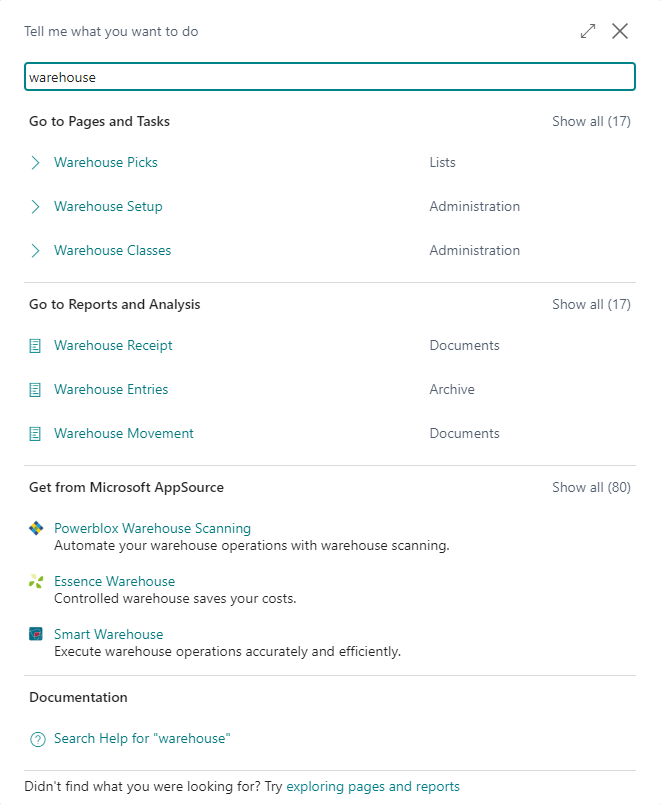
Search results for warehouse

If there are more than three returned results in each of the sections then there is a link to Show all which expands that section and shrinks the rest.

When you search, you don’t actually need to type full words into the search; if I wanted the Warehouse Put-aways list, I can simply type war put and it will find the window I want:
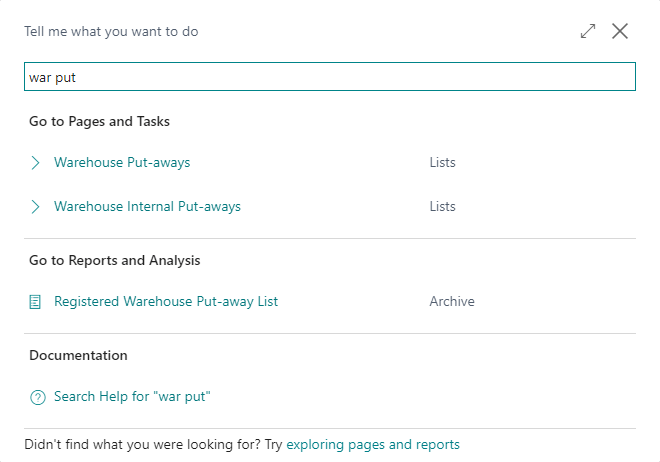
Search results for war put

When the search results are displayed, you can either click the link using the mouse or use the up/down cursor keys to scroll and find the item you want and hit return to select it; if when you search the required page is top of the list, you can simply hit return and it will open that page.

In Microsoft Dynamics 365 Business Central, how do I…

In Microsoft Dynamics 365 Business Central, how do I…
In Microsoft Dynamics 365 Business Central, how do I… Sign Up For a Trial
In Microsoft Dynamics 365 Business Central, how do I… Get Access to the Microsoft 365 Admin Center
In Microsoft Dynamics 365 Business Central, how do I… Create a Company
In Microsoft Dynamics 365 Business Central, how do I… Copy a Company
In Microsoft Dynamics 365 Business Central, how do I… Switch Between Companies
In Microsoft Dynamics 365 Business Central, how do I… Create a Sandbox Environment With Cronus
In Microsoft Dynamics 365 Business Central, how do I… Access Dynamics BC Admin Centre
In Microsoft Dynamics 365 Business Central, how do I… Create a Sandbox Environment With a Copy of Production
In Microsoft Dynamics 365 Business Central, how do I… Create a User
In Microsoft Dynamics 365 Business Central, how do I… Add a User In 365 Admin Center
In Microsoft Dynamics 365 Business Central, how do I… Add a User in Dynamics BC
In Microsoft Dynamics 365 Business Central, how do I… Change My Role
In Microsoft Dynamics 365 Business Central, how do I… Create an Advanced Evaluation Company
In Microsoft Dynamics 365 Business Central (Administration), how do I… Understand the Role Center
In Microsoft Dynamics 365 Business Central, how do I… Change the User Experience in a Company from "Essentials" to "Premium"
In Microsoft Dynamics 365 Business Central (Administration), how do I… Understand the Update Rollout Timeline
In Microsoft Dynamics 365 Business Central, how do I… Hide the Teaching Tips
In Microsoft Dynamics 365 Business Central (Administration), how do I… Set Update Date
In Microsoft Dynamics 365 Business Central (Administration), how do I… Set Update Window
In Microsoft Dynamics 365 Business Central (Administration), how do I… Extend Trial
In Microsoft Dynamics 365 Business Central (Administration), how do I… Understand Search
In Microsoft Dynamics 365 Business Central (Administration), how do I… Know Which Keyboard Shortcuts Are Available
In Microsoft Dynamics 365 Business Central (Administration), how do I…
In Microsoft Dynamics 365 Business Central, how do I… Sign Up For a Trial
In Microsoft Dynamics 365 Business Central, how do I… Get Access to the Microsoft 365 Admin Center
In Microsoft Dynamics 365 Business Central, how do I… Create a Company
In Microsoft Dynamics 365 Business Central, how do I… Copy a Company
In Microsoft Dynamics 365 Business Central, how do I… Switch Between Companies
In Microsoft Dynamics 365 Business Central, how do I… Create a Sandbox Environment With Cronus
In Microsoft Dynamics 365 Business Central, how do I… Access Dynamics BC Admin Centre
In Microsoft Dynamics 365 Business Central, how do I… Create a Sandbox Environment With a Copy of Production
In Microsoft Dynamics 365 Business Central, how do I… Create a User
In Microsoft Dynamics 365 Business Central, how do I… Add a User In 365 Admin Center
In Microsoft Dynamics 365 Business Central, how do I… Add a User in Dynamics BC
In Microsoft Dynamics 365 Business Central, how do I… Change My Role
In Microsoft Dynamics 365 Business Central, how do I… Create an Advanced Evaluation Company
In Microsoft Dynamics 365 Business Central (Administration), how do I… Understand the Role Center
In Microsoft Dynamics 365 Business Central, how do I… Change the User Experience in a Company from "Essentials" to "Premium"
In Microsoft Dynamics 365 Business Central (Administration), how do I… Understand the Update Rollout Timeline
In Microsoft Dynamics 365 Business Central, how do I… Hide the Teaching Tips
In Microsoft Dynamics 365 Business Central (Administration), how do I… Set Update Date
In Microsoft Dynamics 365 Business Central (Administration), how do I… Set Update Window
In Microsoft Dynamics 365 Business Central (Administration), how do I… Extend Trial
In Microsoft Dynamics 365 Business Central (Administration), how do I… Understand Search
In Microsoft Dynamics 365 Business Central (Administration), how do I… Know Which Keyboard Shortcuts Are Available

Read original post In Microsoft Dynamics 365 Business Central (Administration), how do I… Understand Search at azurecurve|Ramblings of an IT Professional


This was originally posted here.

Comments

*This post is locked for comments