




 487
487 Like
Like Share
Share
 Report
Hi All,
Lets learn about multi selection lookup in SSRS report and basic of SSRS report.
Requirement : Add voucher lookup from VendTrans on SSRS report dialog.
Step 1 : Create new project area.

Select custom model and mark Synchronize DB on build true and click apply.

Step 2 : Create temporary table
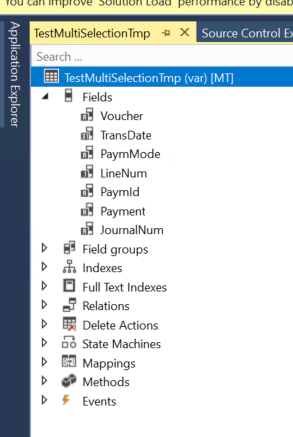
Step 3: Create UI builder class
Create UI Builder class , extend it from SysOperationAutomaticUIBuilder
public final class TestMultiSelectionUIBuilder extends SysOperationAutomaticUIBuilder
{
DialogField dialogVoucherId;
public void VoucherIdLookup(FormStringControl _control)
{
Query query = new Query();
QueryBuildDataSource qbds;
container conVoucherID;
qbds = query.addDataSource(tableNum(VendTrans));
qbds.addSelectionField(fieldNum(VendTrans,Voucher));
SysLookupMultiSelectGrid::lookup(query,_control,_control,_control,conVoucherID);
}
public void postBuild()
{
TestMultiSelectionLookupContract contract;
super();
contract = this.dataContractObject() as TestMultiSelectionLookupContract ;
//bind lookup method to report parameter field.
dialogVoucherId = this.bindInfo().getDialogField(this.dataContractObject(),methodStr(TestMultiSelectionLookupContract , parmVoucherId));
//override standard lookup method and append your voucher id lookup.
dialogVoucherId.registerOverrideMethod(methodStr(FormStringControl, lookup),methodStr(TestMultiSelectionUIBuilder ,VoucherIdLookup), this);
if (dialogVoucherId)
{
dialogVoucherId.lookupButton(2);
}
}
public void postRun()
{
//super();
}
}
Step 4 : Create Contract class
[DataContractAttribute , SysOperationContractProcessingAttribute(classStr(TestMultiSelectionUIBuilder))]
public final class TestMultiSelectionLookupContract
{
List voucherlist;
[DataMemberAttribute("Exclude voucher"),AifCollectionTypeAttribute("Exclude voucher", Types::String),SysOperationLabelAttribute(literalStr("ExcludeVoucher")),SysOperationDisplayOrderAttribute('0')]
public List parmVoucherId(List _listVoucherId = voucherlist)
{
voucherlist = _listVoucherId;
return voucherlist;
}
}
Step 3 : Create DP class
Create DP class as shown below.
[SRSReportParameterAttribute(classstr(TestMultiSelectionLookupContract))]
public final class TestMultiSelectionDP extends SRSReportDataProviderBase
{
TestMultiSelectionTmp testMultiSelectionTmp;
List voucherlist;
str voucherStr;
[SRSReportDataSetAttribute(tablestr(TestMultiSelectionTmp))]
public TestMultiSelectionTmp getMTVendorCashForecastTmp()
{
select * from testMultiSelectionTmp;
return testMultiSelectionTmp;
}
[SysEntryPointAttribute]
public void processReport()
{
TestMultiSelectionLookupContract testMultiSelectionLookupContract = this.parmDataContract() as TestMultiSelectionLookupContract;
ListIterator voucherlistItreator;
ledgerJournalTrans ledgerJournalTrans;
voucherlist = testMultiSelectionLookupContract.parmVoucherId();
if(voucherlist != null)
{
voucherlistItreator = new ListIterator(voucherlist);
while (voucherlistItreator.more())
{
voucherStr += voucherlistItreator.value()+',';
voucherlistItreator.next();
}
}
voucherStr = subStr(voucherStr,1,strLen(voucherStr)-1);
Info(voucherStr);
}
}
Step 5 : Create report

Step 6 : Create controller class to call report.
internal final class TestMultiSelectionLookupController extends SrsReportRunController
{
public void new()
{
super();
this.caption();
}
protected final str getReportName(TestMultiSelectionLookupContract _contract)
{
str reportNameLocal;
reportNameLocal = ssrsReportStr(TestMultiSelectionReport,Test1);
return reportNameLocal;
}
public ClassDescription caption()
{
return "Multi selection lookup";
}
public static void main(Args _args)
{
TestMultiSelectionLookupController controller;
controller = new TestMultiSelectionLookupController();
controller.parmArgs(_args);
controller.ParmReportName(ssrsReportStr(TestMultiSelectionReport,Test1));
controller.startOperation();
}
protected void preRunModifyContract()
{
TestMultiSelectionLookupContract contract = this.parmReportContract().parmRdpContract() as TestMultiSelectionLookupContract;
this.parmReportContract().parmReportName(this.getReportName(contract));
super();
}
}
Step 6 : Create one Output menu item and add object as your controller class and assign it to the menu.

Step Last :
Result :

*This post is locked for comments