







How to restrict an action button based on time in Microsoft Dynamics NAV

 Like
Like Share
Share
 Report
Introduction:
Scenario-
The requirement was such that on click of the action button a payment transaction is done. The time at which transaction was done is stored in the database. A restriction shouldto be applied to disallow the customer to make payment for the same amount till a certain time
E.g. A transaction was done by customer A at 11.40 a.m for amount $100. This customer will be disallowed to make the transaction of the same amount $100 till suppose 5 mins. This time is mins will depend on the client requirement.
Pre-requisites:
Microsoft Dynamics NAV 2017
Steps:
- A field is added in the Sales & recivable setup for Time Check in mins. Here, time in minutes is entered say 5 mins. So the payment will be restricted for 5 mins. I’ve written the code on the action button.
EFTTransaction.RESET; EFTTransaction.SETRANGE("Store No.",'xyz'); EFTTransaction.SETRANGE("Terminal No.",'TERM01'); EFTTransaction.SETRANGE("Sell-to Customer No.",Rec."Sell-to Customer No."); EFTTransaction.SETRANGE("Account Number",Rec."Account Number"); EFTTransaction.SETRANGE("Transaction Amount",Rec."Transaction Amount"); EFTTransaction.SETRANGE("Transaction Status",EFTTransaction."Transaction Status"::Approved); IF EFTTransaction.FINDLAST THEN BEGIN time1:=EFTTransaction."Transaction Time"; - Create Integer variables Hours, Minutes and Seconds and Milliseconds as Decimal variable. Get the transaction time. Time by default is stored in the system in milliseconds.
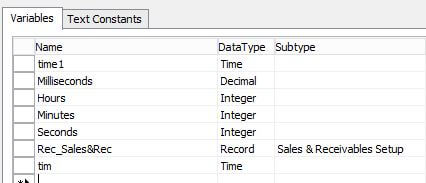
- The below code will convert time and store the hour in Hour variable, minutes in Minutes variable and same for seconds.
//Code written to convert time to hr min and sec **ST** Milliseconds := time1 - 000000T; //MESSAGE('%1 total mili',Milliseconds); Hours := Milliseconds DIV 1000 DIV 60 DIV 60; Milliseconds -= Hours * 1000 * 60 * 60; Minutes := Milliseconds DIV 1000 DIV 60; Milliseconds -= Minutes * 1000 * 60; Seconds := Milliseconds DIV 1000; Milliseconds -= Seconds * 1000 ; //Code written to convert time to hr min and sec **EN** - Get the Time check in mins from Sales & recivable setup and add it up with the Minutes variable.
 "Rec_Sales&Rec".GET;
 Minutes+="Rec_Sales&Rec"."Time Check for Credit Card(min";
- Now we have till which the transaction should be restricted but the time is stored in Integer variables. Write the below code to convert the integer/decimal variable to time.
Milliseconds+=Seconds*1000 +Minutes * 1000 * 60+Hours * 1000 * 60 * 60; //convert time to milliseconds

Milliseconds:=Milliseconds/1000; //convert milliseconds to seconds
 tim := 000000T;
 tim := tim + (Milliseconds MOD 60) * 1000; // get the seconds
 Milliseconds := Milliseconds DIV 60; // keep the minutes
 tim := tim + (Milliseconds MOD 60) * 1000 * 60; // get the minutes
 Milliseconds := Milliseconds DIV 60; // keep the hours
 tim := tim + (Milliseconds MOD 60) * 1000 * 60 * 60; // get the hours
- Here we get our time in time variable. Add the restriction condition.
IF (EFTTransaction."Transaction Date"=TODAY) AND (TIME < tim) THEN
 ERROR('The Transaction for the account number %1 can be only done after %2 mins',Rec."Account Number","Rec_Sales&Rec"."Time Check for Credit Card(min")
 ELSE BEGIN
 Submit;
 "Submit&Settle";
Conclusion :
Thus using the above logic time can be converted to Integer variables and then convert Integer variables to time again.
The post How to restrict an action button based on time in Microsoft Dynamics NAV appeared first on CloudFronts - Microsoft Dynamics 365 | Power BI | Azure.
This was originally posted here.
*This post is locked for comments