Sales teams discussing artificial intelligence often begin with the agent. Which agent should we deploy? What can it automate? How quickly can users start? A better starting point is the sales workflow.
An AI sales agent creates value when it reduces a specific source of friction, such as researching a lead, preparing for a customer meeting, identifying stalled opportunities, or answering a complex pipeline question. Without that focus, teams may enable useful technology without changing how sales work actually gets done.
Microsoft is moving Dynamics 365 Sales from a system that primarily records activity toward what it describes as a system of action. Copilot and AI agents increasingly help users analyze signals, retrieve context, and determine what deserves attention next. However, those capabilities still depend on the process, data, permissions, and ownership already present in the environment.
Start With the Sales Bottleneck, Not the Agent Catalog
Most sales organizations already have substantial customer information. The difficulty is assembling that information at the right moment. Sellers move among Dynamics 365 Sales, Outlook, Teams, proposal documents, dashboards, and customer records. Sales leaders review pipeline movement, forecast risk, and account health. Sales operations teams maintain data quality, reporting definitions, process rules, security, and adoption.
That creates several practical opportunities for AI. The objective is not simply to introduce another assistant. It is to reduce manual coordination inside a workflow the organization already understands.
AI sales agents create the most value when they improve a defined sales workflow, not when teams treat them as another feature to enable.
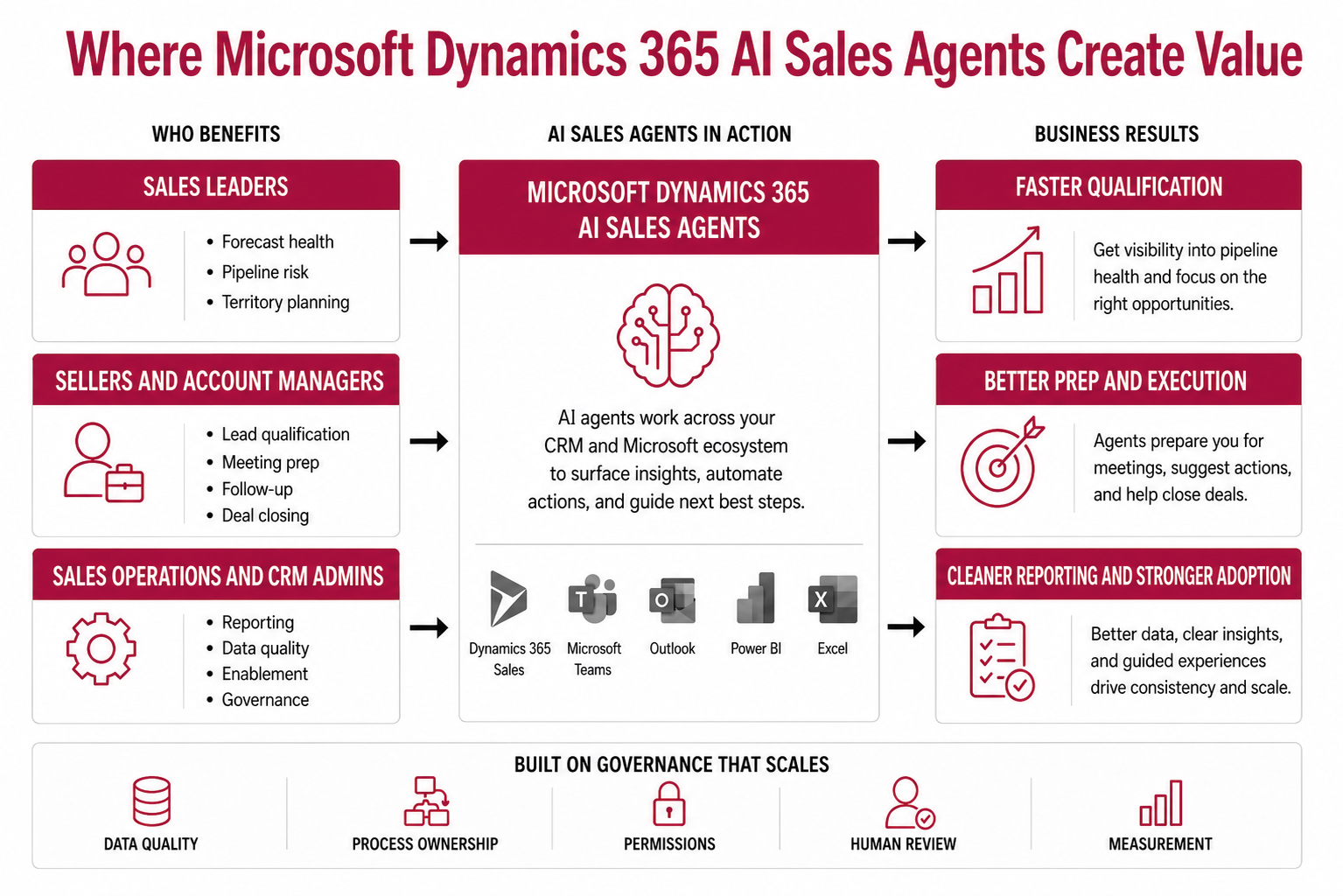
Infographic showing how Microsoft Dynamics 365 AI sales agents support sales leaders, sellers, account managers, sales operations teams, and CRM administrators through lead qualification, meeting preparation, deal review, reporting, and governance.
Six Sales Workflows Worth Evaluating
The following workflows provide useful starting points because each has a recognizable source of friction and a measurable outcome.
1. Lead qualification
Sales teams frequently spend time researching whether a lead fits the organization’s market, services, or selling model. An agent can help gather context, review available information, prepare outreach, and support the handoff to a seller. Before using AI, sales and marketing still need to agree on qualification criteria, lead-source rules, required data, and the point where a person takes ownership.
2. Meeting preparation
Preparing for a customer meeting may require recent emails, previous meetings, opportunity history, open service issues, proposal information, and stakeholder context. The Sales agent in Microsoft 365 Copilot can work with CRM and Microsoft 365 context through natural-language interaction. Microsoft currently documents access to the agent from Outlook, Teams, Microsoft 365 Copilot, and the Dynamics 365 Sales Hub experience. The practical goal is not to create another preparation screen. It is to reduce the assembly work sellers perform before a conversation.
3. Opportunity review
An opportunity may appear active while important signals indicate otherwise. The close date may keep moving. No meeting may have occurred recently. A key contact may have stopped responding. An AI agent can summarize engagement, identify missing activity, surface potential risk, and suggest a next step. The recommendation becomes useful only when opportunity stages, close dates, activity tracking, and ownership rules remain consistent.
4. Pipeline and forecast analysis
Sales leaders often ask questions that do not fit neatly into a standard dashboard:
Which opportunities changed materially this week?
Where does pipeline appear strong by stage but weak by engagement?
Which close dates create the greatest forecast exposure?
What changed between the previous review and the current forecast?
Sales Research Agent is designed for this type of analysis. Microsoft describes it as a research canvas that can examine Dynamics 365 Sales data, uploaded files, and connected sources; generate research blueprints and visualizations; and respond to follow-up questions. Microsoft lists the core Sales Research Agent capability as generally available beginning in March 2026.
5. Sales operations reporting
Sales operations teams frequently answer repeated ad hoc questions about performance, coverage, attainment, and risk. Microsoft has expanded Sales Research Agent to support sales operations analysis, including scenarios where data spans CRM, financial systems, and spreadsheets. The agent should not replace governed reporting definitions. It can provide a more flexible way to investigate the data and determine where deeper analysis is necessary.
6. Sales onboarding and enablement
New sellers often rely on scattered documentation, informal guidance, and experienced colleagues to learn how the organization sells. An agent can make approved process documentation, playbooks, account information, and policy guidance easier to retrieve. That scenario requires current source material and clear ownership of the knowledge the agent uses.
Lead Qualification Tests Process Clarity
Lead qualification is often an attractive first use case because it is repetitive, time-sensitive, and measurable. It also exposes process disagreements quickly. An organization may discover that sales and marketing use different definitions of a qualified lead. One team may prioritize company size while another focuses on buying activity. Handoff expectations may differ by region, service line, or lead source. An agent cannot resolve those disagreements independently. It will apply the criteria and data the organization provides.
Before introducing agent-assisted qualification, answer five questions:
What makes a lead qualified?
Which sources should receive research first?
What data may the agent use?
When must a seller review the result?
What event transfers ownership to the seller?
If the team cannot answer those questions consistently, the process needs attention before the agent does.
Sales Research Agent Changes the Pipeline Conversation
A standard report shows what its model and filters were designed to show. Sales Research Agent allows leaders and operations teams to explore less predictable questions through natural-language interaction.
Users can examine Dynamics 365 Sales data, add files such as Excel, comma-separated values, or PDF documents, review generated visualizations, and ask follow-up questions. Microsoft also provides a “Show Work” capability that explains the data and analysis steps used to create a research result. That transparency matters. AI-assisted research should help users investigate pipeline and performance questions, not encourage them to accept an unexplained answer.
In New Dynamic’s work with enterprise Dynamics 365 environments, the more defensible use case is governed exploration. The agent helps qualified users investigate trusted data while established reporting remains the source for agreed operational metrics.
The Seller Experience Should Reduce Context Switching
Sellers do not benefit when AI adds another place to check. The stronger experience brings useful context into the tools where work already occurs. Microsoft’s current Sales agent documentation reflects this direction by connecting sales information across Dynamics 365 Sales and Microsoft 365 applications. Users can ask questions, generate summaries, prepare for meetings, and work with sales information through the same broader Copilot experience.
That does not remove Dynamics 365 Sales from the process. It changes how frequently sellers need to leave Outlook, Teams, or Copilot to locate CRM context. The result still depends on accurate customer records, associated activities, permissions, and reliable process adoption.
Sales Operations Owns Much of the Readiness Work
Sales operations teams and CRM administrators often feel the governance impact before sellers do. They maintain many of the structures AI depends on:
Before an agent expands across the organization, determine:
Which data sources it may use
Which actions remain read-only
Which outputs require seller or manager approval
Who owns changes to instructions and business rules
How usage, capacity, and cost will be monitored
How the team will identify inaccurate or low-value output
Governance should not become a separate exercise after deployment. It should define the boundaries of the use case from the beginning.
Evaluate Native Microsoft Capabilities Before Custom Development
A custom agent should not be the default response to every sales problem. First evaluate whether Dynamics 365 Sales, Sales agent in Microsoft 365 Copilot, Sales Research Agent, in-app Copilot, Power Automate, or another existing Microsoft capability can support the workflow.
Custom development becomes more appropriate when the process requires organization-specific logic, external systems, specialized approval paths, unique territory models, proprietary scoring, or actions that native capabilities do not support.
The decision is not simply native versus custom. It is a question of ownership:
Which Microsoft layer should own this work, and what is the simplest governed path that can support it?
Measure the Workflow, Not the Feature
Agent usage does not prove business value. Measurement should reflect the workflow selected for improvement.
Useful measures may include:
Lead response and qualification time
Seller preparation time
Percentage of opportunities with current activity and defined next steps
Number of stalled opportunities identified before pipeline review
Time required to answer recurring pipeline questions
Reduction in manual reporting requests
Completeness of account, contact, opportunity, and activity data
A lead qualification use case should not use the same success criteria as pipeline research or meeting preparation. Define the operational baseline before enabling the agent, then compare the result against that baseline.
The Operating Model Still Determines the Outcome
Microsoft Dynamics 365 AI sales agents are becoming more relevant because they are moving closer to the daily work of sellers, sales leaders, and sales operations teams. The strongest use cases are specific. They reduce coordination, improve access to context, or help people act sooner on information already available in the environment.
The technology does not remove the need for a defined sales process. It makes the quality of that process easier to see. Start with one workflow. Confirm the data, ownership, permissions, and human review requirements. Then measure whether the agent improved the work before expanding it elsewhere.
Author bio
Travis South is Director of Marketing at New Dynamic, a Microsoft Solutions Partner focused on Dynamics 365 Customer Engagement and Power Platform.


