







DEX.DIC version 11.00.0349 is not compatible with executable version 11.00.0354
Views (3482)

 Like
Like Share
Share
 Report
I've been trying to figure out a problem with an EFT file format in Dynamics GP 2010 SP2, which I think might be a bug. To see if it might have been fixed in a Hotfix (wishful thinking, I know), I downloaded the March 2012 Hotfix 11.00.1935.
The update launched and started to run, but about half way through, this error appears:
 Lovely.
This is a rather vanilla GP 2010 SP2 install on a test server. The Dynamics.exe was version 11.00.0354, so it would appear that the DEX.DIC that the hotfix is trying to install is 11.00.0349?
When I click OK, the same message popped up two more times. After that, the update appears to complete and asks for a machine reboot. I complied and rebooted the server.
Never one to be afraid of an error message that is likely catastrophic, I launch GP Utilities after the reboot, which showed version 11.00.1752 (not promising), and run the update process.
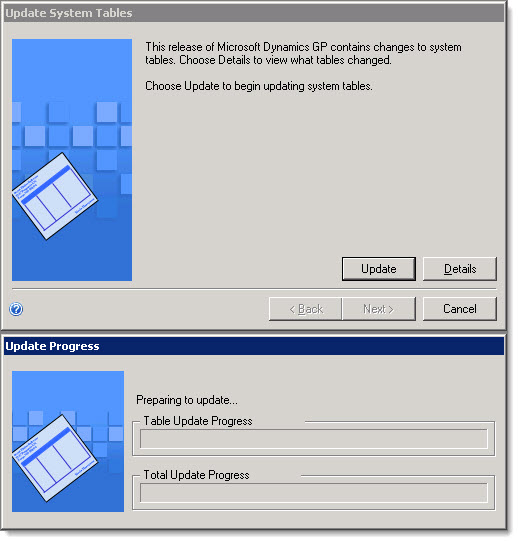
No joy. GP utilities did appear to perform some tasks, but then hangs at the Update System Tables step. An Update Progress dialog appears, but let's just say that it didn't make much progress.
 I launched SQL Server Profiler to see if there was any database activity, but there was none.
I then killed the process, rebooted, and decided to run the Hotfix install again. This second time it completed without error, and launched a "Dexerity Shared Components 11.0 (64-bit)" installation, which also completed successfully.
Just to be safe, I rebooted once more and then ran GP Utilities again.
It politely acknowledged that the previous upgrade attempt failed.

And then it showed a different dialog than the "Update Progress" dialog I saw the first time, indicating that it was waiting for system tables to update.
 This time, SQL Profiler showed a lot of activity, so I let it run. And run. And run.
After SQL Profiler collected over 112,000 rows of SQL Activity, I became suspicious. Just glancing at the SQL flying by, I noticed that the statements appeared to be repetitive. I paused Profiler and reviewed the SQL. Sure enough, it was the same SQL statements running over and over. The statements were convoluted select statements that would never return anything.
Despite several additional attempts, I couldn't get past this eternal Groundhog Day of SQL statements.
Having wasted enough time by this point, I threw in the towel and completely uninstalled GP 2010 and reinstalled from scratch.
Next time, I'll try and remember to make sure to backup my GP directory and databases before the install so I can completely revert.
Not a big deal for me, since it's just my development server, but I don't envy the person who has his happen in their production environment.
UPDATE: I completely removed GP 2010 then reinstalled from scratch. Before launching GP Utilities, I installed the March 2012 Hotfix and it ran without error. GP Utilities launched, this time showing version 11.00.1935. So it seems that the Hotfix failed to complete its upgrade of GP files, despite running it twice.
Steve Endow is a Dynamics GP Certified Trainer and Dynamics GP Certified IT Professional in Los Angeles. He is also the owner of Precipio Services, which provides Dynamics GP integrations, customizations, and automation solutions.
http://www.precipioservices.com
The update launched and started to run, but about half way through, this error appears:
DEX.DIC version 11.00.0349.000 is not compatible with executable version 11.00.0354.000.
This is a rather vanilla GP 2010 SP2 install on a test server. The Dynamics.exe was version 11.00.0354, so it would appear that the DEX.DIC that the hotfix is trying to install is 11.00.0349?
When I click OK, the same message popped up two more times. After that, the update appears to complete and asks for a machine reboot. I complied and rebooted the server.
Never one to be afraid of an error message that is likely catastrophic, I launch GP Utilities after the reboot, which showed version 11.00.1752 (not promising), and run the update process.
No joy. GP utilities did appear to perform some tasks, but then hangs at the Update System Tables step. An Update Progress dialog appears, but let's just say that it didn't make much progress.
I then killed the process, rebooted, and decided to run the Hotfix install again. This second time it completed without error, and launched a "Dexerity Shared Components 11.0 (64-bit)" installation, which also completed successfully.
Just to be safe, I rebooted once more and then ran GP Utilities again.
It politely acknowledged that the previous upgrade attempt failed.
And then it showed a different dialog than the "Update Progress" dialog I saw the first time, indicating that it was waiting for system tables to update.
After SQL Profiler collected over 112,000 rows of SQL Activity, I became suspicious. Just glancing at the SQL flying by, I noticed that the statements appeared to be repetitive. I paused Profiler and reviewed the SQL. Sure enough, it was the same SQL statements running over and over. The statements were convoluted select statements that would never return anything.
Despite several additional attempts, I couldn't get past this eternal Groundhog Day of SQL statements.
Having wasted enough time by this point, I threw in the towel and completely uninstalled GP 2010 and reinstalled from scratch.
Next time, I'll try and remember to make sure to backup my GP directory and databases before the install so I can completely revert.
Not a big deal for me, since it's just my development server, but I don't envy the person who has his happen in their production environment.
UPDATE: I completely removed GP 2010 then reinstalled from scratch. Before launching GP Utilities, I installed the March 2012 Hotfix and it ran without error. GP Utilities launched, this time showing version 11.00.1935. So it seems that the Hotfix failed to complete its upgrade of GP files, despite running it twice.
Steve Endow is a Dynamics GP Certified Trainer and Dynamics GP Certified IT Professional in Los Angeles. He is also the owner of Precipio Services, which provides Dynamics GP integrations, customizations, and automation solutions.
http://www.precipioservices.com
This was originally posted here.
*This post is locked for comments