Customer-data-security-architecture-design-consideration-when-migrate-from-salesforce-to-dynamics-365-CE
This solution combines Dynamics 365 Sales, Dynamics 365 Customer Service, Dataverse, Power Apps, and Azure Active Directory, to establish a scalable and organization-driven customer data security model during migration from Salesforce to Dynamics 365 Customer Engagement. This reference architecture applies to enterprises modernizing CRM security while aligning with Microsoft cloud and governance standards.
Introduction
Migrating from Salesforce to Microsoft Dynamics 365 Customer Engagement requires more than data movement—it requires a fundamental redesign of the security architecture. Salesforce and Dynamics 365 enforce security using different architectural philosophies, and attempting a one-to-one mapping often results in excessive complexity or governance gaps.
This reference architecture should be used in CRM modernization, Salesforce-to-Dynamics migrations, or hybrid CRM coexistence scenarios, particularly in industries such as retail, manufacturing, services, and public sector, where departmental data segregation and hierarchical visibility are critical.
This architecture should be defined early in the implementation lifecycle, during solution architecture and environment design, before user provisioning or data migration begins.
Key stakeholders include:
- Solution and enterprise architects
- Security and compliance teams
- IT administrators
- CRM platform owners
- Sales and service operations leaders
ArchitectureThe following diagram’s and architecture philosophy illustrate the reference architecture for migrating a Salesforce security model to Dynamics 365 Customer Engagement.Security Architecture Philosophy
Salesforce: Permission-Centric Model
Salesforce security is primarily permission-driven:- Profiles define baseline access.
- Permission Sets extend user capabilities.
- Role hierarchy controls record visibility.
- Sharing rules dynamically widen access.
This model emphasizes functional roles over organizational boundaries.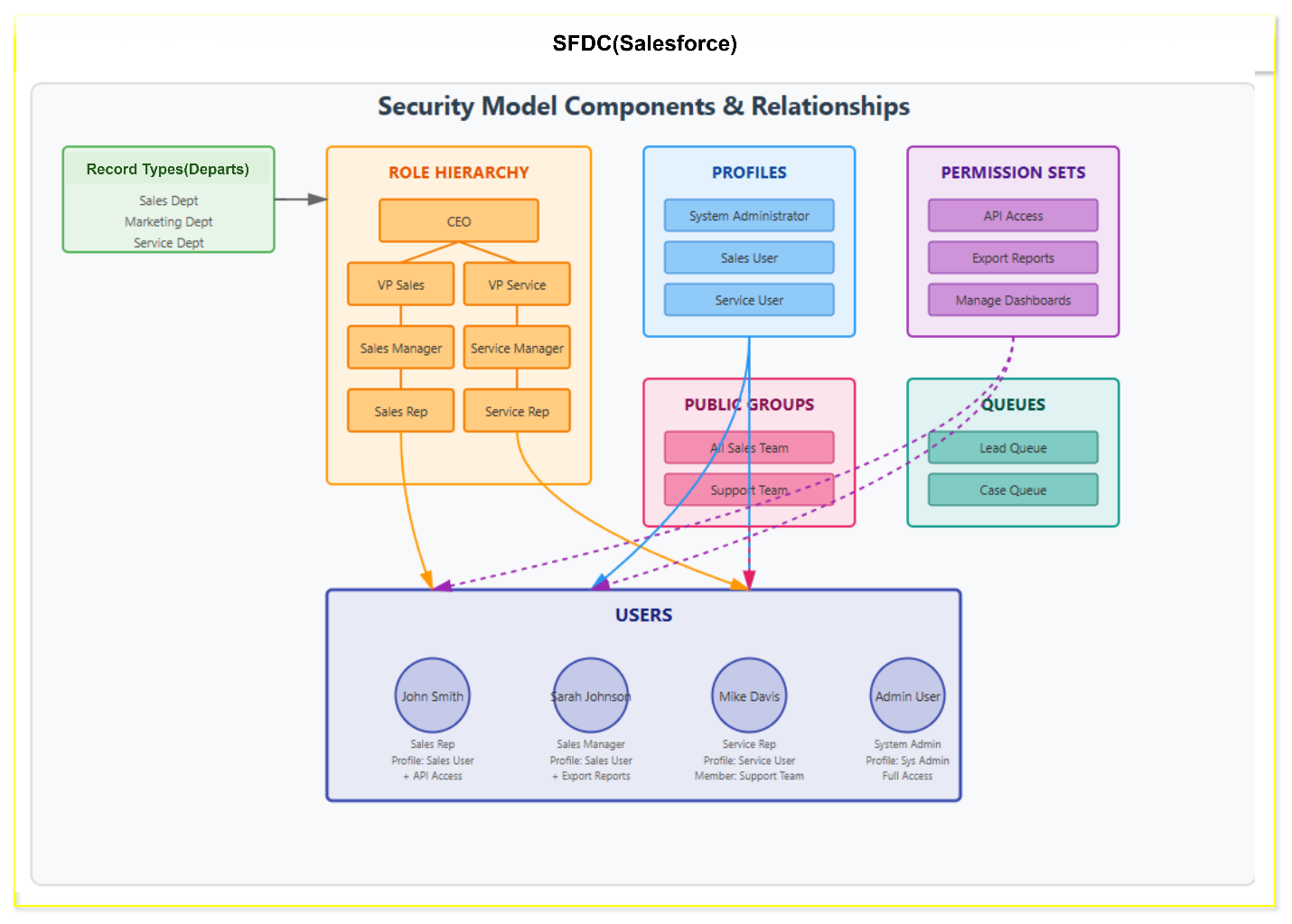
Dynamics 365 CRM: Organizational/Departmental Model
Dynamics 365 security is structure-driven:- Business Units define security boundaries.
- Security Roles grant privileges with scoped depth.
- Teams enable collaborative access.
- Record ownership governs visibility.
This approach tightly couples organizational structure with data security. Dataflow
- Users authenticate through Azure Active Directory, which provides identity, group membership, and conditional access enforcement.
- Users are assigned to Dynamics 365 Business Units, defining organizational and departmental security boundaries.
- Security roles grant entity-level privileges with defined access depth (user, business unit, parent-child, or organization).
- Teams (owner and access teams) provide controlled cross-functional collaboration without violating business unit isolation.
- Field Security Profiles restrict access to sensitive attributes across shared entities.
- Dataverse enforces record ownership and privilege evaluation at runtime for all Dynamics 365 applications.
ComponentsThe following components are used in this reference architecture:- Dynamics 365 Sales
Enables role-based access to customer, lead, and opportunity data aligned with sales hierarchies. - Dynamics 365 Customer Service
Supports secure case management, departmental queues, and escalation paths. - Dataverse
Provides the unified security model for data storage, record ownership, field security, and auditing. - Power Apps
Enables secure model-driven application experiences governed by Dataverse security. - Azure Active Directory
Manages identity, authentication, group membership, and conditional access policies.
Scenario/ Case Study: From Salesforce Security Architecture to Dynamics 365 CRM
Background:
A large enterprise Retail- B2C operating across sales, service, warranty, logistics, events, and administration had been using Salesforce as its core CRM platform for several years. The Salesforce implementation was mature, stable, and well-adopted, with a department-centric security architecture built using standard Salesforce constructs.As part of a broader digital transformation initiative, the organization decided to migrate to Microsoft Dynamics 365 CRM to align with its Microsoft ecosystem, improve integration with Azure and M365, and adopt a more organization-driven security model.This case study documents:- The existing Salesforce security architecture
- Key architectural principles behind the design
- The target Dynamics 365 security model
- How Salesforce constructs were re-architected, not directly replicated
2. Business Context
The organization consisted of multiple operational departments and sub-departments:- Executive Escalations
- Customer Retention
- Warranty Claims
- National & District Sales
- Nationwide Sales
- Home Damage Claims
- Events & Exhibitions
- CRM Administration
Core Business Requirements
- Strong departmental data segregation
- Hierarchical visibility for sales management
- Controlled cross-functional collaboration
- Scalable security model for future growth
- Minimal custom code for security enforcement
Existing security structure is he combination of record type, Roles Hierarchy, Profiles, Permission sets and profiles assigned to the users. Below diagram explain the existing implemented architecture: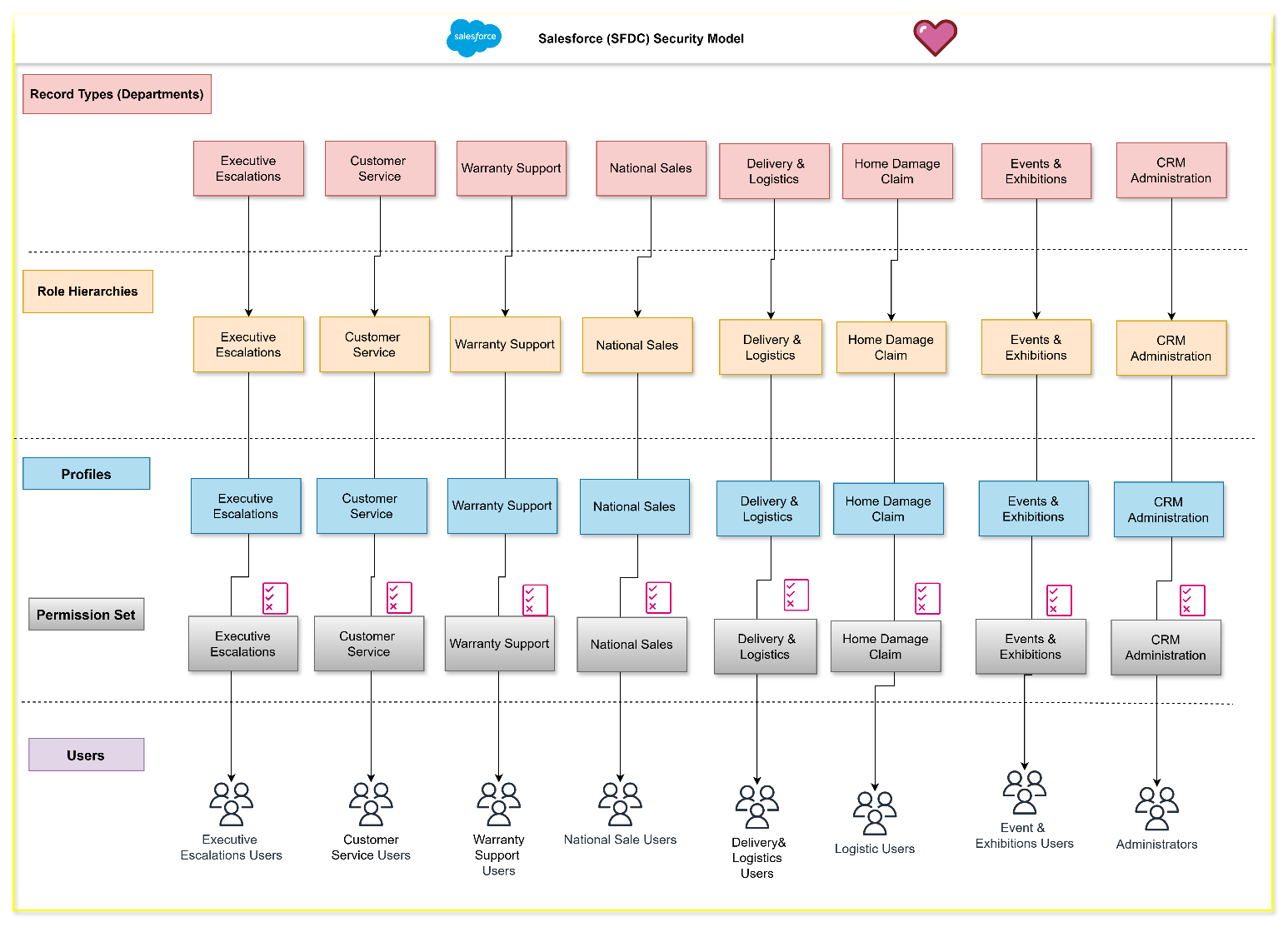
5. Target Dynamics 365 Security Architecture
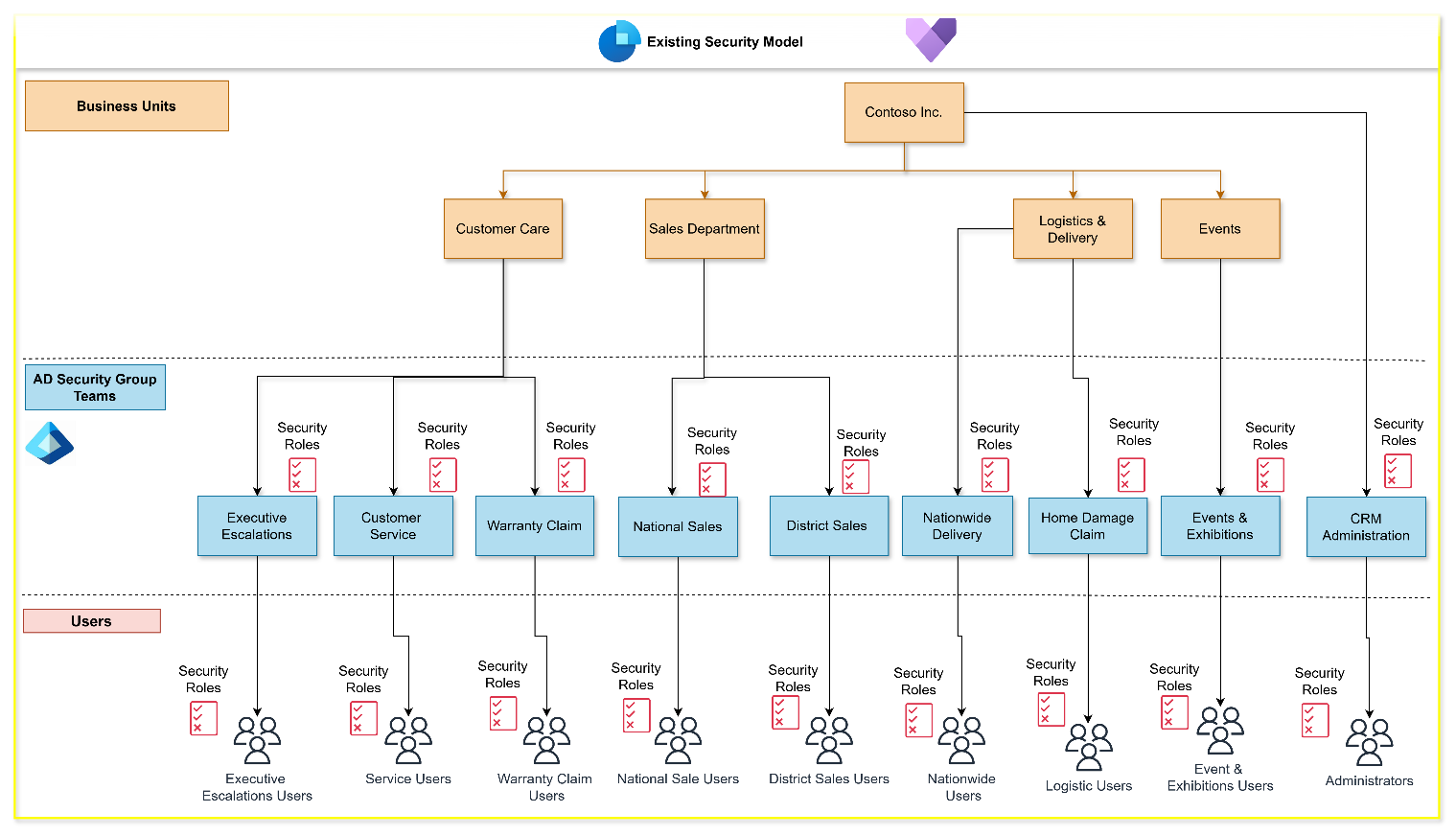
Dynamics 365 introduced a structural shift in security design.5.1 Business Units – Replacing Record Types and Groups/Teams:
Departments were mapped into a Business Unit (BU) hierarchy, rooted under a single enterprise BU.Example structure:- Root BU
- Customer Core
- Sales Department
- Logistics & Delivery
- Events
And the combination of Azure AD security groups to manage the record types level permission, Example:- Executive Escalations
- Customer Retention
- Warranty Claims
- National Sales
- District Sales
- Nationwide Sales
- Home Damage Claims
- Events & Exhibitions
- CRM Administration
Security Roles – Replacing Profiles & Permission Sets
Salesforce Profiles and Permission Sets were consolidated into Dynamics 365 Security Roles.- Base roles for core access
- Additional roles for specialized permissions
- Privilege depth used instead of sharing rules
7. Outcomes & Benefits Achieved:
Business Benefits
- Stronger alignment with organizational structure
- Simplified governance
- Improved scalability
- Better Microsoft ecosystem integration
Technical Benefits
- Fewer security artifacts to manage
- Clearer audit trails
- Reduced dependency on custom sharing logic
Potential use casesThis solution was created for a large enterprise, multi-department organization undergoing CRM platform migration. It can also be applied to industries like retail, manufacturing, services, and public administration.You can use this solution to:- Migrate Salesforce CRM security to Dynamics 365 without recreating complex sharing rules
- Standardize CRM governance across sales and service teams
- Support scalable organizational growth with minimal security rework
- Improve auditability and compliance using Dataverse and Azure Active Directory
ConsiderationsThese considerations help implement a solution that includes Dynamics 365. Learn more at Dynamics 365 guidance documentation.
Cost optimizationCost optimization is about looking at ways to reduce unnecessary expenses and improve operational efficiencies. For more information, see Overview of the cost optimization pillar.This architecture scales primarily with:- Number of users
- Number of security roles and teams
- Dataverse storage and API usage
Cost efficiency can be improved by:- Consolidating roles instead of duplicating Salesforce profiles
- Using team-based access rather than record-level sharing
- Leveraging Azure AD groups for user provisioning automation
As the organization scales, costs increase linearly with users, while governance effort grows sub-linearly due to simplified security artifacts.Use the Azure Pricing Calculator to estimate costs for:- Dynamics 365 Sales and Customer Service licenses
- Dataverse capacity
- Azure Active Directory Premium features (if applicable)
Implementing customer data security model migration to Dynamics 365 CEThis section describes the key configuration steps required to implement the reference architecture.Procedure: Design business unit hierarchyUse the following steps to establish organizational security boundaries.- Define enterprise and departmental structure.
- Create a root business unit in Dynamics 365.
- Create child business units for each department.
- Assign users to their respective business units.
Procedure: Configure security rolesUse the following steps to replace Salesforce profiles and permission sets.- Define base roles for sales and service personas.
- Create specialized roles for elevated permissions.
- Assign privilege depth based on organizational scope.
- Assign multiple roles to users as required.
Procedure: Enable team-based collaboration- Create owner teams for departmental ownership.
- Configure access teams for cross-functional sharing.
- Assign team templates to relevant entities.
Related resourcesReview the following related architecture guides, solutions, and other guidance content:- Dynamics 365 security documentation
- Dataverse security model overview
- Azure Active Directory identity governance documentation
- Power Apps security best practices
Applies to:
Dynamics 365 Sales, Dynamics 365 Customer Service, Power Apps, Dataverse, Azure Active DirectoryIndustries:
Retail Trade (52-59), Manufacturing (20-39), Services (70-89), Public Administration (91-99)Stakeholders:
IT, Sales, Customer services, Service operations, Operations, Audit, AdministrativeProducts:
Dynamics 365 Sales, Dynamics 365 Customer Service, Power Apps, DataverseContributors It was written by the following contributors.Principal author:


